Gravity PDF add-on

Your invoice, paid with one scan.

This add-on appends a payment page to the PDF your form already produces. It carries an EPC QR code that any European banking app reads — beneficiary, IBAN, amount and reference already filled in. No typing, no transposed digits, no „which account was that again”.


The page itself

One more page at the end of the document.

A heading and a short introduction

Both configurable per feed, both merge-tag aware — so the wording can carry the invoice number your document already uses.

The QR code

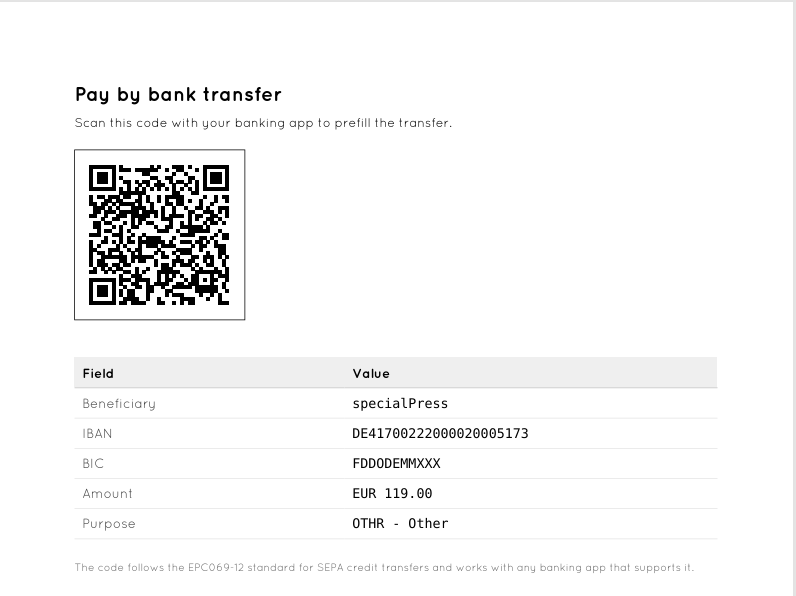
45 mm square, error correction level M, following EPC069-12 for SEPA credit transfers. Beneficiary, IBAN, BIC, amount, purpose and reference travel inside it, exactly as the standard prescribes.

A table of the values that went into the code

Generated from the payload’s own record of what it encoded, not from the settings. It cannot claim something the code does not contain, it makes the page usable for somebody without a banking app, and a wrong beneficiary becomes visible instead of staying hidden inside a square of dots. Switchable per feed.

Its own margins

The page does not inherit the template’s indent, so it looks the same whichever invoice template it is appended to. Adjustable through one filter.

The invoice your template produces stays untouched. The code arrives as a further page at the end.


Where the values come from

Nothing you have to keep in sync.

The amount comes from the entry

It is the same order total Gravity Forms shows — not a second field somebody has to maintain. The code can never ask for a different sum than the invoice states. A form without pricing fields yields an open amount, which tells the banking app to ask the payer; that is better than no code at all.

Invoice number and date via merge tags

Gravity PDF keeps no invoice number of its own — depending on the setup it comes from a template, a form field or another add-on. Rather than hard-wiring one, the reference text is merge-tag aware: write the tags your document already uses, and any source is reachable.

Reference or text, decided per feed

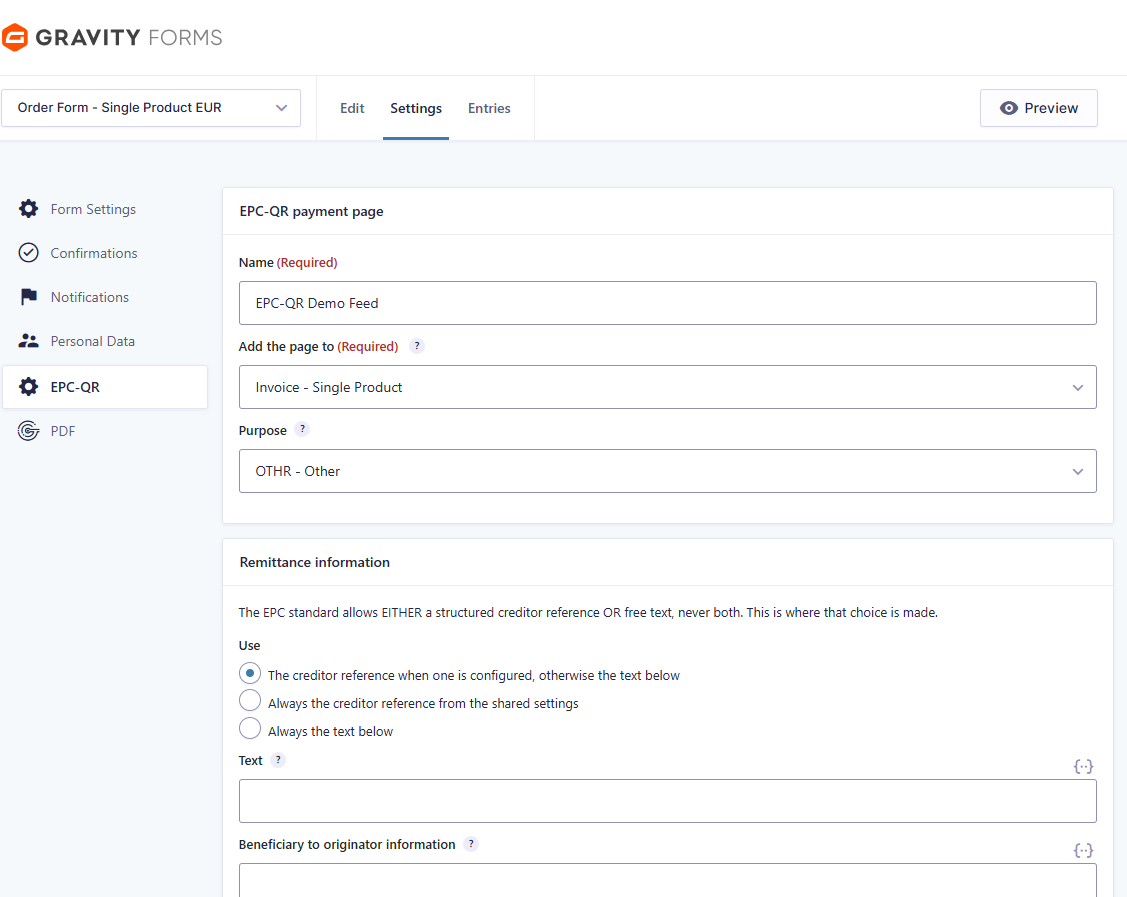
The EPC standard allows either a structured creditor reference or free remittance text, never both. Instead of failing at that, the feed offers the choice: the reference when one is configured, always the reference, or always the text.

Seven purpose codes

From ISO 20022, supplier payment through to tax payment.

One shared settings page

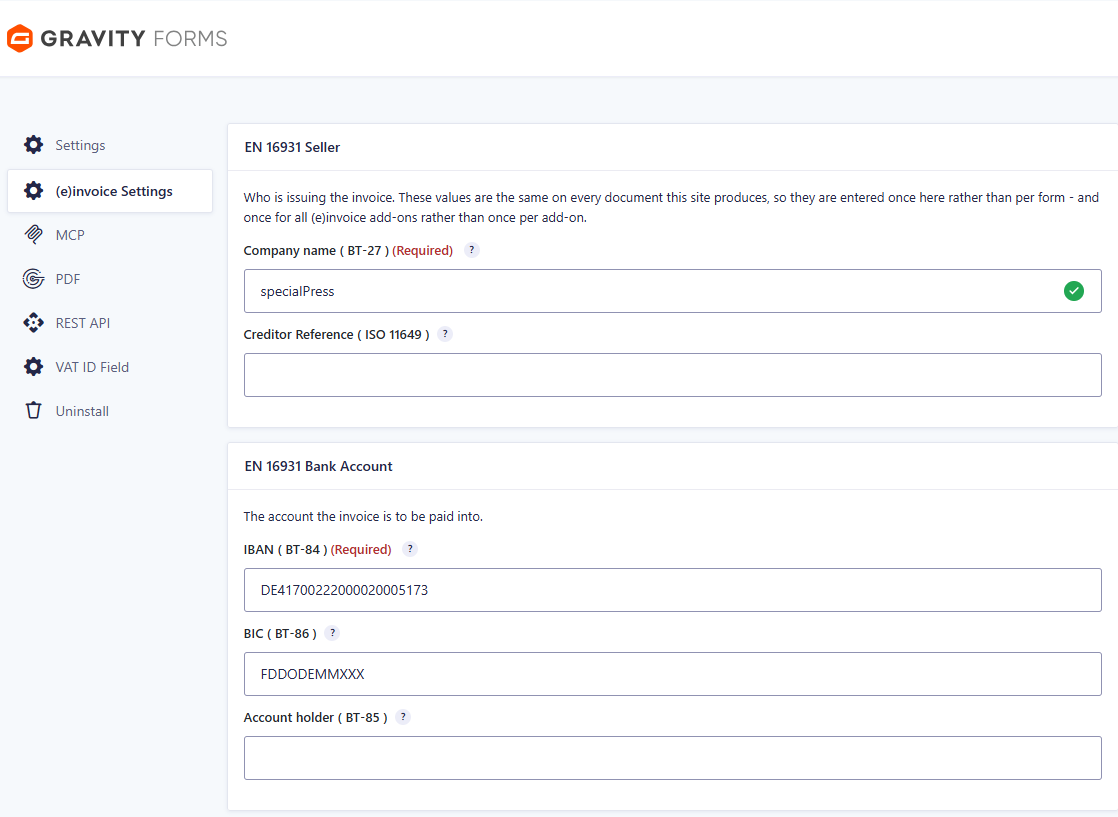
Company name, IBAN, BIC and creditor reference are entered once under (e)invoice Settings and are readable by every add-on of the family. No IBAN typed twice — and therefore no two IBANs.


Built not to break

Only a definite no stops anything.

A PDF is produced in expensive contexts — while a notification is being sent, while a visitor waits for a download. So a malformed BIC costs the BIC, not the code. An unknown purpose code costs the purpose. A remittance text over 140 characters is shortened. Every one of those decisions is written to the log, so the page stays explainable — but none of them turns a payable invoice into a failed document.

Identifiers are validated, not just stored

IBAN check digits, BIC structure with a real ISO 3166-1 country check, and the ISO 7064 MOD 97-10 check digits of the creditor reference. A typo is caught while it is being saved, not when a customer pays the wrong account.

Checked before you configure it

The feed screen names what is missing: wrong currency, Gravity PDF inactive, no PDF on this form, or company name and IBAN not entered yet. The same checks run at render time as a log line.

Nothing to install

The payload library ships with the plugin, and the QR encoder comes from Gravity PDF itself. No Composer step, no API key, no external service — the code is computed on your own server.

A PDF saved before you added the feed keeps its old content, because Gravity PDF reuses saved files. One switch rebuilds it — off by default, so nothing slows down in normal operation. English and German are included; all strings are translatable.

Requirements

What has to be in place.

WordPress with Gravity Forms 2.5 or newer
Gravity PDF 6 or newer
PHP 8.1 or newer
Gravity Forms currency EUR

The currency requirement is not ours: the EPC QR standard supports no other. The plugin is a Gravity Forms feed add-on, so it is configured per form — a form that produces both an invoice and a confirmation can carry the payment page on the invoice only.


Setup

Four steps, then it is out of your way.

01   Enter your details once

Company name, IBAN and — if you use one — BIC and ISO 11649 creditor reference go on the shared (e)invoice Settings page under Forms → Settings. IBAN, BIC and reference are validated when you save, so a typo is caught there and not on the printed invoice.

02   Add a feed to the form

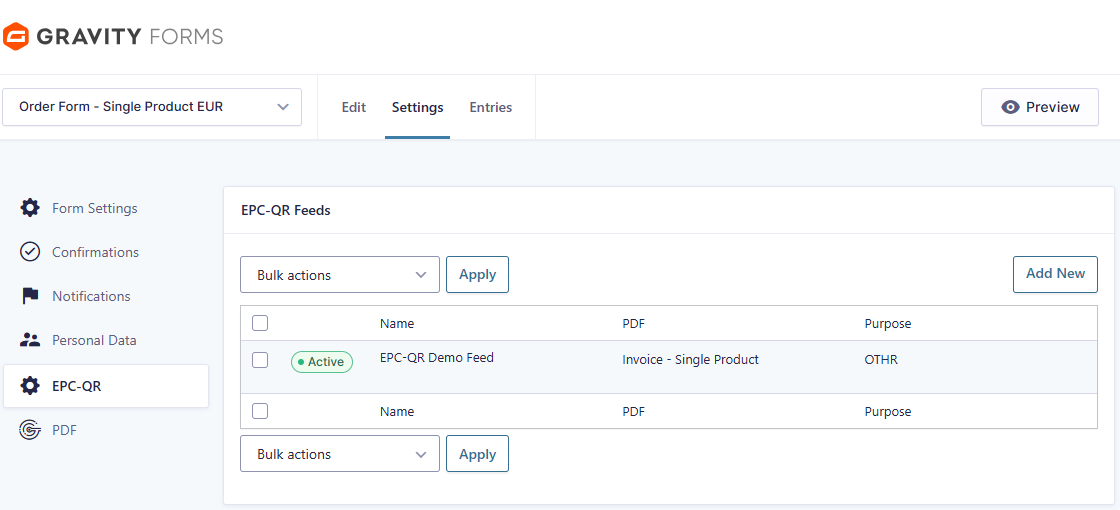
A feed decides which PDF of the form carries the payment page. If a form produces an invoice and a confirmation, the code belongs on the invoice only.

03   Choose reference or text

The EPC standard allows either a structured creditor reference or free remittance text — never both. The feed picks automatically, or you force one of the two. Merge tags work in the text, so Invoice {Invoice Number:12} of {date_dmy} becomes the payment reference.

04   Open the PDF

The payment page is appended at the end. Your template is untouched.


Forms → Settings → (e)invoice Settings — entered once, read by every add-on of the family.

The EPC-QR feed list of a form. One feed per document that should carry the code.

Feed settings: which PDF, which ISO 20022 purpose code, and whether the reference or the text is used.

The result: the appended page. The table is built from the QR code itself, so it can never show a value the code does not contain.


See it before you buy it.

The demo builds a real invoice PDF with a scannable payment page — try it with your own banking app.