
Paid extension for the Viewer

The invoice you just read, as an Excel file.

The Exporter adds two things to the (e)Invoice Viewer: an Export to Excel button and a conversion between UBL and CII. The invoice the visitor has just uploaded becomes an XLSX file following a bundled EN 16931 template — every field in the row the standard puts it in. No second upload, no external service, nothing stored.
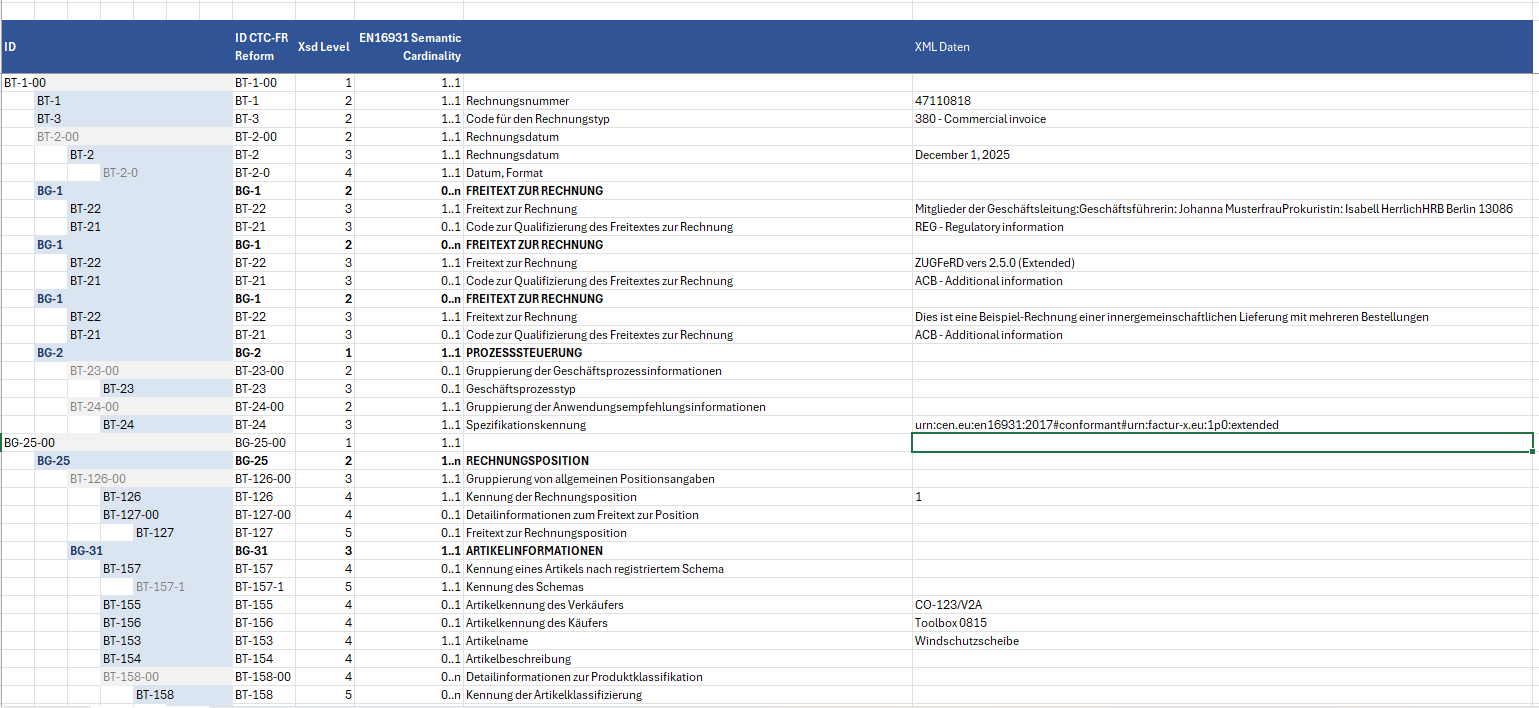

Real output, not a mockup

Excel export of the parsed invoice: each row with the ID, the CII return, the XSD level, the EN 16931 cardinality, the semantic name and the XML value

The Excel file produced by the export: every row with ID, CII return, XSD level, EN 16931 cardinality, semantic name and the actual value from the XML.

How the export works

One button, right in the result.

Search Search

No second dialog

The Exporter brings neither a shortcode nor an upload of its own. It appears as a button in the Viewer’s result area — after every successful upload, PDF or XML alike.

Note Note

A fixed EN 16931 template

The values are written into a bundled Excel template: one row per business term, indented by level, with cardinality, designation and the value that was read side by side.

Tools Tools

Repetitions stay repetitions

A group that occurs several times in the invoice occurs several times in the file — four free-text blocks become four, two line allowances become two. A group that does not occur at all is left out rather than shown empty.

Where the values come from

From the same reading pass as the view.

The Exporter does not read the invoice itself. It works from the data model the Viewer has already built to display it, and maps that onto the template. So there is no second extraction path drifting off on its own: what the view shows is what the file contains.

Verified against six real invoices with an independent count taken straight from the XML — lines, notes, document and line allowances, VAT categories. Including the awkward case where line 1 carries two discounts and line 2 none: both land cleanly separated.

Requirements and limits

Requires the (e)Invoice Viewer for PEPPOL & EN16931 — WordPress enforces this itself and will not let the Viewer be deactivated while the Exporter is active.

Template in this release the German EN 16931 template. English, French and EXTENDED templates ship with the plugin but are not yet wired to the button.

Environment WordPress 5.8+, PHP 8.2+.

The second function

The same invoice, the other syntax.

An e-invoice XML goes in, the same invoice comes back in the other syntax of the UN/CEFACT family: UBL to CII or CII to UBL. Useful wherever the recipient insists on a syntax your own system does not produce.

If the document already is in the requested syntax it comes back untouched — no needless conversion pass. PDF input is rejected with a clear message rather than quietly mishandled: the conversion needs the raw XML, which a PDF reader does not hand out.

Counted, not claimed

0 deviations The conversion was checked business term by business term against three real invoices — across 151, 177 and 176 compared terms not a single value went missing.

The same library the Viewer already uses to read UBL input. No second mapping that could go its own way.

Two ways in the REST routes /einvoice/v1/export and /einvoice/v1/convert, or the equivalent AJAX actions.

See it first, then export it.

The Exporter sits on top of the free (e)Invoice Viewer. Try an invoice of your own there first — the export is the same data, only as a file.

11,90  incl. VAT · instant download after purchase