Gravity PDF add-on

A real QR-bill, not a QR code on a page.

This add-on appends a complete Swiss QR-bill to the PDF your form already produces — payment part and receipt, 210 × 105 mm on the lower cut edge. Your customer scans it with any banking app, or cuts it off and hands it in at the counter.


To the millimetre

The document a Swiss bank expects.

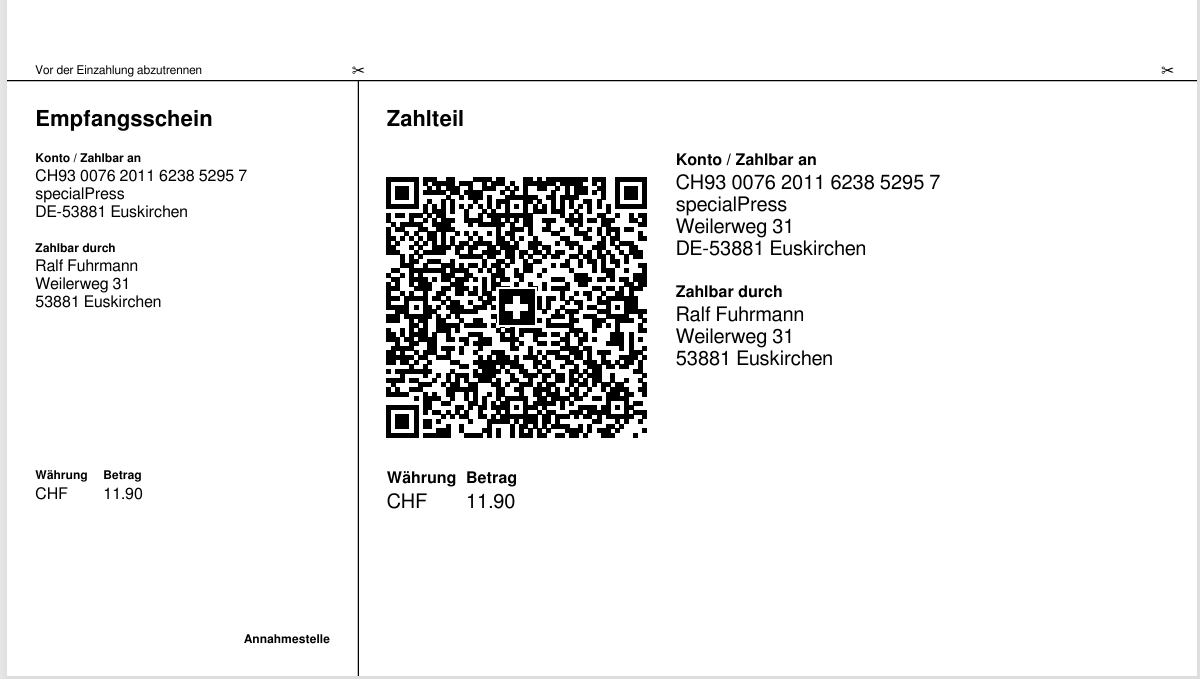
Receipt 62 mm, payment part 148 mm, the mandatory 5 mm blank borders, the amount and payer boxes in their prescribed sizes, the acceptance point area, cut lines with a scissors symbol and the notice to separate before paying in. The measurements below are not approximations — they were read back out of a produced PDF.

Element Required Produced
Total block 210 × 105 mm at the foot 210 × 105
Receipt / payment part 62 / 148 mm 62 / 148
Swiss QR Code exactly 46 × 46 mm 46 × 46
Clear space around the code ≥ 5 mm 17 / 5 / 5 / 13
Module size ≥ 0,4 mm 0,667 mm
Swiss cross 7 × 7 mm, centred 7 × 7, centred
Corner marks 0,75 pt 0,75 pt
Acceptance point area ≥ 20 mm high 20 mm

There is deliberately no heading of your own inside the payment part. Section 3.1 of the guidelines rules out using it as an advertising medium, and a free text inside the A6 area would make the bill non-compliant. Whatever you want to say goes above the upper cut line — that is invoice space, and the feed has a setting for it.


Version 2.4

Built to the version that comes into force, not the one everyone still ships.

The Implementation Guidelines 2.4 are in force from 14 November 2026. Three of their changes matter enough that an implementation following the widely deployed 2.3 is now wrong — and each one can invalidate a bill.

Change in 2.4 What it means for you
QR reference and QR-IBAN are CHF only Since a QR-IBAN obliges you to use a QR reference, „QR-IBAN plus EUR“ has become impossible. It used to be allowed. The feed screen reports it as a blocker before you configure anything.
The structured address is compulsory The combined address type „K“ is gone. Creditor postcode, town and country are mandatory, not merely recommended.
Romansh is a fifth correspondence language Five choices in the language list instead of four.

Verified against the standard’s own examples

Annex A prints two complete worked data sets. This implementation reproduces both of them byte for byte — including the detail that trips up hand-written implementations: the version line inside the code stays 0200, not 0240. Section 7.1 requires readers to validate that line, so 0240 produces a code that is rejected outright.

euroSIC is being discontinued

QR-bills in EUR will be settled as SEPA Credit Transfers from November 2027 at the latest, and the guidelines warn that the payer’s address and a message next to a structured reference are then not guaranteed to reach you. The add-on writes that to the log for a EUR bill rather than staying silent.


The reference

What matches a payment to an invoice.

Which kind you may use is decided by your account, not by preference. The add-on can work it out from the IBAN for you.

Type Requires Format
QRR — QR reference a QR-IBAN, and CHF since 2.4 27 digits, modulo 10 recursive
SCOR — Creditor Reference an ordinary IBAN; CHF or EUR RF + 2 check digits + up to 21
NON — no reference an ordinary IBAN the line stays empty

Built per invoice

Put your invoice number in one field, with merge tags, and the 27-digit reference is assembled and its check digit calculated for you.

Or passed through untouched

Point the same field at a reference that already exists and a complete, valid one is recognised and left alone. Without that, a merge tag on a stored reference would silently produce nonsense — RF18… would become RF97RF18…. It is written to the log when it happens.

What the check digit can and cannot do

Measured rather than assumed: a single wrong digit is always detected — 97,200 mutations, none slipped through. An adjacent transposition is usually but not always detected, about 2 % slip. The gap is precise rather than random, and it is documented.


Built not to break

Only a definite no stops anything.

An apostrophe cannot break your bill

The standard allows a specific subset of Unicode, and WordPress inserts characters outside it without being asked — a typed apostrophe silently becomes a typographic one. Those are converted to their plain equivalents rather than dropped, so „L’Atelier“ stays readable and payable.

Unknown amount or payer is fine

Both are legitimate. The payment part then prints a colourless field with black corner marks, in the exact sizes the standard specifies, for filling in by hand. A donation form works as well as an invoice.

It does not fight your template

The payment part occupies exactly the area a page footer sits in, so the template’s running footer is switched off for that one page — and only for that page. Your invoice pages keep theirs.

Five languages, chosen per form

German, French, Italian, Romansh and English. The headings are prescribed wording rather than translations, and the biller picks the language — so a German-language WordPress can print an Italian payment part, and one form can differ from the next.

Advice notes too

One switch produces the variant the guidelines define for a bill that is not to be paid: the amount fixed at 0.00 and the prescribed wording in the chosen language, which also guarantees that a conversion into an eBill cannot be released for payment.

Nothing to install

No Composer step, no bcmath, no API key, no external service, no vendor directory to collide with another plugin. Payload, check digits and layout are all in the plugin — which is why it still runs on PHP 7.4. The QR encoder comes from Gravity PDF itself.

Developer friendly

The layout is one filterable array of named constants, the payload class is free of WordPress so the standard’s rules can be tested on their own, and the QR reference ships as a portable two-file package you may copy into any other Gravity Forms plugin.

Requirements

What has to be in place.

WordPress with Gravity Forms 2.5 or newer
Gravity PDF 6 or newer
PHP 7.4 or newer
Gravity Forms currency CHF or EUR
IBAN Swiss or Liechtenstein

Seven pre-conditions are checked in one place and shown in two: as a list on the feed screen, where somebody can act on them, and as a log line at render time, where skipping quietly is the only sane reaction. The two can never disagree about what is missing.


Setup

Four steps, then it is out of your way.

01   Enter the full seller address

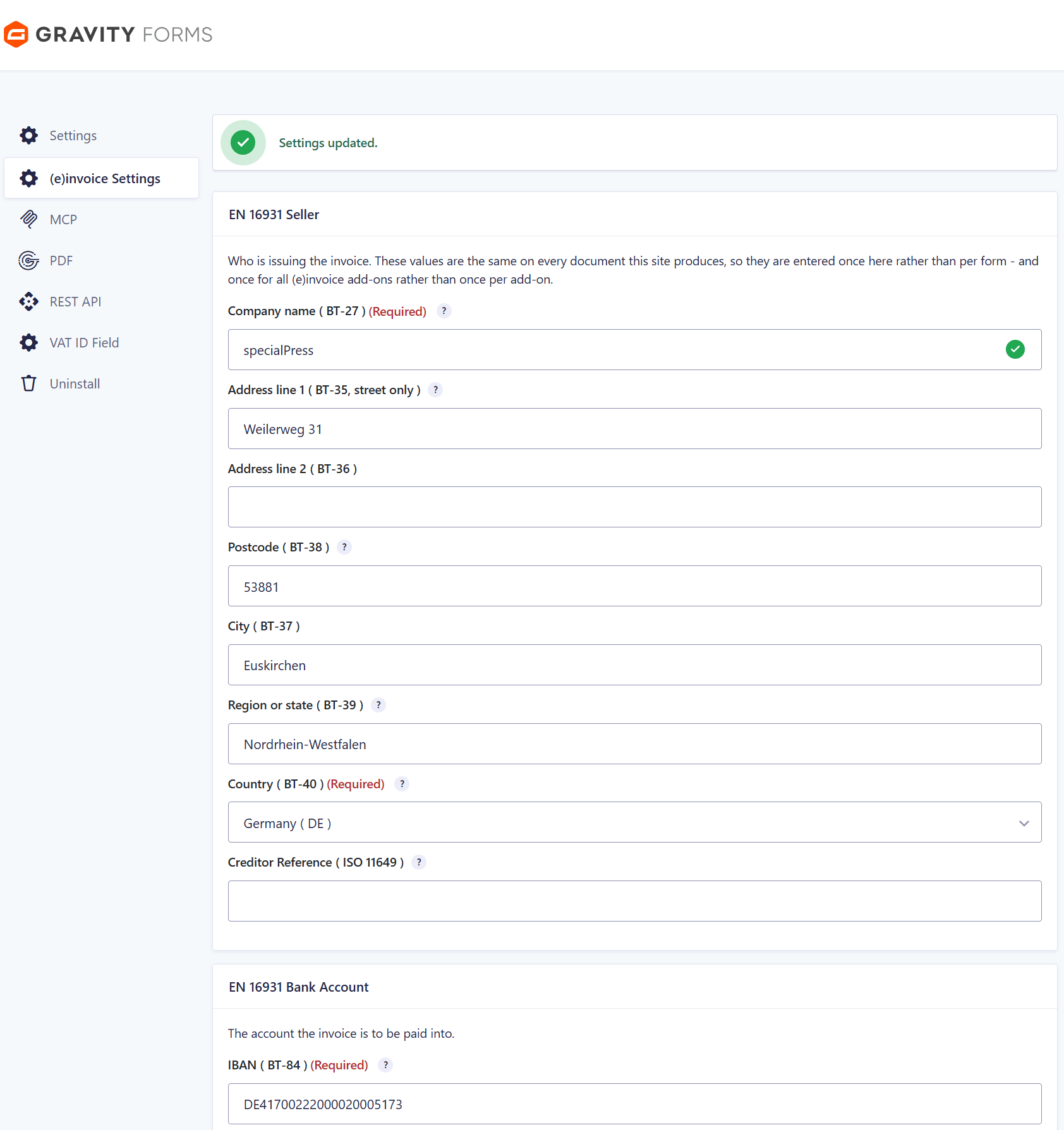
Version 2.4 made the structured creditor address compulsory: street, postcode, town and country, not just a name. They go on the shared (e)invoice Settings page with the IBAN, and every add-on of the family reads them from there.

02   Add a feed and pick the language

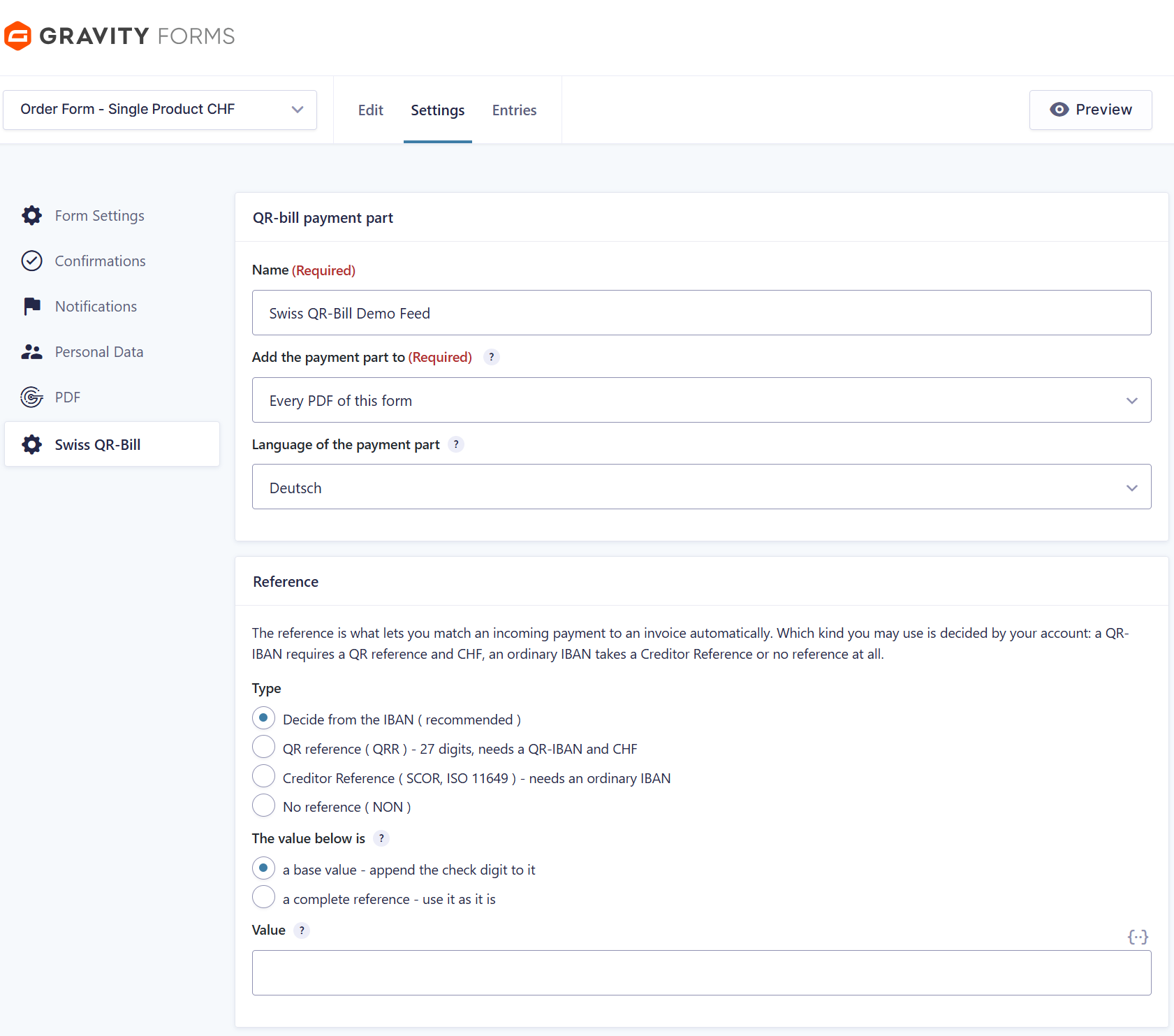
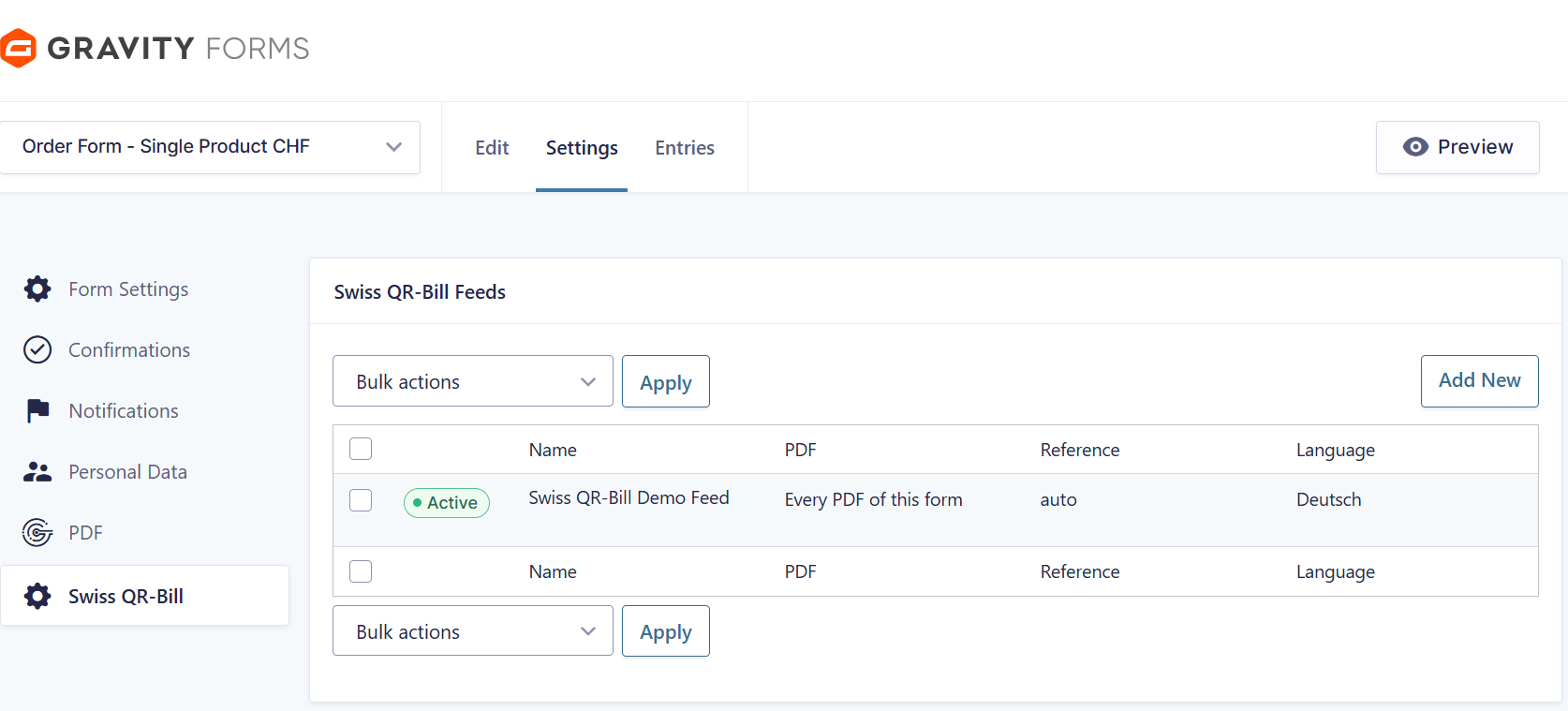
A feed decides which PDF carries the payment part. The headings are prescribed wording in German, French, Italian, Romansh and English — chosen per feed, so a German site can print an Italian payment part.

03   Let the IBAN decide the reference

A QR-IBAN needs a QR reference and CHF; an ordinary IBAN takes a Creditor Reference or none at all. Leave it on Decide from the IBAN and the add-on picks the right one — and tells you on the feed screen if your combination cannot work.

04   Open the PDF

Receipt and payment part are printed on the lower cut edge of the last page, with the cut lines and the notice to separate before paying in.


The shared (e)invoice Settings page — since version 2.4 the seller address is a required part of it.

One feed per document that should carry the payment part.

Feed settings: which PDF, which of the five languages, and which reference type.

The produced QR-bill — receipt 62 mm, payment part 148 mm, cut lines with the scissors symbol.


Does your account allow a QR reference?

Tell us your IBAN’s institution digits and the currency you invoice in, and it is a one-minute answer — including whether version 2.4 rules out the combination you had in mind.