(e)Invoice Viewer for PEPPOL & EN16931

All 164 business terms, visible

Every field of an e-invoice. On your own site.

One shortcode turns your WordPress page into a complete e-invoice reader. A visitor drops a ZUGFeRD / Factur-X PDF or an XRechnung / UBL XML onto the page and immediately sees the whole document — structured, readable, right down to the last detail field. No external service, no API key, and the file is never stored.

164

business terms

32

business groups

125

sample invoices verified

3

languages

Real output, not a mockup

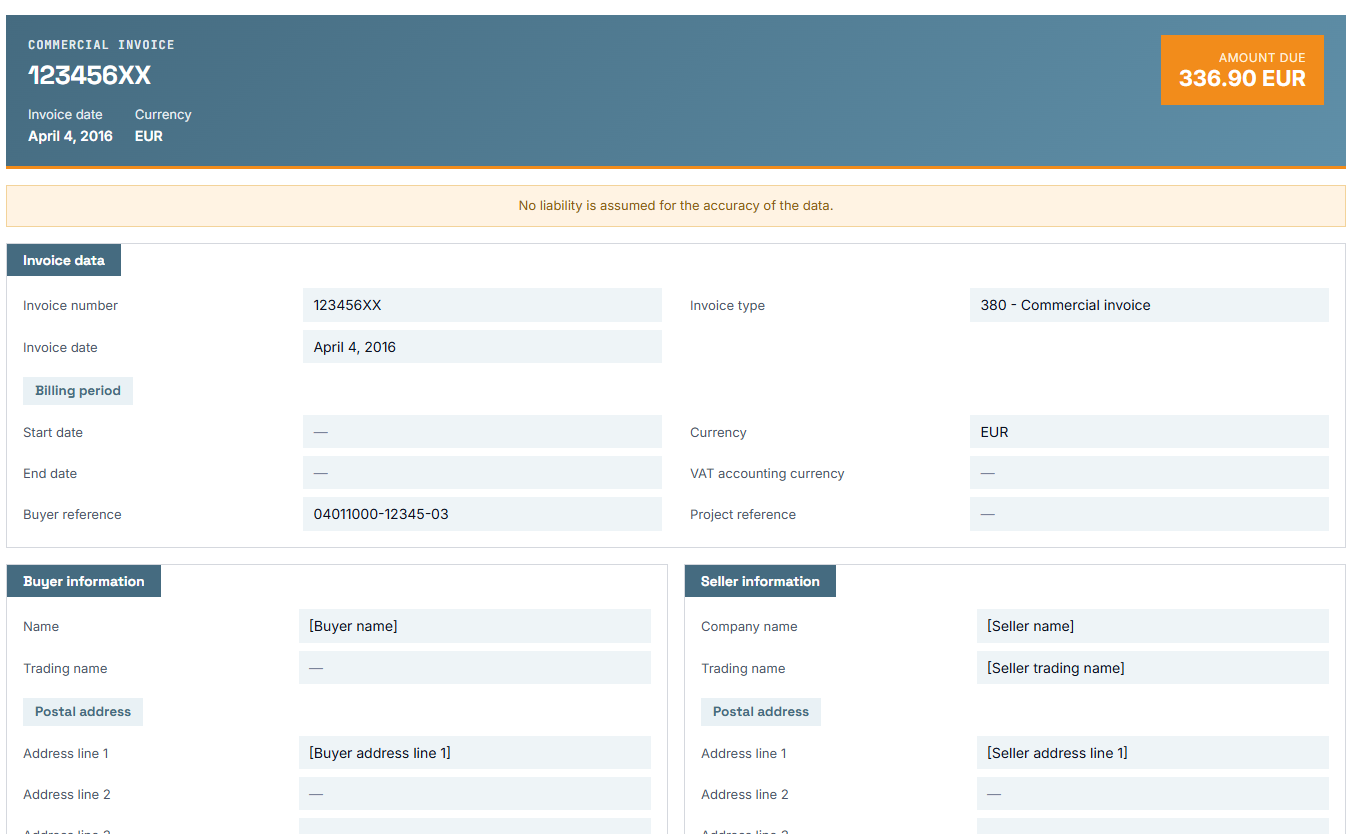
This is what an invoice looks like once it has been read: a header carrying the invoice number, date, currency and amount due, and below it the fields line by line — each with its EN 16931 identifier beside it.


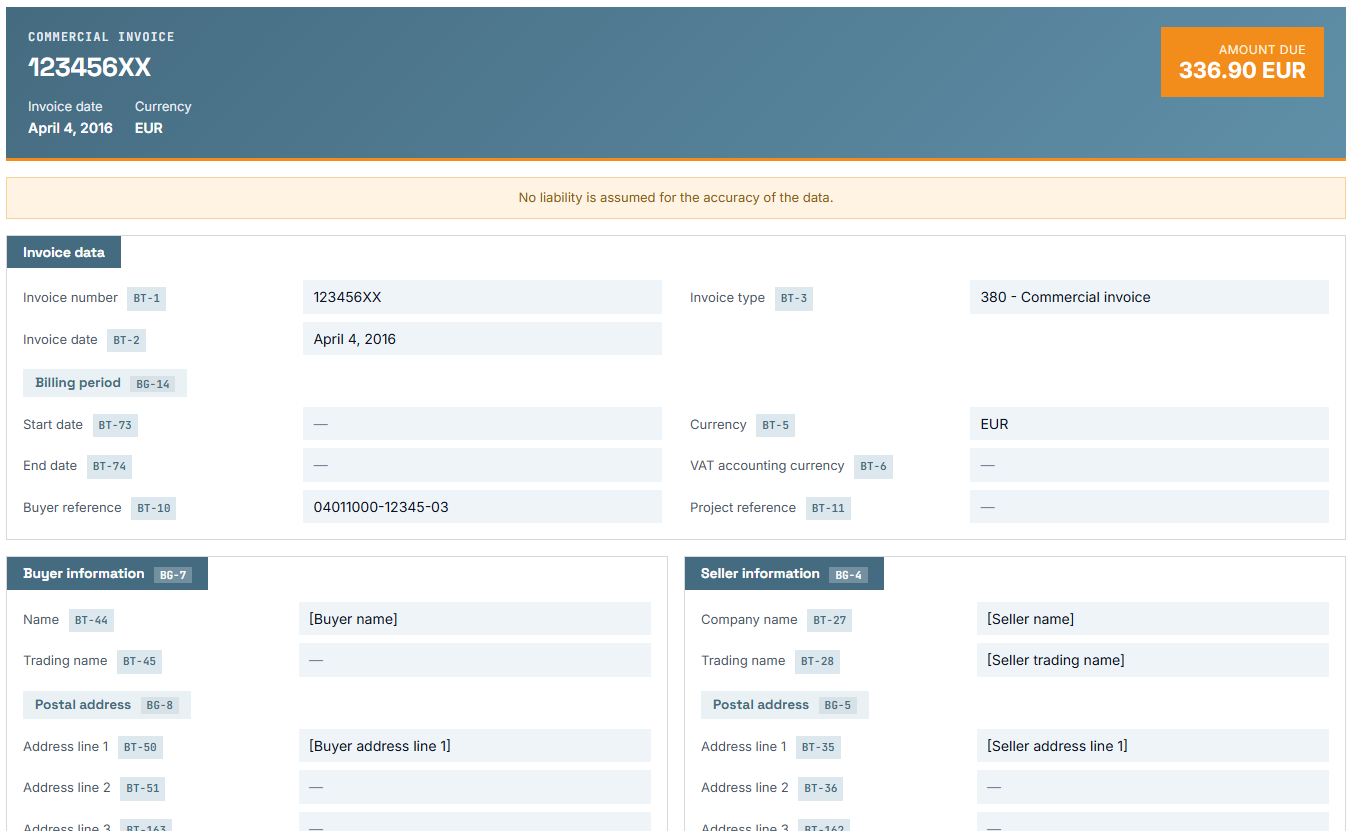
The same invoice without the BT identifiers shown: plain reading view with header band, invoice data and buyer and seller details

Without identifiers: the plain reading view for anyone who just wants to see the invoice.

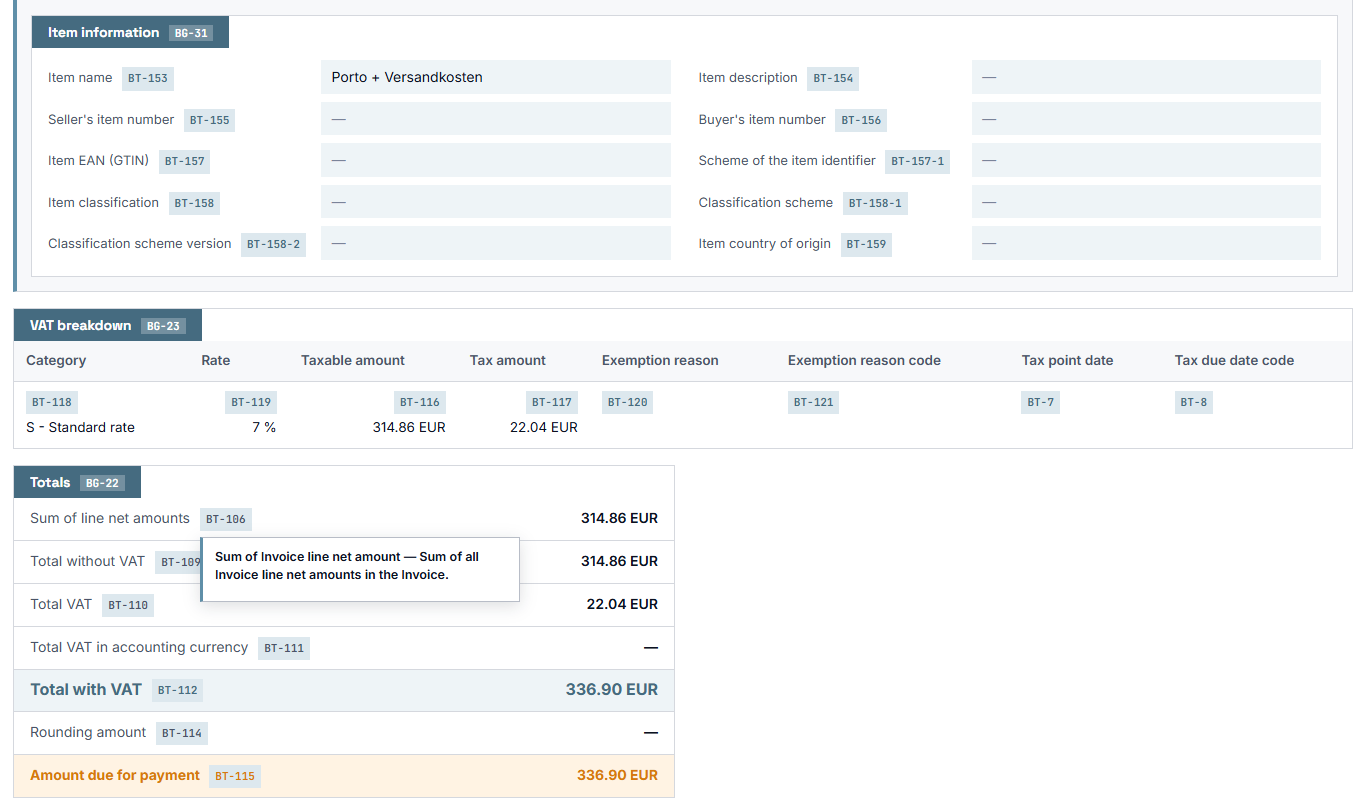
Line-item details, VAT breakdown and totals block of the viewer with an open tooltip explaining BT-106

Line items, VAT breakdown and totals — hovering an identifier shows the official definition from the standard.

What the Viewer reads

Three ways in, one way out.

Note Note

ZUGFeRD / Factur-X (PDF)

The embedded XML is pulled out of the PDF object graph automatically. You hand over the PDF you were sent; nobody has to extract anything first.

Search Search

CII (UN/CEFACT) XML

Read directly, without a detour. This is the syntax ZUGFeRD and Factur-X carry inside their PDFs, so it is also the one the Viewer speaks natively.

Tools Tools

UBL XML

XRechnung-UBL and Peppol BIS Billing 3.0, including credit notes/CreditNote documents are handled like invoices and reported as credit notes.

The format is detected from the document itself, not from the file extension: an .xml holding UBL and one holding CII both work, and nobody has to know which is which.

Coverage

164 of 164 business terms. Measured, not claimed.

All 164 business terms and all 32 business groups are extracted and displayed. That number is measured against the sample corpus, not estimated — including the blocks most viewers quietly skip:

BG-10 Payee — BT-59, BT-60, BT-61

BG-11 / 12 Seller tax representative — BT-62 … BT-69, BT-164

BG-20 / 21 Document-level allowances and charges, with base amount, percentage and reason code

BG-27 / 28 Line-level allowances and charges, in the same detail

Tax BT-7 tax point date, BT-8 its code, BT-121 exemption reason code

Totals BT-111 VAT total in the accounting currency, BT-114 rounding amount

References BT-18 invoiced object identifier, BT-19 buyer accounting reference, BT-26 preceding invoice date

Empty fields stay on the page

A field with no value is rendered as a dash, not hidden. That is deliberate: the point of a business-term view is to see which terms the standard defines and which ones this invoice left out. Hiding the empty ones would hide exactly that.

The BT and BG labels can be shown or hidden by the visitor without a reload — the badges are always in the markup, only their visibility is switched. The starting state is set per embed with bt=”1″ / bt=”0″, or globally in the settings.

Three languages

Hover a label and the official definition is there.

Hovering any BT label brings up the normative term name and its full definition — in German, English or French, following the language of the site.

The wording is taken straight from the Factur-X specification and is not paraphrased, so what your reader sees is what an auditor reads. Where the specification itself has a gap — a handful of the suffixed terms have no French name — the lookup falls back to English and then German, because a term in the wrong language is more useful than an empty tooltip.

The interface itself is fully translated into English, German and French.

Coded values show code and designation

BT-3 380 – Commercial invoice

BT-29-1 0088 – EAN Location Code

BT-81 30 – Credit transfer

BT-130 H87 – piece

BT-151 S – Standard rate

For every field whose value is a code from a reference table: document type, payment means, unit of measure, VAT category, country, identifier scheme and electronic address scheme. The wordings come from the XRepository code lists, not from memory.

Presentation

Looks the same on every site.

  • Isolated from the theme

    The result hangs in a Shadow DOM with a complete :host reset and pixel units throughout. No theme styling leaks in, so the view is identical whether it sits on your site or on someone else’s.

  • One card group per line

    A modern single-scroll layout in the Quba style, with coloured section tabs — filled where the section carries data, light where it is empty. Plus VAT breakdown, totals, notes and attachments.

  • Drag and drop, no framework

    A vanilla-JavaScript uploader: no framework, no reload. The result appears in the page over AJAX, exactly where the shortcode sits.

Privacy and safety

The invoice never leaves your server.

  • Nothing is stored

    The file is read from the temporary upload and discarded. Nothing reaches the media library, the uploads directory or the database, and the plugin makes no outbound HTTP request while reading an invoice.

  • XXE hardened

    A DOCTYPE is rejected before libxml ever sees the document, the external entity loader is disabled, and LIBXML_NONET forbids network access during the parse.

  • Upload validation

    Extension check, a real finfo MIME check, a size limit capped by wp_max_upload_size(), and is_uploaded_file() as proof the path is a genuine upload of this request. Plus a daily limit per visitor and a nonce fetched live, so a cached page cannot hand out an expired one.

For developers

One shortcode — and a clean edge underneath.

Embedding

One shortcode is enough. Put einvoice_viewer in square brackets on any page. With the attribute bt=”1″ the business-term labels start visible, with bt=”0″ hidden — and the visitor can toggle them at any time.

The EN 16931 knowledge lives in a layer of its own (includes/core/), cleanly separated from the WordPress-facing code — which keeps the plugin’s own code small and auditable. No PDF writer, no template engine, no framework is dragged along.

SPEV_Renderer::model() hands you the whole invoice as a nested array — for exports, your own REST endpoints or your own rendering; model_json() returns the same thing as a JSON string. The shape of the model is fixed as a versioned JSON Schema, derived from the actual output rather than maintained beside it. A layout of your own is one class; the extraction logic stays untouched.

If you would rather ask for the view from your own code than through the shortcode, there is the REST route POST /wp-json/einvoice/v1/render alongside the AJAX action. Both call the same code, neither is deprecated.

Filters and actions

spev_template — the active layout

spev_label_locale — the language of the term names, independent of the site

spev_date_format — the date format used for invoice dates

spev_client_ip — how the client IP for the daily limit is determined

spev_code_tooltip — extend a tooltip with your own details (cardinality, data type, XPath …)

spev_invoice_model — append whole additional sections to the model

spev_register_templates — the action a companion plugin uses to register layouts from the outside

Plays well with its neighbours

With the KoSIT Validator active, an XML upload gains a button that validates the very same file — no second file dialog. With the Exporter active, an “export to Excel” button appears after every upload, PDF or XML. With the Visualizer active, four further print-oriented layouts show up in the settings. In every case it stays one upload and one result view.

Verified

125 official sample invoices.

25 / 25 ZUGFeRD 2.5 EN16931, XML

25 / 25 ZUGFeRD 2.5 EN16931, Factur-X PDF

33 / 33 XRechnung test suite, CII

33 / 33 XRechnung test suite, UBL

9 / 9 Peppol BIS Billing 3.0 (credit note included)

Business-term coverage across the whole corpus: 164 / 164 BT and 32 / 32 BG.

The XRechnung suite is particularly useful here because it provides the same cases in both syntaxes — which makes the CII path and the UBL path check each other.

A PDF without embedded XML is correctly rejected, as is malformed XML and any document carrying a DOCTYPE.

Re-verified after the reading engine was swapped out: the same 125 files still read, and the deliberately non-invoice PDF in the corpus is still turned away.

Requirements: WordPress 5.8+ (tested up to 7.1), PHP 8.2+.

Upload an invoice of your own.

The demo runs on the very plugin you would install on your own site. Nothing is stored.