More than 20 tools that work together
Read
In the tabs “Invoice”, “XML” and “PDF” you see every detail with its BT number, the XML with a search and the pages of the PDF invoice.

More than 20 tools that work together
A real screenshot, not a mock-up
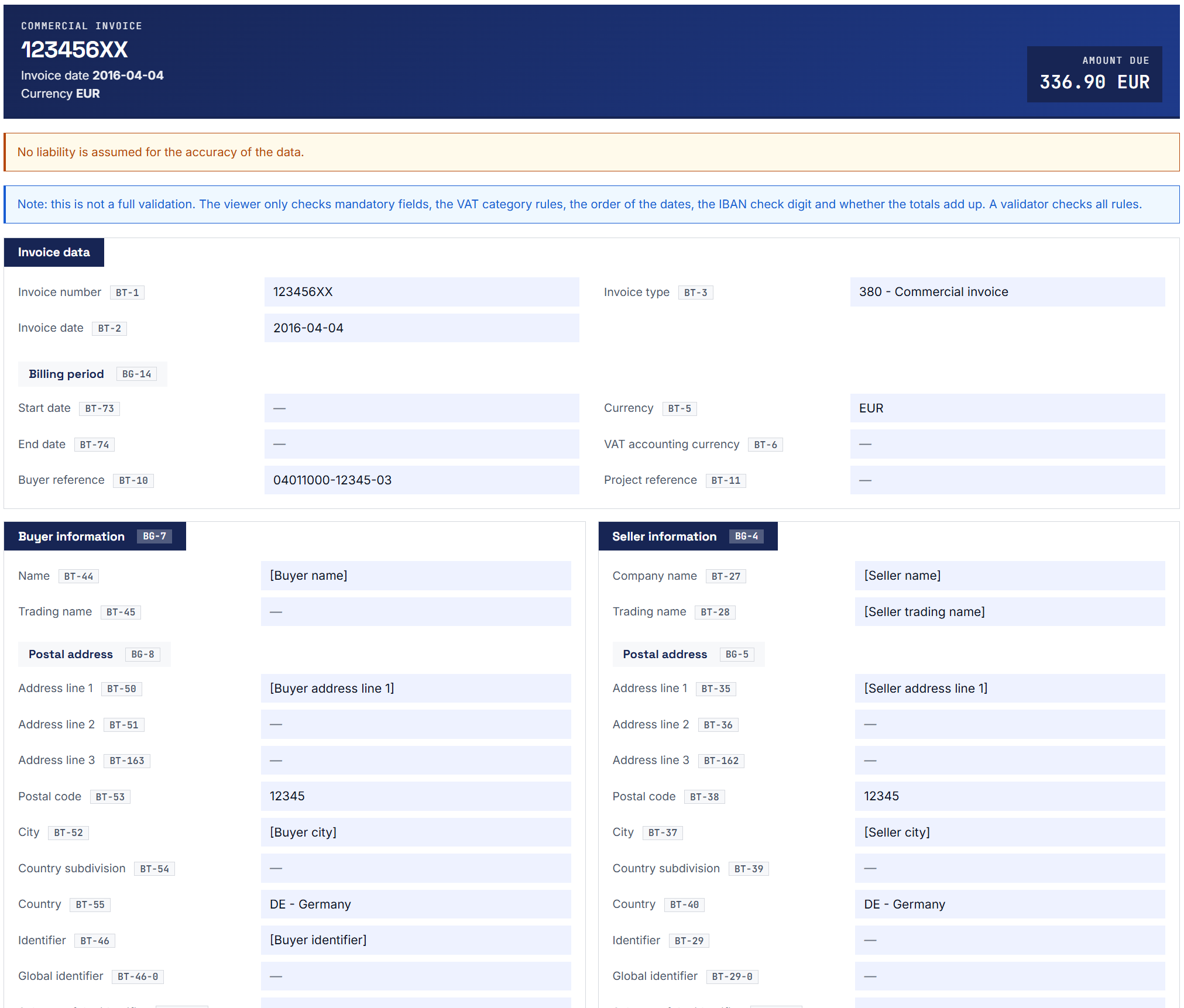
This picture is a screenshot from the demo of the eInvoice Viewer for PEPPOL & EN16931, not a drawn mock-up. The file opened was the official UN/CEFACT test invoice in the CII format. CII is one of the two XML forms an e-invoice under EN 16931 can take. The viewer displayed the invoice as a structured document within a few seconds.
Each value is labeled with its number from the standard, for example BT-1 for the invoice number. EN 16931 is the European standard that defines which details an e-invoice contains. So for every value you can see which detail of the standard it stands for.
The viewer is available as a WordPress plugin, free on wordpress.org, and as a free app for your own computer, your intranet and SharePoint.
One viewer, many tools
At invoicePress almost everything starts in the free eInvoice Viewer. You open an e-invoice once and do everything else from there, without uploading the file a second time. Since version 2.38 the viewer organizes its views in tabs: the invoice with the EN 16931 fields, its XML line by line with a search, and the pages of the PDF invoice. Every connected tool adds its own tab next to them.
What you gain: you learn one single interface and extend it step by step with exactly the tasks you need. The viewer itself stays free, as an app and as a WordPress plugin.
Four tasks, one tool: what comes together in the viewer.
plugins and tools for e-invoices
starting points, depending on your task
Where are you right now?
The eInvoice Viewer shows you your e-invoice as an easy-to-read document, with seller, buyer, line items, tax and totals. It recalculates the amounts and points out missing mandatory details. With its add-ons it also shows you a transfer code for your banking app or warns you when the XML names a different bank account than the PDF. Try it right now in the free demo: the file is read in your browser and never leaves it.
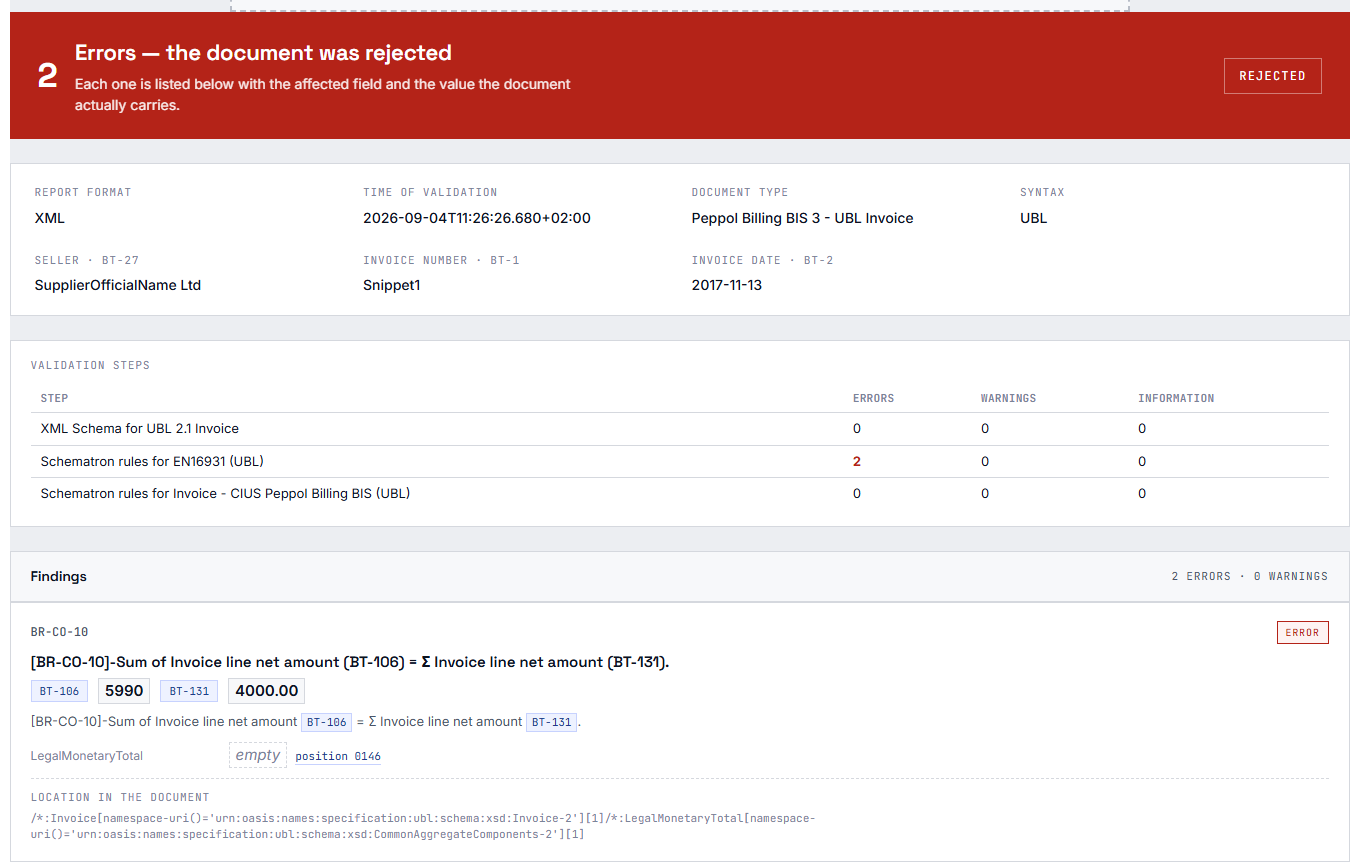
The KoSIT Validator is the official validation program of the German Coordination Office for IT Standards (KoSIT). Its report names errors only by codes such as BR-CO-10. The eInvoice Validation Explorers turn each message into a plain sentence and show the affected field with the value from your invoice, for reports of the official KoSIT Validator, of Mustang and of VAMPIRE. That way you know what to change. If you want to check invoices yourself before sending them, the free eInvoice Validators connect the official KoSIT Validator, Mustang or VAMPIRE to your WordPress site.
The viewer, the validator and the Validation Explorer run as plugins on your own WordPress site. For Gravity Forms, the form plugin for WordPress, there are dedicated extensions: a form entry becomes an e-invoice, and the PDF from Gravity PDF becomes an invoice in the PDF/A-3 format, which is a PDF with an embedded XML file. The identifier fields check entries such as an IBAN or a VAT ID right in the form. We present all extensions on gravityforms.invoicepress.de, for example the generator eInvoice Generator for Gravity Forms.
Through the invoicePress REST API you retrieve code lists and reference data free of charge and without a key. A code list is a defined list of allowed values, for example the currency codes, so you don’t have to maintain such lists yourself. The same interface also lets you have e-invoices checked. If you want to check inside your own program, use VAMPIRE PHP: it checks e-invoices against the official rules in pure PHP and, unlike the KoSIT Validator, needs no Java. That means it also runs on ordinary web hosting. VAMPIRE PHP is free of charge and free software under the GPL-2.0-or-later license. Anyone can read its source code on GitHub, and you install it from Packagist with composer require invoicepress/vampire-php. For the browser, for Node.js and for our apps there is a second edition, VAMPIRE JS, as a paid product. We present both editions on vampire.invoicepress.de, with documentation, rule packages and a playground to try them out.
Apps and WordPress plugins
Many of our tools come in two forms: as a WordPress plugin for your website and as an app for your own desk. Both are the same product, with the same features, the same look and the same manual. You simply choose where you want to work.
For us, an app is a folder of files. You unpack it and open the start file in your browser with a double click. Nothing is installed, you need no administrator rights and no WordPress, and your invoice is never uploaded. This lets you read and check confidential invoices on your own computer. If you like, you put the same folder on a web server in your intranet, show it on a SharePoint page or embed it in your existing website with a few lines of HTML.
An app is a workplace for one person. If you need permissions for a team, storage or a page for visitors, choose the WordPress plugin.
Today you can download the viewer app for free. The add-on packages for the viewer app and the Validation Explorer apps are available in the shop; the invoice inbox, the Rule Studio and VAMPIRE JS for the apps follow soon. Free tools have a blue icon, paid products an orange one.
The viewer shows any e-invoice as a clear, readable document, with seller, buyer, line items, tax and totals, in three languages. Six paid add-ons go into the app folder as add-on packages: Extended Profiles, Visualizer, Identifier Check, Inbound Check, EPC QR Code and Hybrid Check. Each appears as a tab of its own next to the invoice.
App and WordPress plugin · free · available for download today
The invoice inbox opens an XML or PDF file and tells you whether it is an e-invoice and which kind. It formally checks the mandatory details, the totals and whether you are named correctly as the recipient, and it lets you forward or reject the invoice. In the Outlook add-in you see the result right next to the email, without saving the attachment.
App and Outlook add-in free, available for download soon · WordPress plugin as a paid product, coming soon to the shop
You drop a validation report from the KoSIT validator into the app and see every message in plain language at the affected field of the invoice. One file is enough, because the report carries the checked invoice with it. The explorer also reads reports from VAMPIRE.
App and WordPress plugin · paid product · in the shop
The same for reports from Mustang and from VAMPIRE. With a Mustang report you also drop in the invoice, because the report does not contain it. From VAMPIRE, the report in the KoSIT Validator format is enough on its own; the VAMPIRE JSON report needs the invoice next to it.
Each as app and WordPress plugin · paid products · in the shop
Go to the Explorer for Mustang · Go to the Explorer for VAMPIRE
In the Rule Studio you create validation profiles, switch rules on or off, change their severity and design rules of your own. Its test bench checks your profiles right away with the included VAMPIRE JS, directly in the browser.
App with VAMPIRE JS inside · paid product · coming soon to the shop
With this add-on package, the viewer, the invoice inbox and the explorer apps check an invoice fully against the official rules, offline and on your own computer. You simply place the vampire/ folder in the app folder; the same package fits each of these apps. VAMPIRE JS is also available as a paid add-on for the Outlook add-in.
Add-on package for the apps · paid product · coming soon to the shop
eInvoice Validation Explorer for KoSIT
A code such as BR-CO-10 and a technical location in the XML usually mean something only to specialists. The eInvoice Validation Explorer for KoSIT reads the report of the KoSIT Validator and links each finding to the affected field of EN 16931.
For each message you see the rule, an explanation in plain language, the actual value and the expected value side by side. So you know what to change in the invoice without having to study the validation rules. This happens on your own server, and nothing is stored. The explorer is a paid product.
For reports from Mustang and VAMPIRE there are separate explorers with the same view. Together with the free viewer, every finding also appears right at its field in the invoice.
Free: eInvoice Validator for KoSIT
The free eInvoice Validator for KoSIT plugin gives your own KoSIT Validator a page on your WordPress site. Visitors, such as colleagues or suppliers, drop an invoice there. Your validator checks it with the official validation configurations for XRechnung and ZUGFeRD, and the report appears in a clear, readable layout. You can also download the official report.
The invoice is not sent to any third-party service. In Germany, the KoSIT Validator is the usual benchmark that recipients apply to an e-invoice. The plugin requires Java and the KoSIT Validator to run on your server; neither is included in the plugin.
VAMPIRE · validation engine in PHP and JavaScript
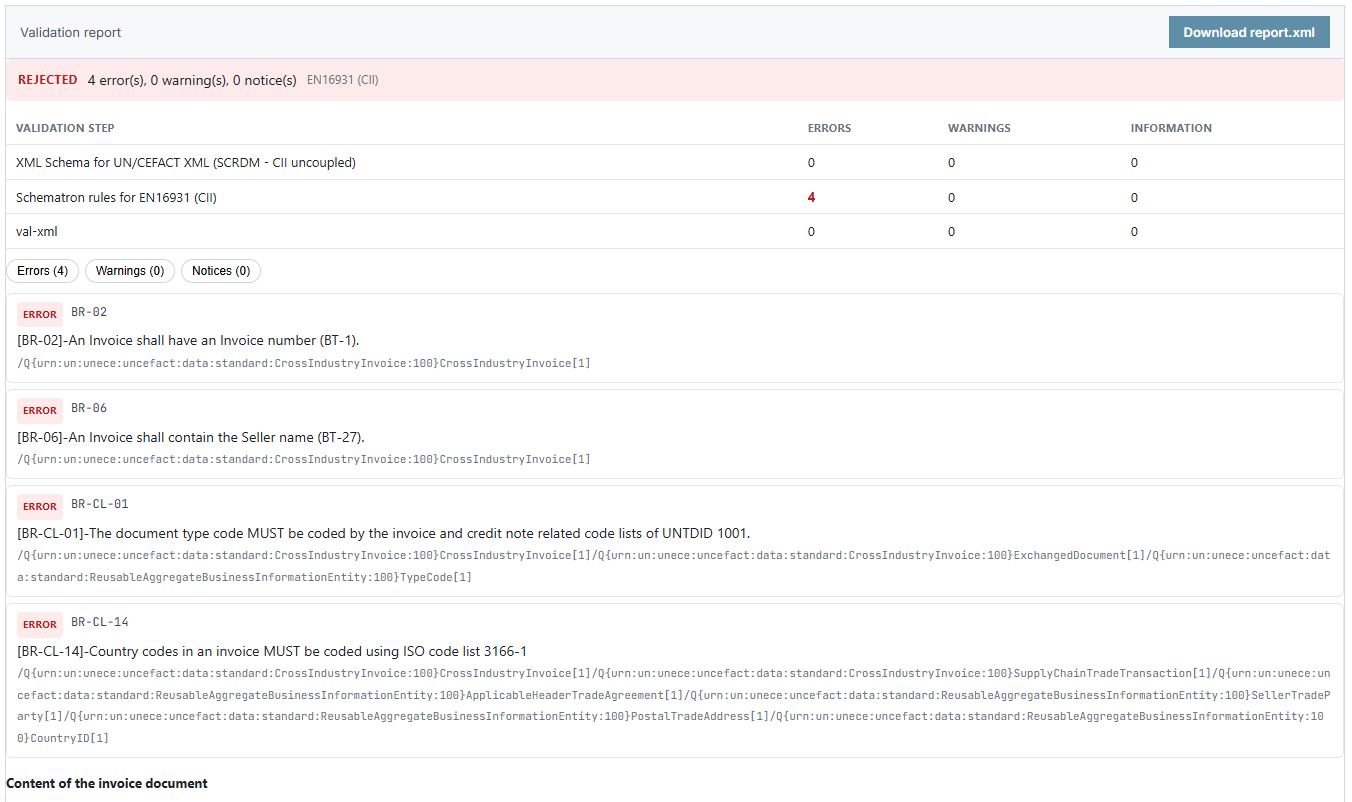
Do you want to validate e-invoices without Java, that is, without a server of your own running the KoSIT validator? That is what VAMPIRE is for. VAMPIRE checks e-invoices in the XRechnung, ZUGFeRD, Factur-X and Peppol BIS formats against the official validation rules. The publishers of the formats release these rules as files, and VAMPIRE translates them automatically into its rule packages. The invoice is checked where it already is and is not sent to any third-party service.
VAMPIRE comes in two editions. Both read the same rule packages and produce the same validation report for the same invoice.
VAMPIRE PHP runs in any PHP process from PHP 8.2 on, including ordinary web hosting. It needs no Java and calls no other program. This lets you validate e-invoices in your own PHP software, even where you cannot run a server with Java.
VAMPIRE PHP is free of charge and free software under the GPL-2.0-or-later license. You can read the source code on GitHub, and you install it from Packagist with composer require invoicepress/vampire-php.
Free · GPL-2.0-or-later · Composer and Packagist · PHP 8.2 or later
VAMPIRE JS runs in Node.js from version 18 on and in the browser. It even runs in an HTML file that you open on your computer with a double click, with no web server at all. That way you can check an invoice right where it is open, without uploading it anywhere.
VAMPIRE JS is included as an add-on package in our apps and as a paid add-on in the Outlook add-in. With it, the apps, such as the invoice inbox, validate fully against the official rules without sending the invoice anywhere.
For the WordPress plugin eInvoice Validator for VAMPIRE, VAMPIRE JS is available as a paid add-on of its own. The validation page on your site then checks the invoice in the visitor’s browser, with the same report as on the server, and the invoice is not sent to your site.
Paid product in the shop · Node.js 18 or later · browser · add-on package for the apps
of 220 test invoices received the same result from VAMPIRE and the official KoSIT validator (as of October 9, 2026)
Measured, not claimed: we checked 253 test invoices with VAMPIRE and with the official KoSIT validator. Both could match 220 of them to a rule set, and for all 220 both reached the same result, accepted or rejected. The KoSIT validator is the benchmark against which VAMPIRE is measured. Measured on October 9, 2026.
of 50 ZUGFeRD invoices were accepted under the rules of some versions and rejected under the rules of others
The first figure comes from the measurement on 253 test invoices, 220 of which both validators could match to a rule set. The second shows why VAMPIRE checks a ZUGFeRD invoice across several versions.
Do you use WordPress? The free plugin eInvoice Validator for VAMPIRE includes VAMPIRE PHP and gives your website a validation page for e-invoices, with no Java at all. In the playground on vampire.invoicepress.de you check your own invoices with VAMPIRE JS directly in your browser.
Branded edition
For tax advisers, software companies and businesses that want to give their clients, customers or their own team a tool in their own corporate design.
Take your time to look at all the tools and choose the parts you need: WordPress plugins, apps, extensions for Gravity Forms or the REST API. Or open one of your own invoices right away in the free viewer demo.