Add-on for the eInvoice Viewer · WordPress plugin and Viewer app · Paid product · Version 1.5.0
Are the VAT ID, GLN and IBAN on this invoice right? You see it as soon as you open the invoice.
The Identifier Check is an add-on for the free eInvoice Viewer for PEPPOL & EN16931. It checks every identifier in an e-invoice for length, structure and check digit. Identifiers are numbers such as the VAT ID, the GLN or the IBAN that clearly identify a company, a location, an account or an item.
It marks a wrong identifier in red, right at its field, and this check runs entirely in your browser. This lets accounts staff and invoice senders find transposed digits that a check against the official rule sets lets through. If you wish, it can also have VAT IDs and Peppol identifiers confirmed online.
The Identifier Check in the app and in the WordPress plugin
In the app. The Identifier Check is an add-on for the free viewer app. You put it into the viewer’s folder, as a folder or as a single file, and it is there the next time you start the viewer. Next to the one-file app, the single file is enough. In the app it checks length, structure and check digit of every identifier; anything beyond that goes through the REST API there.
In the WordPress plugin. On your website you install The Identifier Check as a plugin of its own next to the free viewer plugin. There you get the additional functions of a website: you limit the calls per visitor and day and decide from which role the add-on appears. Only the plugin also queries public registers, if you wish.
The invoice passed the check, and the IBAN is still wrong
Imagine your checking program reports not a single error on an invoice, and you release it for payment. A few days later the bank returns the transfer because two digits in the IBAN are swapped.
The checking program, a so-called validator, did not miss anything. The official rule sets check whether an invoice is built correctly, but they do not check the check digits of the identifiers in it. A check digit is calculated from the other digits of a number and so reveals a typing error. A VAT ID with one digit too many or a GLN with a typo therefore gets through every one of these checks.
Validator
Identifier Check
Is the invoice built correctly?
✓
–
Are length, structure and check digit of the identifiers right?
–
✓
A validator and the Identifier Check check different things and therefore complement each other.
Without help, the only option is to compare every number by hand. That is still possible for a single invoice, but with many invoices a day nobody can keep up.
Every wrong identifier is marked where you are looking anyway
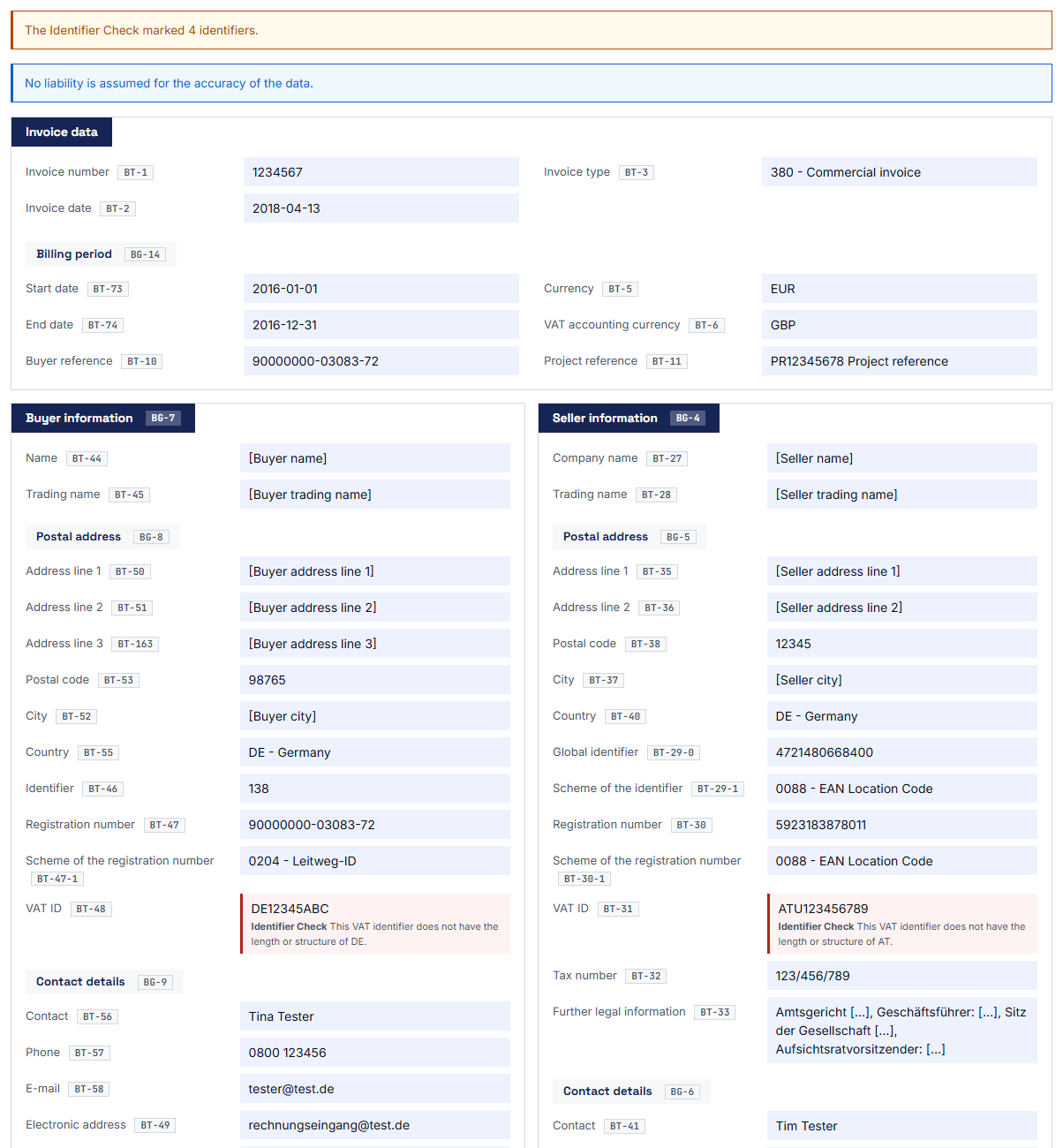
You open the invoice in the viewer as usual, and the Identifier Check checks every identifier without you having to click anything. A wrong identifier is marked in red, and a short sentence next to it says what is wrong: the length, the structure or the check digit. Below the header of the invoice you also see how many identifiers are marked.
1. Install the add-on
You upload the ZIP file from the shop to WordPress and activate the plugin next to the eInvoice Viewer. The check needs no settings.
2. Open an invoice in the viewer
You open an invoice in the viewer the way you are used to. The check of the identifiers runs along by itself.
3. Read the red fields
Every wrong identifier has a red border. Below it, one sentence says what is wrong, so you know what needs to be corrected.
The mark right at the field
A wrong identifier gets a red border. Below its value, “Identifier Check” appears in bold together with an explanatory sentence, for example “The check digit of this value does not match scheme 0088.” The viewer marks missing mandatory fields and wrong totals in the same way, so all notes look alike.
What you gain: You see the error at first glance at the invoice, exactly at the place that needs correcting. This works even if you had not thought of a check at all.
Every identifier at a glance in the “Identifier Check” tab
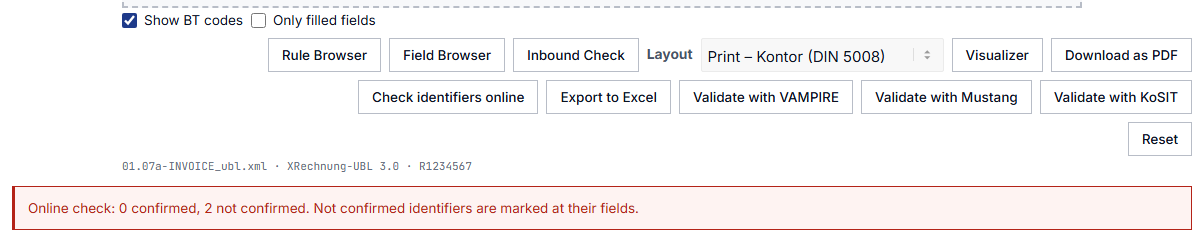
Starting with Viewer version 2.38, the Identifier Check gets its own tab next to “INVOICE” and “XML” as soon as the invoice contains an identifier. It shows every identifier of the invoice as a card, including the correct ones: at the top the BT number and “OK” in green or “Error” in red, below that the name of the field, such as “VAT ID”, the result sentence and the value exactly as it appears in the invoice. After a click on “Check identifiers online”, every card also shows the online result, that is “Confirmed”, “Not confirmed” or “Not checked”, and the tab opens by itself.
What you get: You see not only what is wrong but also what was checked and is fine. The cards look like the findings of the Inbound Check, so you read both checks the same way.
Eighteen identifier fields, from the seller to the item
The Identifier Check checks the identifiers of the seller, buyer, payee, tax representative and delivery location, as well as the bank accounts, the SEPA creditor identifier, the creditor reference in the remittance information and the item identifiers. These are eighteen fields of EN 16931, the European standard for the information in an e-invoice. Its fields are called Business Terms, BT for short, and carry numbers; the checked ones range from BT-29 to BT-157.
What you gain: Every identifier on the invoice for which a check rule exists is checked. You do not have to think about which field you should check yourself.
Identifiers checked without any outside connection
The check runs in your browser and needs no internet connection. It knows the check digits of 22 kinds of identifiers and checks the length and structure of 16 further schemes and of the BIC, plus the VAT IDs of the EU countries. It checks the check digit, for example, of the GLN, of SIREN and SIRET from France, of the LEI, of the company numbers from Sweden, Finland, Denmark, Norway and the Czech Republic, of the Swiss UID, the IBAN, the SEPA creditor ID and the creditor reference according to ISO 11649. For further identifier schemes and for the BIC it checks length and structure, for VAT IDs from the EU the country code, length and structure.
Check digit for identifiers such as IBAN, GLN and LEI
Length and structure further identifier schemes and the BIC
VAT ID from the EU country code, length and structure
Online, if you want confirmation via VIES, in the Peppol Directory and in further registers
What the Identifier Check checks in the browser and what the optional online check adds.
What you gain: You find typos and transposed digits immediately, and not a single piece of information leaves your browser for it.
Better no mark than a guess
Not every identifier has a published check rule. For identifiers without a scheme code, that is, without the information on what kind of number it is, for German tax numbers and for VAT IDs from countries outside the EU, such as Switzerland, the Identifier Check therefore marks nothing.
What you gain: A red mark really means that something is wrong, and you lose no time with false alarms.
Online confirmation via VIES, in the Peppol Directory and in further registers, if you wish
The online check is optional and switched off by default. When you switch it on, the viewer shows the button “Check identifiers online”. You do not need an API key for it. One click has VAT IDs confirmed via VIES, the European Commission’s lookup service for VAT IDs. Identifiers with a scheme code are looked up in the Peppol Directory, the participant directory of the European Peppol network for e-invoices. For many countries the add-on also asks the responsible register directly, without going through a service: besides VIES and the Peppol Directory, these are the French INSEE/Sirene, the Swedish Bolagsverket, the Finnish PRH/YTJ, the Australian ABR, the Czech ARES, the Slovak ORSF, the Danish CVR, the Japanese NTA, the Norwegian Brønnøysund Register, data.gov.sg for Singapore, GLEIF for the LEI, data.gov.lv for Latvia and the British HMRC for the UK VAT number; some of these registers require their own access credentials. Alternatively, the lookups run with your API key through the E-Invoice API service from invoicePress. Whatever is not confirmed is marked at its field.
1 · Click in the viewer “Check identifiers online”
→
2 · Your server sends only the identifiers
→
3 · Register VIES, Peppol Directory or the responsible register
→
4 · Answer at the field confirmed or marked
The path of the online check: only the identifiers go through your server to the register; the rest of the invoice is not sent.
What you gain: You learn not only whether a VAT ID is structured correctly, but also whether it is confirmed. Typing it into an authority’s website is no longer necessary.
Identifier Check in the Viewer app
You work without WordPress? For the free Viewer app, the Identifier Check is available in the shop as a separate add-on package. There it checks the length, structure and check digit of every identifier entirely in your browser, without WordPress and without a server. You unpack the ZIP file into the app’s folder, where its start file is, reload the app in your browser and open an invoice. A faulty identifier is then marked at its field.
The online check with the registers is available only in the WordPress plugin. In the app, the check therefore stays entirely on your computer.
What you get: You catch transposed digits in an IBAN, GLN or VAT ID even where no WordPress website is running, and the invoice never leaves your computer.
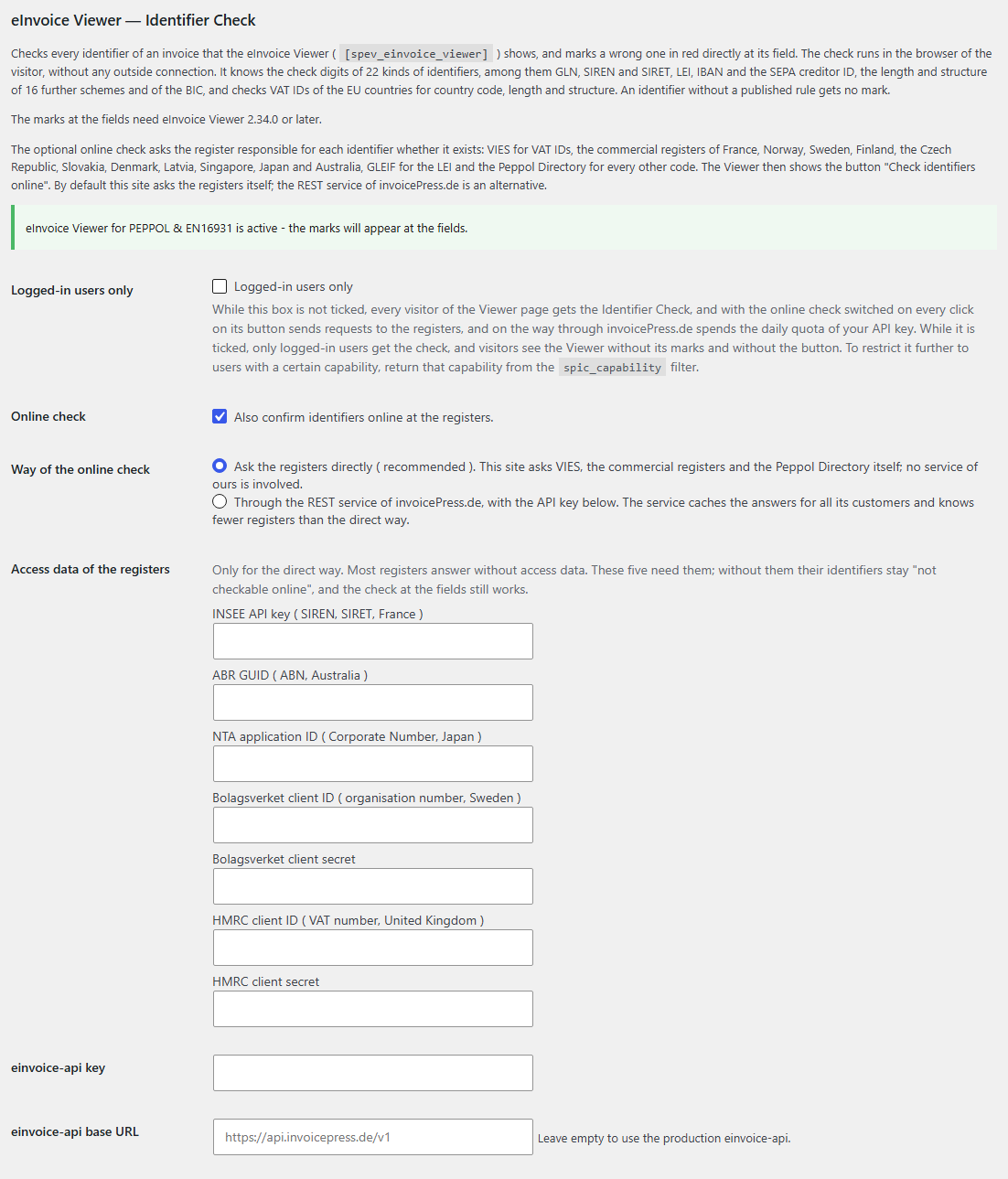
By default, every visitor to the page with the viewer also gets the check. If you tick the box “Logged-in users only”, all other visitors see the viewer without the marks and without the button for the online check.
What you gain: You can offer the viewer publicly and still reserve the check for your staff. This also limits the number of requests to the registers, and if you have chosen the route via invoicePress, it saves the daily quota of your API key.
The accounts payable clerk before the payment run
She opens the incoming invoice in the viewer. If the IBAN field is marked in red, she asks the supplier before the payment goes out and comes back from the bank as a return.
The invoice sender before sending
He drags his freshly created e-invoice into the viewer before he sends it. A transposed digit in his own VAT ID or in the customer’s GLN is noticed immediately and not only when the customer rejects the invoice.
The tax firm with a client portal
The firm offers the viewer on a page for its clients. It ticks “Logged-in users only” and switches on the online check. Logged-in clients click “Check identifiers online” and see whether their supplier’s VAT ID is confirmed via VIES.
Ready to go without settings
After activation, the marks appear wherever the viewer is embedded with its shortcode. A shortcode is a short placeholder in square brackets that WordPress replaces with the viewer when it displays the page. The Identifier Check needs no shortcode of its own; it stays with this one:
[spev_einvoice_viewer]
All settings in one place
You find the settings with the viewer under eInvoice Viewer → Viewer, in the section eInvoice Viewer — Identifier Check. There you find the box “Logged-in users only”, the box “Online check”, the choice of route for the online check, the access credentials for the registers, the key for the einvoice-api and its base address. By default both boxes are off, the online check asks the registers directly, and all fields are empty. If the base address stays empty, https://api.invoicepress.de/v1 applies.
For developers
If “Logged-in users only” is ticked, you can restrict the check further. With the filter spic_capability you give it only to users with a specific WordPress capability. An example is in the manual.
The invoice and its identifiers stay in the browser.
The viewer reads the invoice in your browser, and the identifier check runs there as well. Nothing is stored in the process.
Something only goes online when you click the button for it.
Only after a click on “Check identifiers online” does the list of identifiers go to your own server. From there, each identifier goes to the responsible register, for example to VIES or the Peppol Directory, or, if you have set it up that way, to the E-Invoice API service on invoicepress.de, which asks there for you. The rest of the invoice is not sent, and IBAN, BIC and SEPA creditor IDs are never checked online.
Your API key never reaches the browser.
The key stays on your server and is never delivered to the visitors of your site.
So that you know exactly what you get, we also tell you the limits of the add-on:
The Identifier Check does not read the invoice itself. It works with what the viewer has already read and therefore needs the viewer.
It does not calculate a check digit for VAT IDs from the EU. It checks country code, length and structure. Whether the number has really been issued is reliably answered by the online check.
It does not check German tax numbers. The usual short form on an invoice does not show which of the sixteen state procedures applies.
It does not tell you whether the invoice is valid. Whether an invoice meets all the rules of its format is checked by a validator.
It does not tell you whether an IBAN is your supplier’s known account. It only checks whether the IBAN is formed correctly. Whether it belongs to your supplier is checked by the Inbound Check.
eInvoice Validator for VAMPIRE
This free WordPress plugin checks the whole invoice against the official rules of its format. It is written in pure PHP and therefore needs no Java.
eInvoice Viewer — Inbound Check
This add-on compares an incoming invoice with your own company data and your supplier list. This tells you, for example, whether the money is to go to a known account. Paid product
18
identifier fields of EN 16931 are checked, from BT-29 to BT-157
22
kinds of identifiers are checked by their check digit, plus length and structure of 16 further schemes and of the BIC
0
clicks are needed for the check, and it makes no outside connection
3
languages for settings and messages: German, English and French
Do I need the eInvoice Viewer?
Yes, from version 2.34.0. The Identifier Check is an add-on and does nothing without the active plugin eInvoice Viewer for PEPPOL & EN16931. The Viewer shows the “Identifier Check” tab from version 2.38 on. You get the viewer free of charge on wordpress.org.
Do I need an API key?
No. The marks at the fields work entirely without a key, and the online check also asks the registers directly by default, without a key. You only need an API key if you choose the route via the E-Invoice API service from invoicePress instead. Five registers require their own access credentials, which you apply for there.
Is my invoice sent anywhere?
No. The check runs in your browser. Only when you click “Check identifiers online” do the identifiers go through your server to the responsible register or, if you have set it up that way, to the E-Invoice API service from invoicePress. The rest of the invoice is not sent.
Has a VAT ID without a mark really been issued?
Without a mark, the country code, length and structure are right. Whether the number has actually been issued is only answered by the online check, which asks the European Commission’s VIES for it.
Can every visitor to my website get the check?
By default, yes. With the box “Logged-in users only” you give the check only to logged-in users. This is especially advisable when the online check is switched on, because every click on its button triggers requests to the registers. On the route via invoicePress it also counts against the daily quota of your API key.
Does the Identifier Check replace a validator?
No, the two complement each other. A validator checks the invoice against the rules of its format, the Identifier Check checks the identifiers in it. Because the rule sets do not check the check digits of the identifiers, the Identifier Check closes exactly this gap.
Make transposed digits visible before they cause trouble: with the Identifier Check you see for every invoice you open in the viewer straight away whether its identifiers can be right. You do not have the eInvoice Viewer yet? It is the free basis for this add-on.