eInvoice Viewer — Visualizer

Add-on for the free eInvoice Viewer · For WordPress and the Viewer app · Paid product · Version 1.9.0

The e-invoice on paper: five print layouts and a PDF with the XML inside

The Visualizer turns the invoice you have opened in the free eInvoice Viewer into a print-ready document. You choose one of five layouts, from the German business letter under DIN 5008 to the sample presentation of the ZUGFeRD specification, and print the invoice or download it as a PDF.

What makes this PDF special: the invoice’s original XML file, the data a program reads, is stored inside it unchanged. So you pass on a single file that a person can read and a program can process.

App and plugin

The Visualizer in the app and in the WordPress plugin

In the app. The Visualizer is an add-on for the free viewer app. You put it into the viewer’s folder, as a folder or as a single file, and it is there the next time you start the viewer. Next to the one-file app, the single file is enough. In the app it shows and prints the invoice in the five layouts.

In the WordPress plugin. On your website you install The Visualizer as a plugin of its own next to the free viewer plugin. There you get the additional functions of a website: you limit the calls per visitor and day and decide from which role the add-on appears. Only the plugin turns it into a PDF/A-3 with the embedded invoice XML, if you wish.

A view on the screen is not yet an invoice for the file

An e-invoice is an invoice stored as a structured XML file that a program can read. With the Viewer you can already read it on the screen. But the colleague who approves it wants a sheet of paper in his hand, the auditor expects a document in the folder, and the business partner abroad wants to see an invoice that actually looks like one.

An XML file cannot be printed in any meaningful way. And a printout of a screen view consists of fields and blocks, without an address field, fold marks or a line table.

If you pass on just any PDF instead, the most important part is often lost: the structured data that makes the e-invoice what it is. Then two files sit side by side, and nobody knows for sure which one counts.

One click in the Viewer’s toolbar turns the invoice into a document

The Visualizer adds itself to the Viewer’s toolbar. You choose one of the five layouts and immediately see the invoice as a print-ready sheet. One more click downloads a PDF in which the sheet and the original XML are combined in one file. The table shows what the Visualizer adds to the free Viewer.

Free Viewer With Visualizer
Read the e-invoice on the screen ✓ ✓
Five print-ready layouts in the toolbar – ✓
Business letter with fold marks under DIN 5008 – ✓
PDF/A-3 with the unchanged original XML – ✓
Norm layout: the 25 details required by the German VAT Act (§ 14 UStG) in a fixed place – ✓
What the free Viewer already does and what the Visualizer adds.

The print view of an invoice in the Kontor layout.

Invoice in the Kontor layout under DIN 5008 with letterhead, address field, line table and highlighted amount due.

Note Note

1. Activate the add-on

You upload the ZIP file to WordPress and activate the add-on. The Viewer must be active; there is nothing to configure.

Tools Tools

2. Load the invoice in the Viewer

You open the page with the Viewer and load your invoice as usual. The toolbar now offers the choice of layouts.

Adjust Adjust

3. Choose a layout, print or download as PDF

The invoice appears in the chosen layout, and you print it or download it as a PDF.

Kontor
business letter under DIN 5008
Ledger
international, in the style of an audit report
Leiste
compact with an information bar
Business Central
familiar invoice look
Norm
sample of the ZUGFeRD specification, in your website’s language
The five Visualizer layouts at a glance; all of them appear in your website’s language.

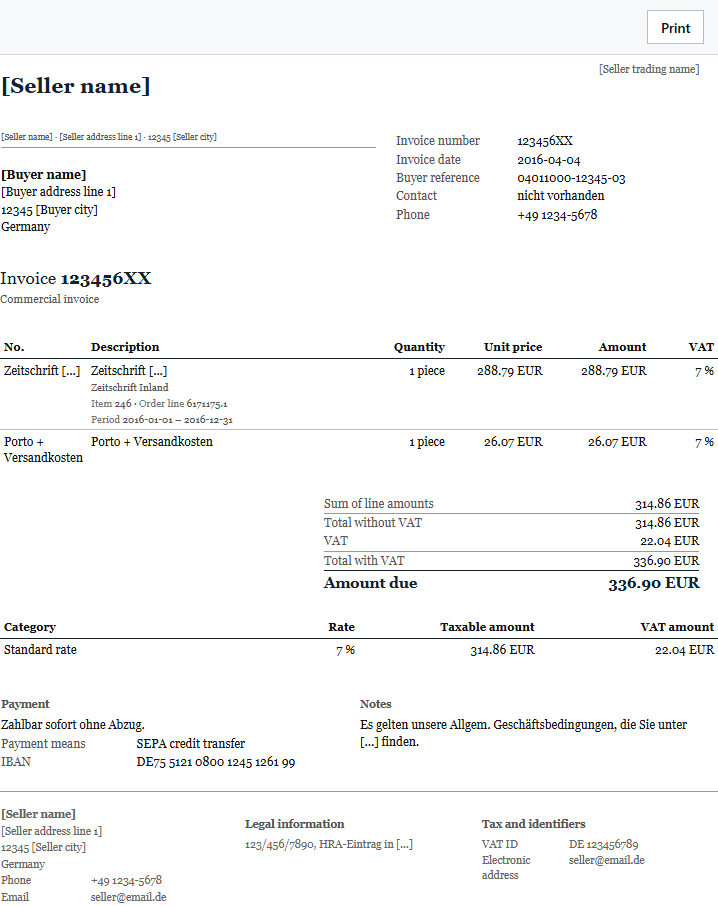
Kontor: the German business letter

Kontor sets the invoice as a business letter with fold marks under DIN 5008, the German standard for the layout of business letters. The layout is made for printing and mailing.

What this means for you: You print, fold and file the e-invoice like any paper invoice you have received so far.

Ledger: the document for the audit

Ledger is an international layout in the style of an audit document. Like every layout, it is labeled in the language of your website, that is German, English or French.

What this means for you: An auditor or a business partner abroad can read the invoice without you having to translate anything.

Leiste: everything important close together

Leiste is a compact layout that uses an information bar to show many details in a small space.

What this means for you: You take in the invoice at a glance and save paper as well.

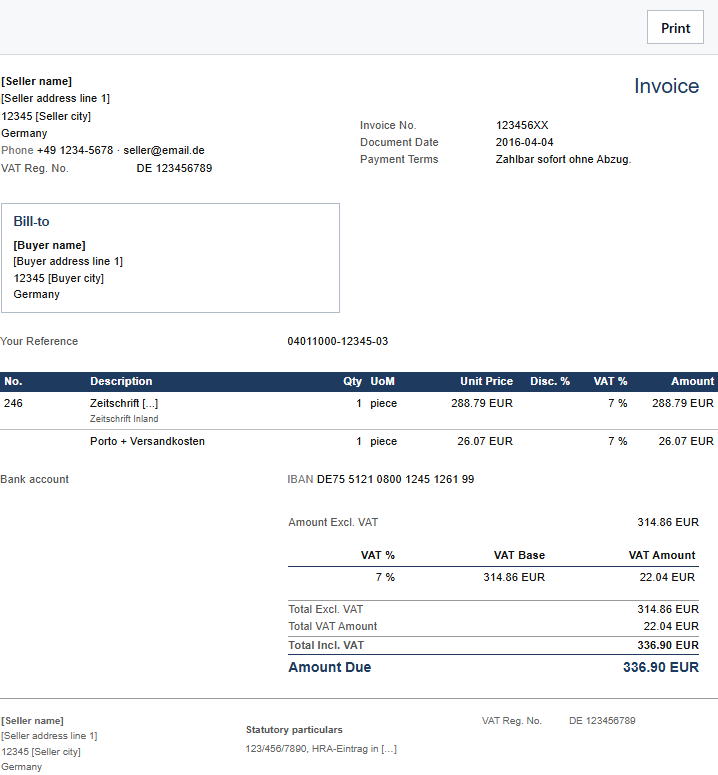
Business Central: the familiar invoice look

This layout follows the invoice look of Microsoft Dynamics 365 Business Central.

What this means for you: If your other documents come from this environment, the e-invoice you receive looks the same in the file.

A sample invoice in the Business Central layout.

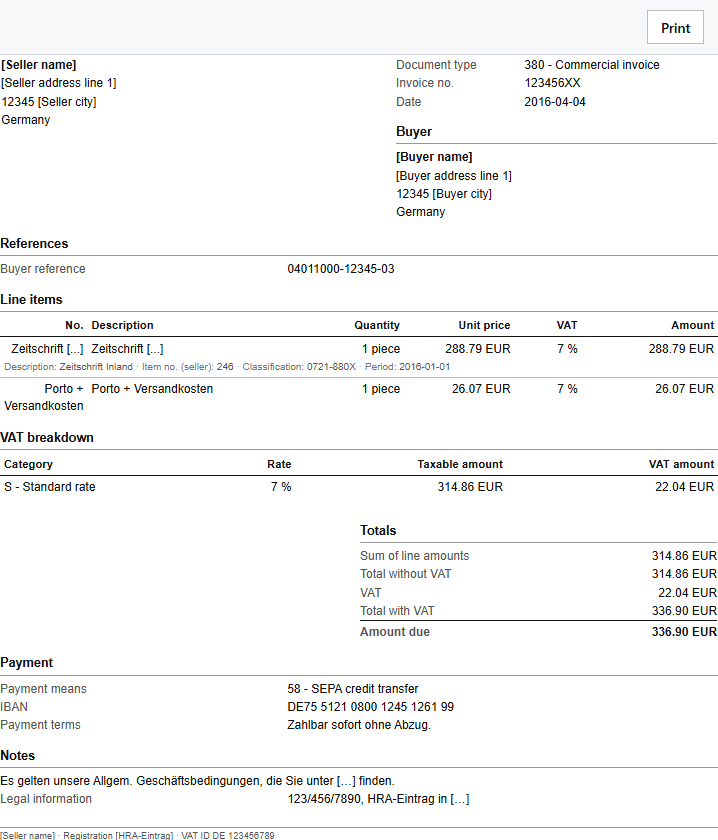
Norm: the sample invoice of the ZUGFeRD specification

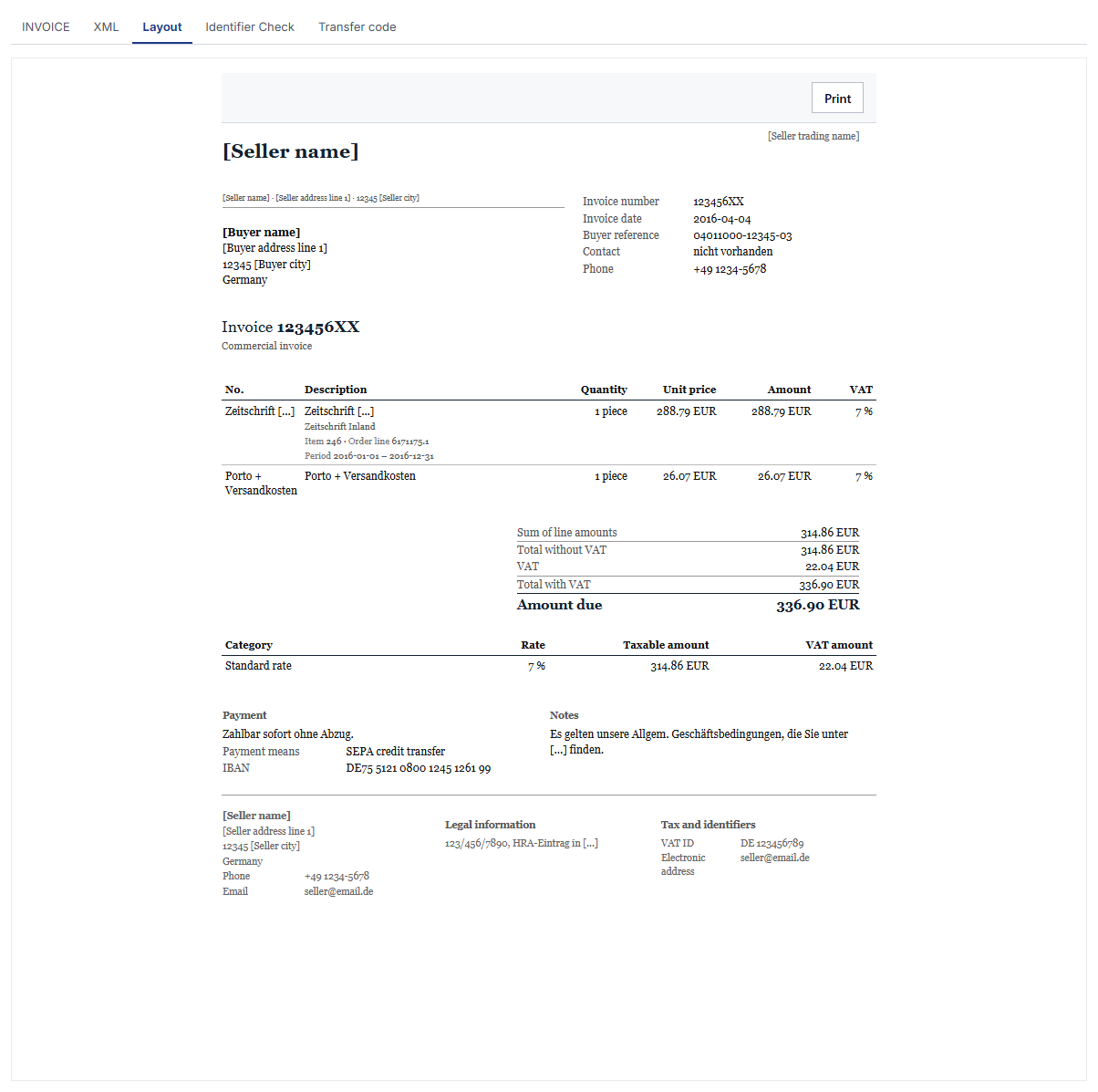
ZUGFeRD is the German format for a PDF with an embedded XML invoice; in France the same format is called Factur-X. Norm reproduces the sample presentation shown on pages 91 and 92 of the ZUGFeRD specification. The layout shows the 25 details that Section 14 of the German VAT Act (§ 14 UStG) requires on an invoice and ties each one to its term in EN 16931, the European standard for the content of e-invoices. Norm looks the same on the screen, in print and as a PDF, and its labels, numbers and dates follow the language of your website: German, English or French.

What this means for you: You show a document the way the specification shows it, and you always find the mandatory details under § 14 UStG in their fixed place.

A sample invoice in the Norm layout, built like the sample invoice of the ZUGFeRD specification.

A PDF that carries the original XML inside

“Download as PDF” creates a PDF file in the chosen layout. It is built as PDF/A-3, the PDF format for long-term archiving that allows attachments, and the invoice XML is included as an attachment. If you loaded a ZUGFeRD or Factur-X PDF, its XML is extracted and embedded again unchanged. If you loaded a CII or UBL file, exactly this file is embedded; CII and UBL are the two XML forms in which an e-invoice under EN 16931 can exist. The XML is never derived anew from the drawn sheet.

1 · Load the invoice
ZUGFeRD, Factur-X, CII or UBL
2 · Choose a layout
one of five
3 · Download PDF/A-3
sheet and original XML in one file
How the PDF is created: the loaded invoice XML is embedded unchanged into the drawn sheet.

What this means for you: You pass on a single file. People read the sheet, programs read the XML, and both come from the same invoice.

Right where you already work

The Visualizer adds no new page, no new shortcode and no second upload. A shortcode is a short placeholder in square brackets that WordPress replaces with a tool on the page. The choice of layouts sits in the Viewer’s toolbar, every layout shows exactly the data the Viewer has read, and the familiar Viewer display stays as it is.

What this means for you: Your visitors and colleagues do not have to learn anything new. You load the invoice once and then choose how it should look.

The Viewer’s toolbar with the choice of the five layouts and the “Visualizer” button.

The finished sheet opens in the “Layout” tab

Since version 1.9.0, with eInvoice Viewer 2.38 or later the selected layout no longer opens in a window of its own but in the “Layout” tab next to the invoice. In the top right corner is the “Print” button, which opens your browser’s print dialog. With an older Viewer, the print view still opens in a separate window.

What you get: You switch between the invoice, its data and the finished sheet with one click, and no extra window gets lost behind your browser.

Invoice in the Ledger layout, designed for international use and labeled in English.

Ledger: designed for international use, with supplier and customer side by side.

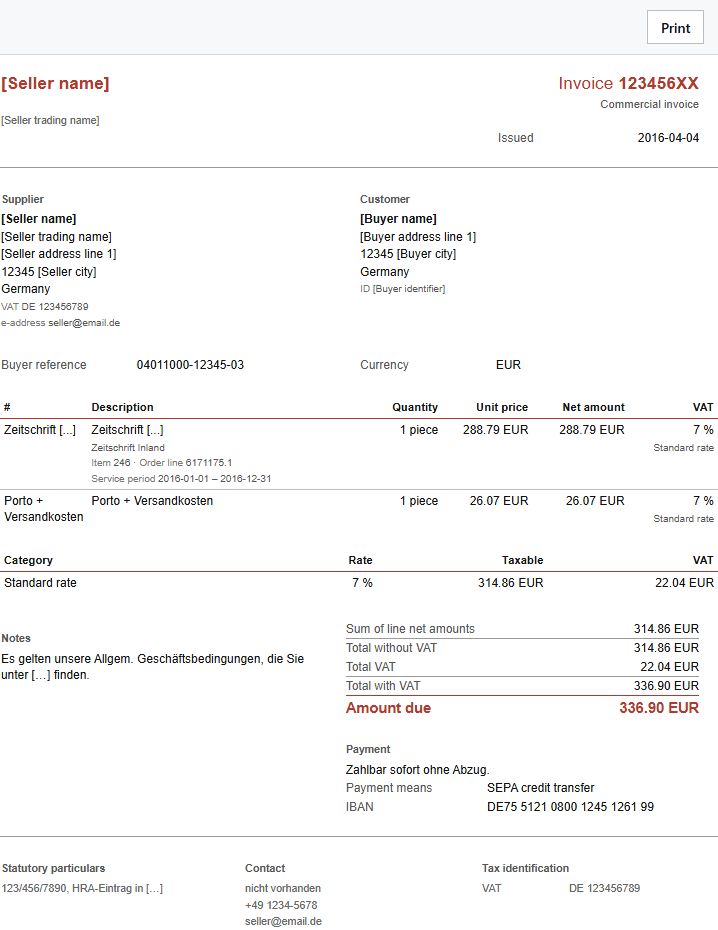
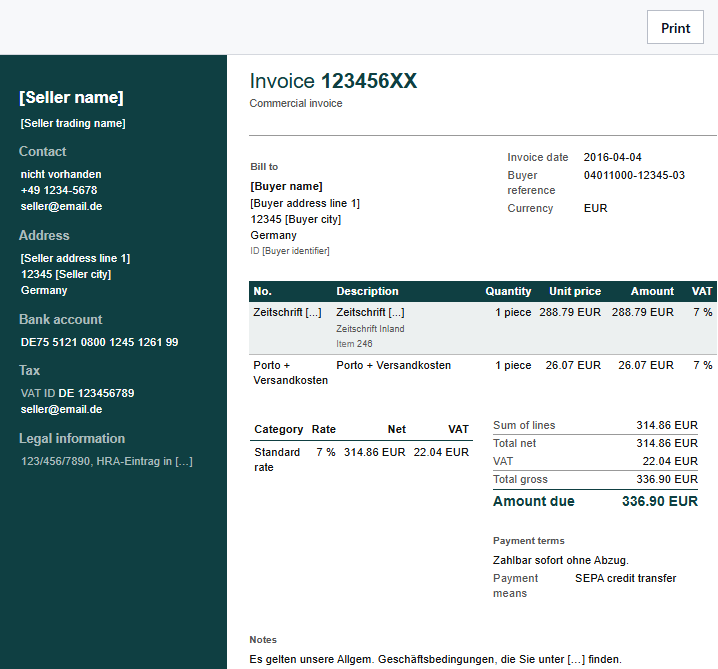
Invoice in the Leiste layout. The sender details are in a colored sidebar.

Leiste: the sender details in a colored sidebar, the document next to it.

  • The clerk in the accounting department

    An XRechnung arrives by email; XRechnung is the German standard for e-invoices to public authorities and is built on EN 16931. The clerk loads the invoice into the Viewer, chooses Kontor and prints the sheet for the approval folder. Empty fields appear as a dash instead of simply being missing.

  • The law firm with a client portal

    Clients load their e-invoices into the Viewer on the firm’s website, choose a layout and take a PDF with them that holds the original XML. Later, the firm receives one file instead of two.

  • The buyer with suppliers abroad

    To coordinate with a supplier, he chooses Ledger and opens the Viewer on the English version of the website. The English labels spare everyone questions about German terms.

  • The operator of a WordPress website

    She offers the Viewer to her visitors as a service and adds the print layouts to it. She can turn off the PDF download if she wishes; the print view then remains available.

Install

You upload the ZIP file under Plugins → Add New → Upload Plugin and activate eInvoice Viewer — Visualizer. WordPress activates the add-on only if the eInvoice Viewer is active. You do not need to enter a license key.

Settings

There is no settings page of its own. The bar above the print view follows the design kit you have chosen under eInvoice Viewer → Viewer for all eInvoice tools. On the same page, under “Extensions available from role”, you decide from which WordPress role on the Visualizer appears in the Viewer. The layouts themselves are fixed.

Turn buttons off for a single page

Starting with Viewer version 2.38, you can turn the buttons off for a single page in the shortcode: button_spev_visualizer="no" removes the “Visualizer” button from the page, button_spev_visualizer_pdf="no" removes only the “Download as PDF” button.

Turn off the PDF download everywhere

Perhaps you want to offer the layouts but never want PDFs to be created on your server. Then you turn off the download with one line in your theme or in a small plugin:

add_filter( 'sp_einvoice_viewer_pdf_export_enabled', '__return_false' );

The Visualizer in the Viewer app

For the free Viewer app, the Visualizer is available in the shop as a separate add-on package. There it draws the layouts entirely in your browser, without WordPress and without a server. You unpack the ZIP file into the app’s folder, reload the app in your browser, and find the layout selection and the “Visualizer” button in the toolbar.

The app does not create a PDF file itself. You can still save the sheet as a PDF through your browser’s print dialog; that PDF does not contain the original XML. The PDF with embedded XML is created only by the WordPress plugin.

What you get: The invoice never leaves your computer, and you can still print it as a proper business letter.

  • The layouts are created on your own server.

    To draw a layout and create the PDF, the visitor’s browser sends the invoice data to your WordPress installation. For the PDF, the original file is transferred as well.

  • Nothing is stored.

    The data is processed only for the duration of this one request.

  • No outside service.

    The add-on makes no outgoing requests; the PDF is created with the bundled mPDF library.

  • Every request is secured.

    On every call, the server checks a security token of the page.

Check it yourself: Press F12 to open your browser’s network panel and choose a layout. You will see that the request goes to your own website and to no other address.

Good to know before you buy

  • It does not work without the eInvoice Viewer. It has no shortcode and no upload of its own.
  • The layouts are fixed. In the current version you cannot add a logo, your own colors, your own texts or a layout of your own.
  • The language of a layout cannot be chosen separately. All five layouts follow the language of your website, that is German, English or French. For any other language they appear in German.
  • It does not check an invoice for validity. It shows what the Viewer has read.
  • It does not create a new invoice. The XML in the PDF is always the original, and without readable XML no PDF is created.
  • It stores nothing and keeps no archive.
  • A PDF from the browser’s print dialog contains no XML. You get the embedded XML only through “Download as PDF”, and that button exists only in the WordPress plugin, not in the Viewer app.
Note Note

eInvoice Validator for KoSIT, for Mustang, for VAMPIRE

These free validators check whether an invoice meets the validation rules of its format.

Tools Tools

eInvoice Viewer — Exporter

The Exporter turns the invoice that is open in the Viewer into an Excel file with one click.

5

layouts: Kontor, Ledger, Leiste, Business Central and Norm

25 von 25

mandatory details under § 14 UStG are tied to their term in the Norm layout

0

requests to outside services

The XML is embedded from ZUGFeRD and Factur-X PDFs as well as from CII and UBL files. Since version 1.7.4, invoices that name XRechnung 4.0 or EN 16931-1:2026 can also be opened.

No. The layouts appear in the Viewer’s toolbar, and WordPress activates the add-on only together with the free plugin “eInvoice Viewer for PEPPOL & EN16931”.

Yes. The PDF it creates carries the invoice XML embedded inside. You can still print the print view through your browser as usual.

Yes. For a ZUGFeRD or Factur-X PDF, the embedded XML is extracted and embedded again unchanged, and a CII or UBL file is embedded itself. The XML is never derived anew from the drawn sheet.

Not separately from the website. All five layouts appear in the language of your website, that is German, English or French; for any other language they appear in German. Open the Viewer on the language version of your website that you need.

Not in the current version. The five layouts are fixed, and there is no settings page.

Only to your own server. There it is processed for the duration of the request and not stored, and no outside service is involved.

No. The add-on does not ask for a key and is fully usable as soon as it is activated.

Give your next e-invoice a proper look: get the Visualizer in the shop, choose a layout and print the invoice or pass it on as a PDF with the XML inside. You do not have the eInvoice Viewer yet? It is free and it is the requirement for this add-on.

11,90 € incl. VAT · instant download after purchase