eInvoice Validator for VAMPIRE

Free · WordPress plugin · For websites without Java

Validate e-invoices without Java, right on your WordPress website

Validate e-invoices without Java and without a third-party service: that is exactly what the free eInvoice Validator for VAMPIRE does. An e-invoice is an invoice in the form of a structured file that a program can read. The plugin comes with its own validation engine, VAMPIRE PHP. It checks against the official rules of XRechnung, EN 16931, Peppol BIS Billing and ZUGFeRD/Factur-X, and it runs in the same PHP as WordPress, so it works on ordinary web hosting too.

  • No Java and no extra service: You install the plugin, place a shortcode on a page and can start validating right away.
  • The invoice stays with you: It is checked on your own server, and nothing is stored.
  • Measured against the official KoSIT validator: For 220 of 220 test invoices, both reached the same result.
  • Every ZUGFeRD version on request: A table shows under which version of the format an invoice is accepted.
  • Even in the browser, if you like: With the paid VAMPIRE JS add-on, the page checks the invoice in the visitor’s browser, and the invoice never reaches your server.
Also as an app

Without WordPress: the Validator for VAMPIRE as an app

The plugin brings VAMPIRE PHP along and validates on your web server, without any Java. It adds the controls of a website, that is daily limits per role, file size and the validation page for your visitors.

If you want to validate without WordPress, use the free app: a folder that you unpack and open with a double click. In the app, VAMPIRE JS validates right in the browser, and the invoice never leaves your computer. VAMPIRE JS is a paid add-on and is not part of the app package; you simply place it next to the app.

More than “accepted” or “rejected”: three features for your proof

An ordinary validation report only tells you what is wrong with an invoice. eInvoice Validator for VAMPIRE also shows you what was checked and what is fine, and on request it checks a ZUGFeRD invoice against every version of the format. You switch on all three features in the settings, at no extra cost.

Check Check

Positive validation report

An ordinary report only lists the rules that were broken. The positive validation report lists every rule of the rule sets used, with its result: passed, failed, not applicable or not checked. It also names each rule set with its version, the time of validation and the SHA-256 checksum of the file.

What you get: you document not only that no error was found, but what was checked. It is technical evidence, not a certification.

List List

List of checked rules

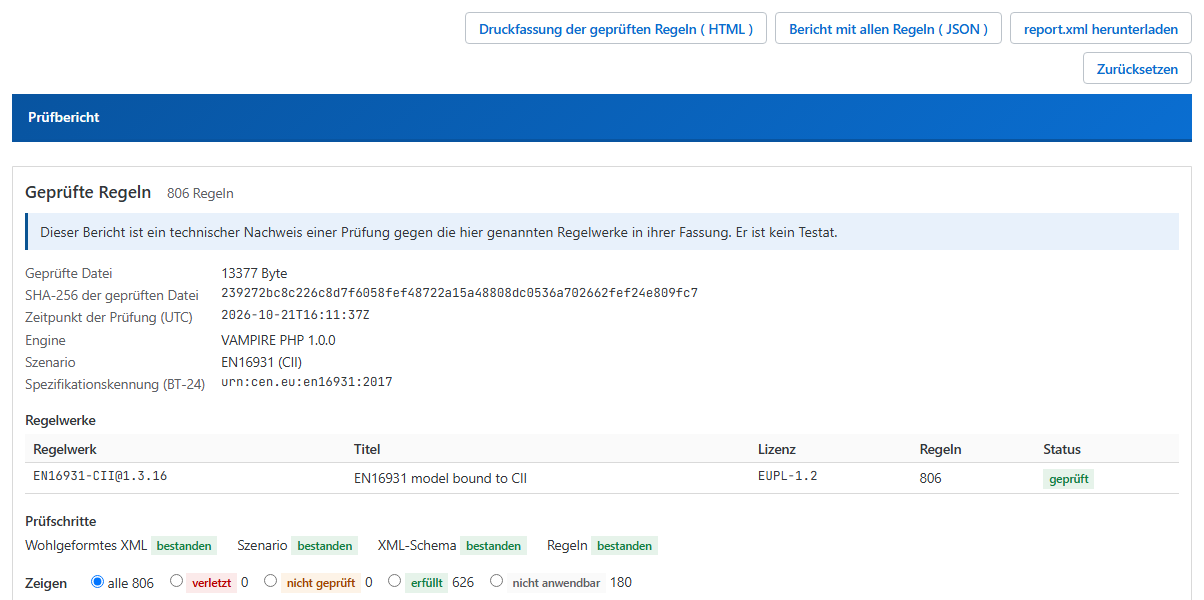
Two downloads appear above the report: the complete report with all rules as a JSON file and a printable list of the checked rules as an HTML file, which your browser saves as a PDF through its print dialog. In the example below there are 806 rules of the EN 16931 rule set for CII: 626 passed, 180 not applicable, none failed.

What you get: you file the list with the invoice or send it to your supplier or auditor, as a file for software or as a PDF for people.

Multiple validation across all versions

A ZUGFeRD or Factur-X invoice does not say which version it was made for. With “Check against every version” the plugin also checks it against versions 2.1, 2.2, 2.3.2, 2.3.3, 2.4, 2.5 and 2.5.2, each in the profiles MINIMUM, BASIC WL, BASIC, EN 16931 and EXTENDED, either as a cascade from the newest version down or as a full matrix; a table shows the result for each version.

What you get: in our measurement of 50 ZUGFeRD invoices, 17 were accepted under the rules of some versions and rejected under others. You see at once which version accepts the invoice.

The “Checked rules” section of the report: 806 rules of the EN 16931 rule set for CII, 626 passed and 180 not applicable; above it the buttons for the printable list (HTML), the report with all rules (JSON) and report.xml.

Positive validation report with the list of checked rules.

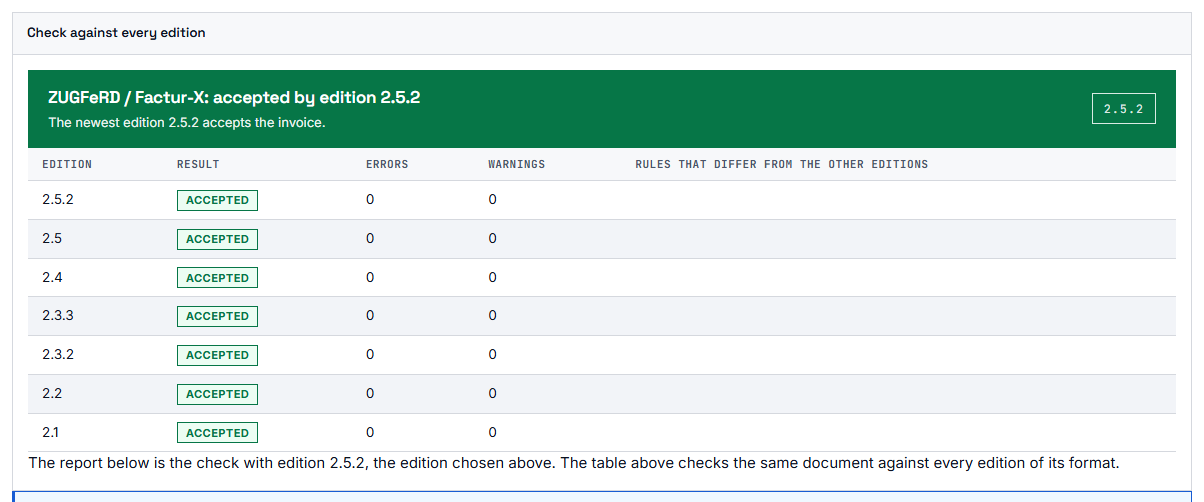
Validation against every version: the table shows the result, errors and warnings for each version of a ZUGFeRD invoice.

Multiple validation: the result for each ZUGFeRD version in one table.


You want to know whether an e-invoice is correct, but your web hosting has no Java

An e-invoice can look complete and still be rejected because it breaks a rule of its format. Only a check against the rule set shows whether it is correct, that is, against the defined validation rules of that format in a specific version.

The well-known validators, the official KoSIT validator and Mustang, are Java programs. Ordinary web hosting has no Java, though, and a website there is often not allowed to start any other program either. Anyone who wants to offer suppliers, customers or colleagues a validation page has so far needed a server of their own.

The easy way out would be a validation service on the internet. But an invoice contains names, addresses, bank details and prices, and not everyone is allowed or willing to send this data outside the company.

With ZUGFeRD, there is a second question. The invoice does not say which version of the format it was created with. A check against the newest version alone can therefore reach a different result than a check against the version the invoice was actually built for.

A plugin that validates on its own: VAMPIRE PHP on your web space

Inside eInvoice Validator for VAMPIRE is VAMPIRE PHP, our validation engine written in pure PHP. The name stands for “Validator And Multi-Platform Invoice Rule Engine.” VAMPIRE PHP runs in the same PHP process as WordPress and needs neither Java nor a background service nor another plugin. You don’t enter any paths, credentials or addresses.

It ships with eight rule packages for fourteen scenarios. A scenario defines how VAMPIRE recognizes an invoice and which rule sets then run for it. A visitor drags an invoice onto the page, your website checks it, and the validation report appears right below.

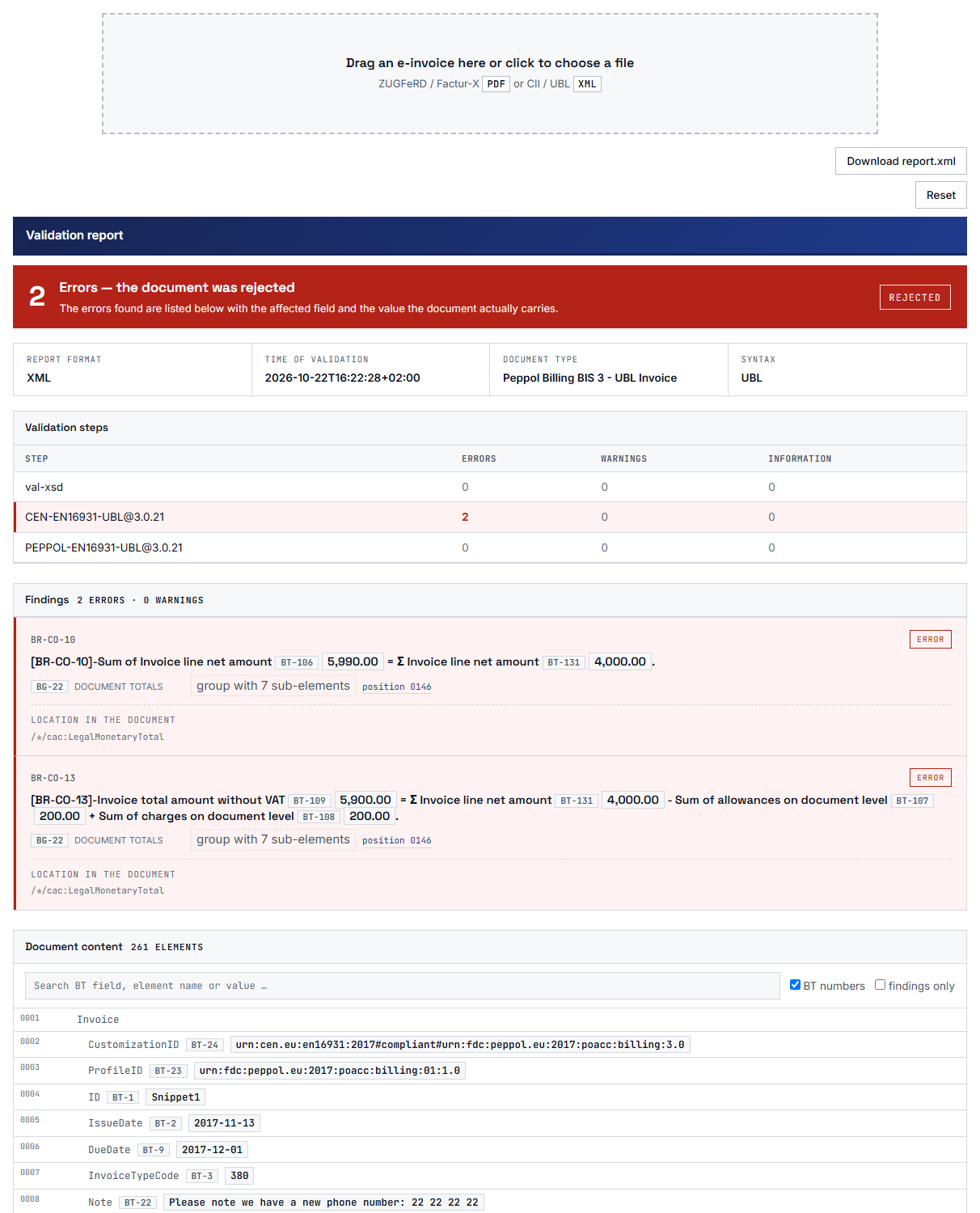
VAMPIRE report in the plugin: result, validation steps per rule set, findings with field and value, and the invoice content.

Note Note

1. Drop the invoice

The visitor drags an XML invoice or a ZUGFeRD or Factur-X PDF onto the drop zone. For a PDF, the visitor’s browser extracts the embedded invoice, and only this XML goes to your server.

Tools Tools

2. Your website validates

VAMPIRE PHP detects the format and checks the invoice with the matching rule set, in the memory of your own server. No request goes to any other server.

Adjust Adjust

3. Read and save the report

The report states the result, that is, accepted or rejected, and explains every finding with the field it concerns. You save it as XML in the report format of the KoSIT validator or as an HTML page for reading and printing.

How a check works: the visitor drops the invoice, your own website checks it, and the report appears on the same page.

What sets eInvoice Validator for VAMPIRE apart

Six features set this plugin apart from an ordinary validation page. Each one is described in the manual, and the figures behind them are measured.

Note Note

Official validation rules without Java

VAMPIRE PHP checks with rule packages that are derived by machine from the published rule sets of CEN, KoSIT, OpenPeppol and FeRD. The official KoSIT validator and Mustang need Java; VAMPIRE does not. The plugin only needs PHP 8.2 with the extensions dom, libxml and bcmath.

What you get: You need no server of your own and no Java installation. The validation page runs on the hosting your website already has.

Tools Tools

Every ZUGFeRD version in one table

With the setting “Check against every version,” the plugin also checks a ZUGFeRD or Factur-X invoice against versions 2.1 to 2.5.2, each in the profiles MINIMUM, BASIC WL, BASIC, EN16931 and EXTENDED. A profile is a level of detail of the format. The cascade checks from the newest version downward until the invoice is accepted under the rules of one version. The full matrix checks every version. A table above the report shows the result for each version. In VAMPIRE, the versions are just data, so there is nothing for you to set up.

Our measurement of September 24, 2026, shows why this matters: of 50 ZUGFeRD invoices, 17 came out differently depending on the version.

What you get: You see at a glance under which version an invoice is in order, instead of relying on the newest version alone.

Validation against every ZUGFeRD version: the table shows the result, errors and warnings for each version.

Adjust Adjust

Positive validation report: every rule with its result

A validation report usually only names what is wrong. With the setting “Positive validation report,” the report lists every rule of the rule sets used, with its result: passed, failed, not applicable or not checked. It also names each rule set with its version, the time of the check and a checksum of the file, a kind of fingerprint. You can save it as a JSON file or as a print version that your browser can store as a PDF.

What you get: For every invoice, you can show that it was checked and against what, for example to your auditors. The report is a technical record of the check and not an audit opinion.

Search Search

Better no result than a wrong one

If the plugin cannot check an invoice, it never reports it as accepted and never as rejected. An orange bar then states openly that there is no result and gives one of three reasons: the rule set is not included, the invoice names a version that is not included yet, such as XRechnung 4.0, or the check stopped at a rule.

What you get: You never mistake an unchecked invoice for a checked one, and no supplier gets a rejection that is only caused by a missing rule set.

Note Note

The invoice stays on your server

The plugin makes no outgoing requests, neither to invoicePress nor to anyone else. The invoice is checked in memory and not stored, and the report is not saved on the server either. A PDF never even leaves the visitor’s computer, because only the extracted XML goes to your website.

What you get: You can offer the validation page for invoices with confidential data, too, without bringing in a third-party service.

Tools Tools

A report that existing tools can read

You download the report as XML in the report format of the KoSIT validator. Since version 1.12.1, “Download report.html” also gives you the HTML page that the engine writes itself. You can open, print and share it without an internet connection. In it, the engine names itself with its version and its rule packages, not as the KoSIT validator. Tools that read reports from the KoSIT validator read this file as well.

What you get: You can file the report and process it in your existing workflows, and it stays clear what the invoice was checked with.

Measured, not claimed: VAMPIRE compared with the official KoSIT validator

The official KoSIT validator is the benchmark VAMPIRE is measured against. We checked 253 test invoices with VAMPIRE and with the official KoSIT validator. Both could match 220 of them to a rule set. For all 220, both reached the same result, that is, accepted or rejected. Date of the measurement: October 9, 2026.

Same result as the official KoSIT validator: 220 of 220 invoices
Exactly the same rules fired: 215 of 220 invoices

Comparison with the official KoSIT validator on the 220 of 253 test invoices that both could match to a rule set (as of October 9, 2026).

How we measured

Of the 253 test invoices, 144 come from our own test corpus and 109 from the test suite of XRechnung 3.0.2. Each invoice went through VAMPIRE and through the official KoSIT validator, and we compared the two results.

For 215 of the 220 invoices, exactly the same rules fired as well. For the other five, the difference comes from the version of the EN 16931 rules for CII: the KoSIT validator in the comparison setup ships version 1.3.15, and VAMPIRE ships the newer version 1.3.16. Neither validator could match the remaining 33 invoices to a rule set.

What the validator does in detail

  • XML and ZUGFeRD PDF by drag and drop

    The drop zone accepts XML invoices in both forms, UBL and CII. These are the two XML forms in which an e-invoice under the European standard EN 16931 can come. It also accepts ZUGFeRD and Factur-X PDFs, that is, PDF files with an embedded XML invoice. The library for reading the PDF is only loaded when a PDF is actually dropped.

    What you get: Your visitors hand in the invoice just as they received it, and the page stays lightweight.

  • A report in plain language

    The result is at the top, followed by the check steps and the findings, which you can filter by level. Every finding has a clear explanation and names the field or the attachment it concerns. A field-by-field view of the invoice marks the fields that break a rule. Numbers and dates appear in the notation of the page language.

    What you get: Whoever checked the invoice understands the result on their own and can tell the issuer exactly which field is wrong.

  • New rule sets without a new plugin

    When a new version of a rule set is published, you upload the new rule package as a ZIP file on the settings page. The engine stays as it is. A package that does not fit is rejected, and a button switches back to the bundled rule packages at any time.

    What you get: You stay current with the rule sets without waiting for a plugin update.

  • Your own rules from the Rule Studio

    A rule profile from eInvoice Rule Studio for VAMPIRE adds your own requirements to the official rules. It can also switch official rules off, replace them or change their severity. Every finding from a profile carries the profile’s name in the report.

    What you get: You can check supplier invoices against your in-house rules as well, and your own rule never looks like a rule of the standard.

  • Limits for public use

    You set the largest file allowed and, in a table, how many checks each role may run per day, with a separate row for guests. An empty field means unlimited, and 0 means no access. A freshly fetched security token protects every check, even on cached pages.

    What you get: You can offer the validation page publicly and keep the load on your server under control.

  • A system check that names the next step

    The settings page shows the PHP environment, the three required extensions, the memory limit, the execution time and the number of rule packages found. Each row is green or red, and a red row tells you what to do. Below it, you see which formats this installation checks.

    What you get: You know before the first check whether your hosting is enough, and you don’t have to search when something is missing.

Which e-invoices the plugin checks

XRechnung is the German standard for e-invoices sent to public authorities. Peppol is a European network for exchanging e-invoices between businesses and public authorities. ZUGFeRD and Factur-X are PDF files with an embedded XML invoice, called ZUGFeRD in Germany and Factur-X in France.

The bundled rule sets with their version and what they check.
FormatVersionWhat is checked
XRechnung3.0.2UBL Invoice, UBL CreditNote and CII, including the CVD variant
EN 16931core rules of the standardinvoices in UBL and in CII
Peppol BIS Billing3.0.21Invoice and CreditNote
Factur-X / ZUGFeRD2.5.2profiles EN16931 and EXTENDED
ZUGFeRD with “Check against every version”2.1, 2.2, 2.3.2, 2.3.3, 2.4, 2.5 and 2.5.2profiles MINIMUM, BASIC WL, BASIC, EN16931 and EXTENDED

Not included are the national variants for Romania, Portugal, Belgium, Serbia, Italy, Croatia and Turkey. Such an invoice is not reported as rejected. Instead, the report says that there is no result and names the missing rule set.

Who the plugin is for

  • The website owner on ordinary web hosting

    You want to offer customers or suppliers a validation page, but your hosting has no Java. With this plugin, PHP 8.2 is enough, and one shortcode sets up the page.

  • The invoice recipient with a supplier portal

    Suppliers check their invoice themselves before they submit it. With a rule profile from the Rule Studio, the page also checks your own requirements, and a daily limit per role keeps the load in check.

  • The accounting team that needs a record

    With the positive validation report, you save a print version after the check that names every rule checked, and you store it as a PDF next to the invoice using your browser’s print dialog.

  • Anyone who receives ZUGFeRD invoices of unknown version

    Set “Check against every version” to “Cascade.” The table above the report then shows under which version the invoice is accepted.

Requirements and setup

What your website needs for eInvoice Validator for VAMPIRE.
WhatRequirement
WordPress5.8 or later, tested up to 7.1
PHP8.2 or later; this is a hard limit
PHP extensionsdom, libxml and bcmath
Memory256 MB recommended
Javanot needed
Validation engineVAMPIRE PHP is included in the plugin
Other pluginsnone; the plugin validates on its own
Visitor’s browserwith JavaScript enabled

Set up in four steps

  • Install: Upload the plugin’s ZIP file under Plugins → Add New → Upload Plugin. Once the plugin is approved on WordPress.org, you can also find it there directly by searching for “eInvoice Validator for VAMPIRE.”
  • Activate: Activate the plugin on the “Plugins” page.
  • Look at the system check: Open eInvoice Validator → VAMPIRE in the admin area and make sure every row in the “System check” section is green.
  • Create the page: Place the shortcode [sppv_validator] on a page or in a post and publish it. A shortcode is a short placeholder in square brackets that WordPress replaces with the tool.

The shortcode has no attributes, and the settings apply to every page it is on. If your server runs a PHP older than 8.2, the plugin stays inactive and says so in the admin area. It does not cause a blank page.

What you can configure

The six settings under eInvoice Validator → VAMPIRE with their defaults.
SettingDefaultEffect
Maximum file size8 MBLargest file accepted; 1 to 64 MB are allowed. A lower limit on the server takes precedence.
Daily uploads per role20 per roleOne row for guests and one for each role. Empty means unlimited, 0 means no access. Logged-in users are counted individually, guests by IP address; administrators are never limited.
Behind a proxy or CDNoffReads the visitor address from the X-Forwarded-For header.
Positive validation reportoffThe report gets the section “Checked rules” and two extra downloads, as JSON and as a print version.
Check against every versionoffOff, cascade or full matrix. The matrix takes up to seven times as long as the simple check.
Design kitKit HThe look of the drop zone and the report; the choice applies to all eInvoice tools on the website, including a custom kit.

Important: Only turn on “Behind a proxy or CDN” if there really is a proxy in front of your website. Otherwise, a visitor could claim any address, and the daily limit would have no effect.

For your own programs

The same check is available through the REST route POST /wp-json/einvoice/v1/validate-php. A REST route is an address through which another program can call the check. It requires the shared security token of the eInvoice tools. The manual describes the fields, the responses and the filters for developers.

Privacy: what happens to the invoice

  • A PDF stays in the visitor’s browser.

    The browser reads the embedded invoice XML from the PDF and sends only this XML. The files for download are also created in the browser.

  • The XML goes only to your own website.

    The plugin makes no outgoing requests, neither to invoicePress nor to anyone else. The rule packages live in the plugin or in your uploads folder, and the plugin never downloads them on its own.

  • No copy is left behind.

    The invoice is checked in memory and not stored. The only thing counted is how many checks a visitor address has made per day. This counter expires after one day and, for guests, holds only a hash of the IP address.

  • The server accepts only XML.

    There is no PDF reader in PHP and no subprocess. A rule profile is a data file and is never run as a program.

See for yourself: Open your browser’s network panel (F12 key) and drop an invoice. You will only see requests to your own website.

What the plugin deliberately does not do

  • It is not an archive. It stores neither invoices nor reports.
  • It only reads the embedded XML from a PDF. A PDF without an embedded invoice, such as a printed or scanned one, is rejected with a message.
  • It does not announce new releases. The plugin does not check on its own whether a newer version of a rule set has been published. What applies is what was bundled or uploaded as a rule package.
  • It is not a queue. The check time grows with the number of invoice lines. On the development server, an invoice with 1,000 lines took about 40 seconds and 174 MB of memory.
  • It does not issue an audit opinion. The report is a technical record of a check, and the report says so itself.

How the validator fits into the eInvoice tools

The validator works on its own, and none of the following products is required. Together with them, you read, check and explain e-invoices in one place.

eInvoice Viewer for PEPPOL & EN16931 eInvoice Viewer for PEPPOL & EN16931

eInvoice Viewer for PEPPOL & EN16931

The central tool of the family shows any e-invoice as a readable document. An open invoice gets the “Check with VAMPIRE” button, and from Viewer 2.38 on, the report appears in its own tab with the buttons for report.xml and report.html.

free

eInvoice Validation Explorer for KoSIT eInvoice Validation Explorer for KoSIT

eInvoice Validation Explorer for KoSIT

When it is installed, it takes over the display of the report with its own, more detailed view. No setting is needed for this.

paid product

Extended Profiles add-on Extended Profiles add-on

Extended Profiles add-on

Findings for fields of an extension (BT-X) show their value from the invoice, and the rules of ZUGFeRD / Factur-X EXTENDED and EXTENDED-CTC-FR are explained.

paid product

Search Search

eInvoice Rule Studio for VAMPIRE

Writes the rule profiles with your own validation rules, which you upload on the validator’s settings page.

paid product

The other validators: If you already run the official KoSIT validator, the free eInvoice Validator for KoSIT gives it a page. For Mustang users, there is the free eInvoice Validator for Mustang. Both need Java on the operator’s side; VAMPIRE does not. If you install two validators, you can have the same invoice checked by both and compare the results.

Making sense of finished reports: The eInvoice Validation Explorer for VAMPIRE explains a validation report that VAMPIRE PHP or VAMPIRE JS wrote somewhere else and shows every finding at its field in the invoice. It is available as a plugin and as an app, and it is a paid product.

VAMPIRE in your own software: The VAMPIRE PHP engine is also available as a free library for your own PHP programs, as the Composer package invoicepress/vampire-php. The second edition, VAMPIRE JS, validates in JavaScript in the browser or in Node.js and is a paid product. It comes as an add-on for this plugin (see Validate in the browser with VAMPIRE JS), as an add-on package for our apps and in the Outlook add-in. You will find both editions, their documentation and a playground to try them out at vampire.invoicepress.de.

Comparison check: A comparison check has been built for invoicePress.de, where the same invoice goes to the official KoSIT validator, to Mustang and to VAMPIRE at the same time and the results are shown side by side. It will appear on the website as soon as we release it.


Validate in the browser with VAMPIRE JS

Without an add-on, the validation page sends every invoice to your website, where VAMPIRE PHP checks it. With the paid VAMPIRE JS add-on, the same page checks the invoice right in your visitor’s browser. VAMPIRE JS is the second edition of VAMPIRE, written in JavaScript. The page looks the same as before, and your visitors use it the same way: drop the invoice, read the report. Below the drop zone, the page then says that the invoice is being checked in the browser.

With VAMPIRE JS too: the positive validation report with the list of checked rules, the JSON report and the printable list is then created right in your visitor’s browser. For multiple validation across all versions, the page automatically switches to validation with VAMPIRE PHP on your server.

Note Note

The invoice never leaves the browser

Neither the invoice nor the report is sent to your website or to any other service. From your website, the browser loads only the rule packages and the field catalog, just like any other file on the page. If the check in the browser ever fails, the page says so in red and does not quietly send the invoice to the server instead.

What you get: You can promise your visitors that their invoice stays on their own computer, and that promise holds.

Tools Tools

The same rules, the same report

VAMPIRE JS checks against the same rule sets as VAMPIRE PHP: EN 16931 for UBL and CII, XRechnung, Peppol and the Factur-X and ZUGFeRD profiles. The report has the same explanations and the same view of the invoice, and report.xml comes in the same format. With “Positive validation report” switched on, it also lists every rule with its result and offers the JSON report and the print version.

What you get: Your visitors have nothing new to learn, and you get the same records as before.

Adjust Adjust

No extra work for your server

The visitor’s computer does the checking. That is why checks in the browser do not count toward the daily limit, and the line showing the remaining checks for the day disappears. The first check on a page loads the rule packages, about 10 MB; every further check on the same page reuses them.

What you get: You can open the validation page generously without large invoices or many visitors slowing down your web hosting.

Good to know

  • The “Check with VAMPIRE” button in the eInvoice Viewer still validates on the server.
  • “Download report.html” is only available for checks on the server, because VAMPIRE PHP writes that HTML report.
  • If you use “Check against every version” or rule profiles, the page validates on the server as before. The settings page says so next to the setting.
  • On a slow computer, a large invoice takes a moment longer, because that is where the work happens.

Requirements and setup

You need eInvoice Validator for VAMPIRE version 1.13.0 or later, WordPress 5.8 and PHP 8.2 or later. Your visitors need a current version of Chrome, Edge, Firefox or Safari. Upload the add-on’s ZIP file under Plugins → Add New → Upload Plugin and activate it. The add-on has no settings page of its own, because the validator’s settings under eInvoice Validator → VAMPIRE apply.

VAMPIRE JS is a paid product, currently in version 1.0.0. The add-on contains VAMPIRE JS and the rule sets from their publishers, and an included file lists the publisher, version and license of every rule set.

0

outgoing requests made by the plugin, neither to invoicePress nor to anyone else

8

rule packages for 14 scenarios are included in the plugin

7

ZUGFeRD versions from 2.1 to 2.5.2 are checked by the setting “Check against every version”

220

of 220 test invoices got the same result from VAMPIRE and the official KoSIT validator (as of October 9, 2026)

eInvoice Validator for VAMPIRE, version 1.14.0. The plugin is free and licensed under the free GPL-2.0-or-later license. The rule packages carry the license of their source, and the package names the origin and license of each rule package.

Frequently asked questions about validating e-invoices without Java

Yes. The VAMPIRE PHP engine is written in PHP and included in the plugin. You need PHP 8.2 or later with the extensions dom, libxml and bcmath; 256 MB of memory is recommended. You don’t need Java, a background service or another plugin.

No. The invoice is checked on your own server during the request and is not kept. The plugin stores neither invoices nor reports and makes no outgoing requests.

Yes. The visitor’s browser extracts the embedded XML invoice from the PDF and sends only that to your website. A PDF that was only printed or scanned contains no invoice data, and the page tells you so. With “Check against every version,” you also see the result for every version from 2.1 to 2.5.2.

In our measurement of October 9, 2026, it did: for all 220 test invoices that both could match to a rule set, both reached the same result. For 215 of them, exactly the same rules fired; the other five are explained by a newer version of the EN 16931 rules for CII in VAMPIRE. VAMPIRE is an independent tool by invoicePress and has no connection to KoSIT.

Yes, with the paid VAMPIRE JS add-on. The validator’s page then checks the invoice in the browser against the same rule sets and shows the same report, and the invoice is not sent to your website. Only when you use “Check against every version” or rule profiles does the page keep validating on the server. You will find the details in the section “Validate in the browser with VAMPIRE JS” on this page.

Nothing. The plugin is free and licensed under the free GPL-2.0-or-later license, and there is no license key. It has been submitted to WordPress.org and is coming to WordPress.org soon. After that, you install and update it from within WordPress like any other plugin.

Check your next e-invoice where your website already runs

You need no Java, no server of your own and no third-party service. Install eInvoice Validator for VAMPIRE, place the shortcode on a page and drop your next e-invoice. The plugin is free and coming to WordPress.org soon. The manual takes you through setup and use step by step. Already running the official KoSIT validator? Then eInvoice Validator for KoSIT gives it a page.