eInvoice Viewer — Extended Profiles

Add-on for the free eInvoice Viewer · WordPress plugin and apps · Paid product · Version 1.7.0

See everything an EXTENDED invoice contains, not just the core fields

Some suppliers send ZUGFeRD or Factur-X invoices in the EXTENDED profile, the profile with the most fields. These contain details such as additional parties, cash discount terms or references to the quotation and the delivery note, which the free eInvoice Viewer for PEPPOL & EN16931 does not display. Extended Profiles is the add-on that makes these details visible, with every field placed where it belongs in the invoice.

To our knowledge, Extended Profiles is the only tool that shows the complete field list of the extensions ZUGFeRD/Factur-X EXTENDED and EXTENDED-CTC-FR – every field with its name, description and value, not only the core fields of EN 16931. You activate the add-on and it works right away, with nothing to configure.
App and plugin

Extended Profiles in the app and in the WordPress plugin

In the app. Extended Profiles is an add-on for the free viewer app. You put it into the viewer’s folder, as a folder or as a single file, and it is there the next time you start the viewer. Next to the one-file app, the single file is enough. It works in every app of the family that shows an invoice or a report, including the explorers and validators.

In the WordPress plugin. On your website you install Extended Profiles as a plugin of its own next to the free viewer plugin. There you get the additional functions of a website: you limit the calls per visitor and day and decide from which role the add-on appears.

The invoice contains more than you see

Here is an example. Your supplier sends a ZUGFeRD invoice in the EXTENDED profile. ZUGFeRD is a PDF with an embedded XML invoice, which is a file a program can read; in France the same format is called Factur-X. EXTENDED is the profile with the most fields. You open the invoice and see the seller, the buyer, the lines and the totals. The cover letter, however, mentions an invoicee who differs from the buyer, a cash discount schedule and a quotation the invoice refers to. You find none of this in the display.

The data is not missing from the invoice. It is stored in fields that do not exist in the core of EN 16931, the European standard that defines which data an e-invoice contains. Because these fields go beyond the standard, many display programs skip them, and you would have to search the XML file in a text editor to find them.

Every field of the extension appears where it belongs

The Viewer shows an invoice in cards, for example for delivery, payment and each individual line. Extended Profiles places every field of ZUGFeRD / Factur-X EXTENDED in the card it belongs to: the department of the delivery recipient appears with the delivery information, the cash discount deadline with the payment data and the package quantity in the card of its line. Groups for which the Viewer has no card, such as an invoicee who differs from the buyer, appear as separate cards alongside. You hide empty fields of the extension with a separate switch.

Free Viewer With Extended Profiles
Seller, buyer, lines and totals under EN 16931 ✓ ✓
Six additional parties, such as the invoicee and the delivery location – ✓
Cash discount and late payment terms from EXTENDED – ✓
Test and copy flags, references to quotation, order and delivery note – ✓
BT-X identifier and name on every field of the extension – ✓
Rules of the extensions explained in the validators and the Validation Explorer – ✓
What the free Viewer shows for an EXTENDED invoice and what Extended Profiles adds.

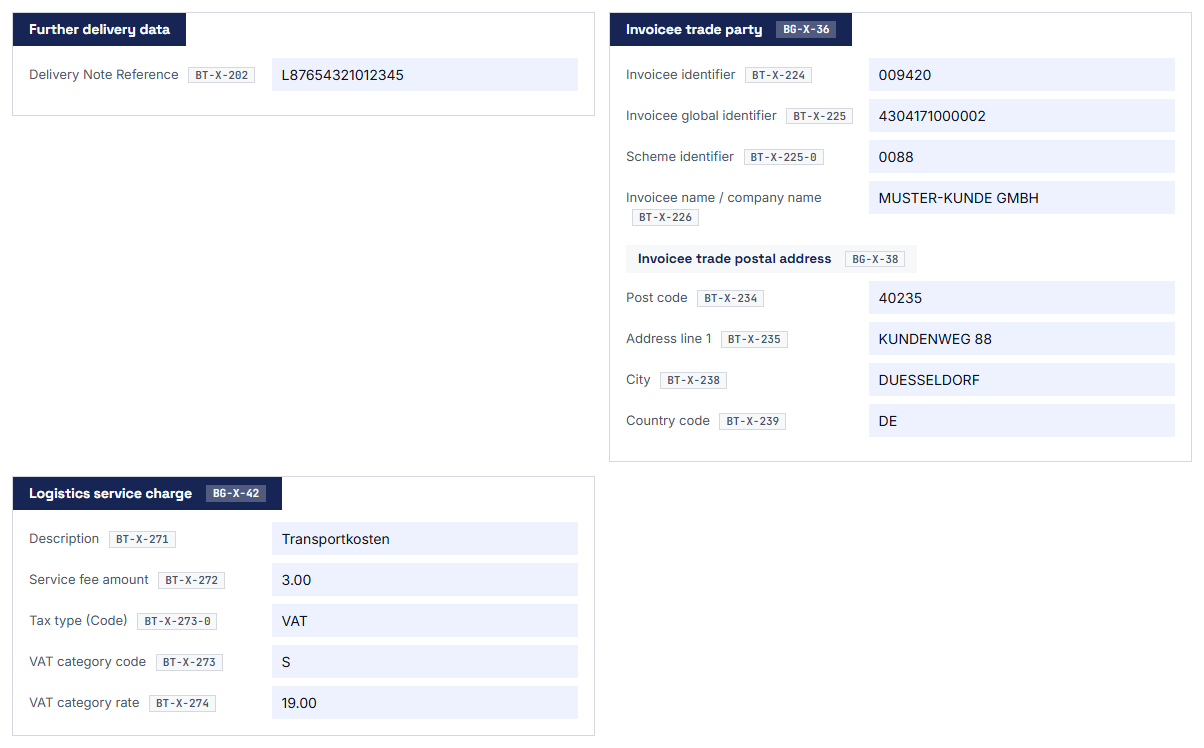
An invoice in the EXTENDED profile in the Viewer: the cards of the extension, such as the invoicee and the logistics charges, sit in their place in the document view.

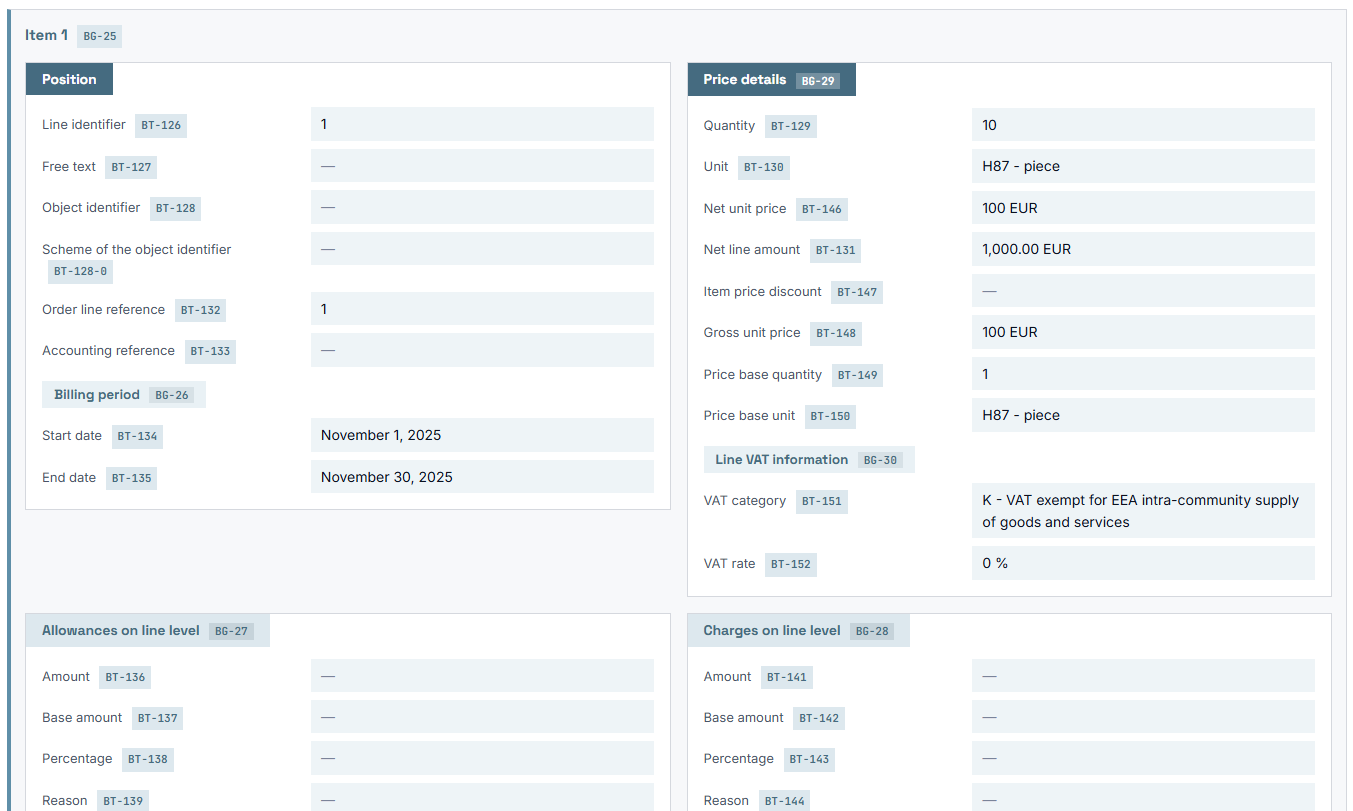
Line view of an EXTENDED invoice in the Viewer. It shows the line, the price details, the billing period and the allowances and charges of the line, each with its BT identifier.

Note Note

1. Activate the add-on

You upload the ZIP file from the shop to WordPress and activate the plugin next to the eInvoice Viewer.

Tools Tools

2. Load an invoice as usual

You drag an invoice in ZUGFeRD / Factur-X EXTENDED into the Viewer on your page.

Adjust Adjust

3. Read the whole invoice

The additional details appear in the cards they belong to, each with its BT-X identifier. With the switch “Only filled BT-X fields” you can show the empty fields as well if you wish.

Six additional parties

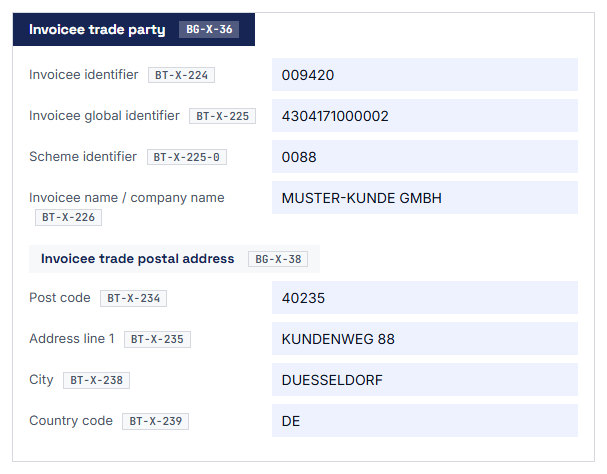
Extended Profiles shows six parties beyond the seller and the buyer: the shipper, the invoicer, the invoicee, the end user of the product, the final delivery location and the buyer’s tax representative. For each of them you see the name or description, address, tax registration, legal form and contact, as far as the invoice contains these details.

What this means for you: You see at once who else is involved in the transaction, without having to open the XML file.

The card of an additional party shows the invoicee with its details here.

Cash discount and late payment terms

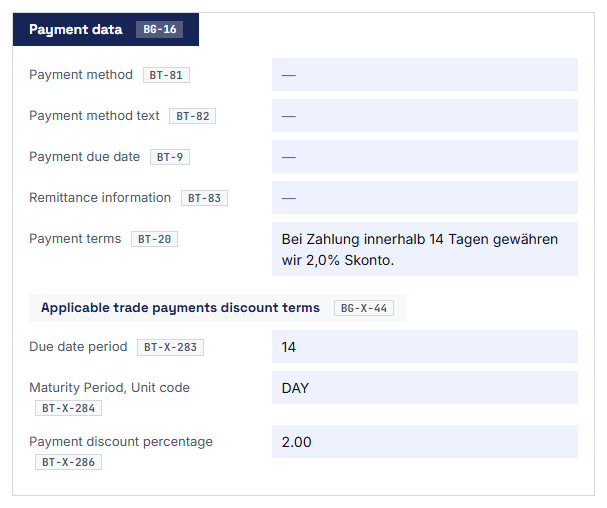
EXTENDED has its own fields for cash discounts and late payment, which have no equivalent in the core of EN 16931. Extended Profiles shows these fields with the payment data.

What this means for you: You see the payment terms exactly as the issuer wrote them into the data, and you do not have to pick them out of a free text.

The payment details of the invoice show the cash discount terms from the EXTENDED profile.

Document flags and related documents

Extended Profiles shows the test flag and the copy flag with the invoice and process data. It adds the references to the quotation, to the end customer’s order and to the delivery note, and the logistics costs. Every reference appears with its number or description and with its date or amount.

What this means for you: You see whether a document is flagged as a test or a copy, and you find the documents the invoice refers to.

Identifier and name on every field

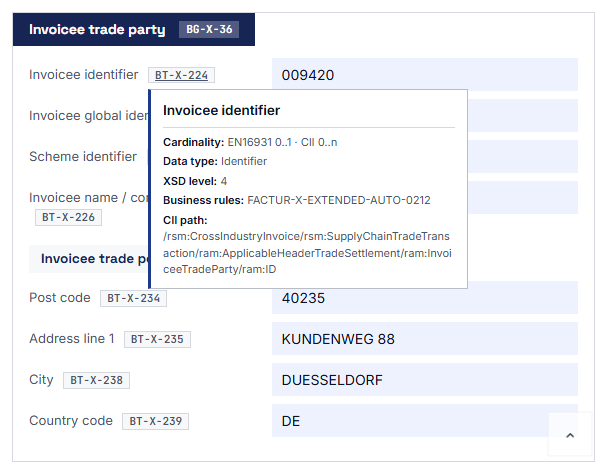
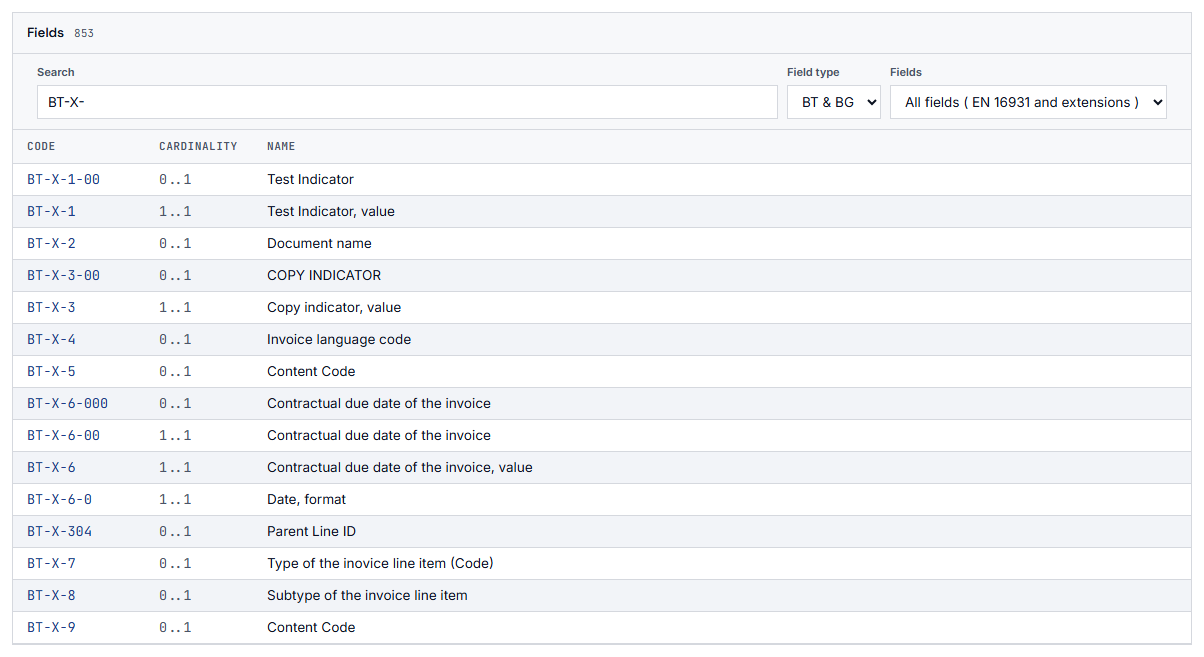
EN 16931 numbers its fields as Business Terms (BT) and its field groups as Business Groups (BG); the fields of EXTENDED carry the identifier BT-X. When you hover over a field that matches exactly one Business Term of EXTENDED, you see its identifier BT-X and its name. The fields of the core show their identifiers BT and BG in the same way.

What this means for you: When you have a question for the supplier, you name the field exactly as the specification calls it and avoid misunderstandings.

The tooltip on a field of the extension shows its BT-X identifier and its name.

Hide empty fields

Many fields of the extension are not filled in any given invoice. The switch “Only filled BT-X fields” hides them, so you see only the details that are actually in the invoice. You can bring the empty fields back whenever you like.

What this means for you: The display stays clear, and you can still see which fields the extension provides in total when you need to.

Explained rules in the validation tools

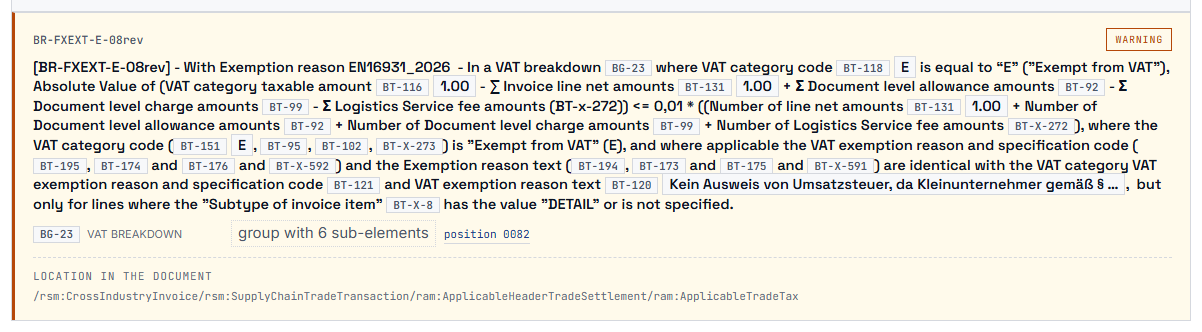
A validator is a program that checks an e-invoice against the validation rules of its format. When Extended Profiles is active, the Validation Explorers and the validators for KoSIT, Mustang and VAMPIRE explain findings on the rules of ZUGFeRD / Factur-X EXTENDED and EXTENDED-CTC-FR in plain language. If a finding concerns a field of the extension, they also show the value of that field from the invoice.

eInvoice Viewer
shows every field of the extension in its card
Validators for KoSIT, Mustang and VAMPIRE
explain findings on the rules of the extensions
Validation Explorer
explains the rules and shows the value of the field
Technical Details
lists the fields and rule sets of the extensions
Extended Profiles takes effect in these tools as soon as the add-on is active; blue marks free tools, orange marks paid products.

What this means for you: You understand what is wrong with the invoice instead of reading only a rule identifier and the brief message of the validation program.

A finding on a rule of ZUGFeRD/Factur-X EXTENDED is shown together with an explanation.

The fields of the extensions for reference

Together with the add-on “Technical Details”, the field overview shows 974 fields of the extensions next to the 311 fields of EN 16931. The rule browser then also lists the three rule sets of ZUGFeRD / Factur-X EXTENDED and EXTENDED-CTC-FR.

What this means for you: You look up a field or a rule of the extension in the same place as the fields of the core.

The field overview of Technical Details shows the fields of the extensions with their BT-X identifiers.

  • The accounts payable team with industrial suppliers

    The invoice names an invoicee who differs from the buyer and a final delivery location. The clerk reads both in separate cards next to the seller and the buyer and can assign the invoice correctly.

  • The purchasing department that wants to take cash discounts

    The cash discount terms are stored as separate fields in the invoice. The buyer sees them in the document view before the invoice goes to payment.

  • The software company that creates EXTENDED invoices

    The developer loads her test invoice into the Viewer and checks whether parties, flags and references arrive the way she wrote them. If a validator reports a finding, she reads the explanation of the rule and the value from the invoice.

You install the add-on like any WordPress plugin from a ZIP file, or you place its folder in /wp-content/plugins/. The eInvoice Viewer must be installed and active first; otherwise WordPress does not activate the add-on.

There is nothing to configure: the add-on has no settings page and no shortcode of its own, which means no placeholder in square brackets that WordPress replaces with a tool. It works wherever the Viewer is embedded on your website.

The additional details appear in the language of the Viewer, that is German, English or French. You do not have to maintain a translation of your own.

Extended Profiles for the apps, no WordPress needed

You work without WordPress? Extended Profiles is now also available in the shop as a separate add-on package for the apps. It works in the free Viewer app and in the apps of the Validation Explorer for KoSIT and for Mustang. An app is a folder that you open in your browser with a double-click, on your intranet or on your own web server. You unpack the ZIP file into the app’s folder, where its start file is, and reload the app in your browser. From then on it shows the fields of the extensions just like the plugin does.

What you get: No installation, no license key and no sign-in, and the app loads nothing from the internet. The invoice stays on your computer.

The Viewer app itself is a free download.

  • The invoice stays in the browser.

    The additional display is built in the visitor’s browser from the invoice the Viewer has already read. The add-on sends no invoice data to your server, let alone to third parties.

  • Files load only from your own server.

    The browser fetches the add-on’s script and the field descriptions from the plugin folder on your website. This request contains nothing from the invoice.

  • The field descriptions are public files.

    They belong to the plugin just like its script and contain the identifier, name and description of the fields, but no data of yours.

  • No settings, no account.

    The add-on has no settings page, and you do not need an account to use it.

Check it yourself: Press F12 to open your browser’s network panel and load an invoice into the Viewer. You will see that no request with invoice data leaves your computer.

Good to know before you buy

  • Some fields of the extension sit on the same XML element as a field of EN 16931. Such a field appears only once, under the identifier of EN 16931.
  • The current version does not yet show the own fields of EXTENDED-CTC-FR ( EXT-FR-FE ) in the document view.
  • On its own, this add-on does nothing. It needs the free eInvoice Viewer for PEPPOL & EN16931.
  • It does not check an invoice for validity. It shows what is in the invoice. The validators do the checking, and there the add-on explains the rules of the extensions.
  • An invoice without one of the extensions is displayed by the Viewer exactly as without the add-on.
Note Note

eInvoice Viewer — Technical Details

With this add-on, the field overview also shows the fields of the extensions, the tooltips on each field gain technical rows, and the rule browser lists the three rule sets of the extensions.

Tools Tools

Validation Explorer for KoSIT and for Mustang

The Validation Explorers explain findings on the rules of the extensions in plain language and show the value of the field from the invoice.

Adjust Adjust

Validators for KoSIT, Mustang and VAMPIRE

The validators show the same explanations when you validate invoices on your website.

974

fields of the extensions in the field overview of Technical Details, next to the 311 fields of EN 16931

963 + 6 + 5

breakdown of these fields: 963 from ZUGFeRD / Factur-X EXTENDED, 6 from a further extension and 5 from EXTENDED-CTC-FR

715 + 93

fields and groups of ZUGFeRD / Factur-X EXTENDED that the Viewer shows in their place; 215 of these fields belong to the invoice lines

3

languages: German, English and French

Supported are invoices in ZUGFeRD / Factur-X EXTENDED and EXTENDED-CTC-FR. Both are based on CII, one of the two XML forms in which an e-invoice under EN 16931 can exist.

No. The additional details appear in the Viewer’s display, and WordPress only activates the add-on when the eInvoice Viewer for PEPPOL & EN16931 is active.

To invoices in ZUGFeRD / Factur-X EXTENDED and EXTENDED-CTC-FR. Both formats are based on CII.

Yes. The fields of a line appear in the card of that line, and its groups appear inside it as separate cards. For this, the Viewer needs at least version 2.35.0.

Then the document is not an EXTENDED invoice, or it contains no details that exist only there; in that case the Viewer displays it as it would without the add-on. Also check that your Viewer has at least version 2.35.0. Older versions show the fields collected at the end of the invoice.

No. The display is built in the visitor’s browser from the invoice the Viewer has already read. The browser loads only the script and the field descriptions from your own website.

You buy it in the shop on invoicePress.de, where you also see the price. For WordPress you receive a ZIP file to upload; for the apps you receive a separate add-on package that you unpack into the app’s folder. The plugin is licensed under GPL-2.0-or-later.

Do your suppliers invoice in the EXTENDED profile? Then get Extended Profiles in the shop and see everything that is really in your invoices, starting with the next one. You do not have the eInvoice Viewer yet? It is free, and you install it first.

11,90 € incl. VAT · instant download after purchase