
eInvoice Validation Explorer for KoSIT

Paid product · WordPress plugin and app · Version 1.10.0 · Explains the validation reports of the official KoSIT validator

The validation report says “BR-CO-10”. What does that mean for your invoice?

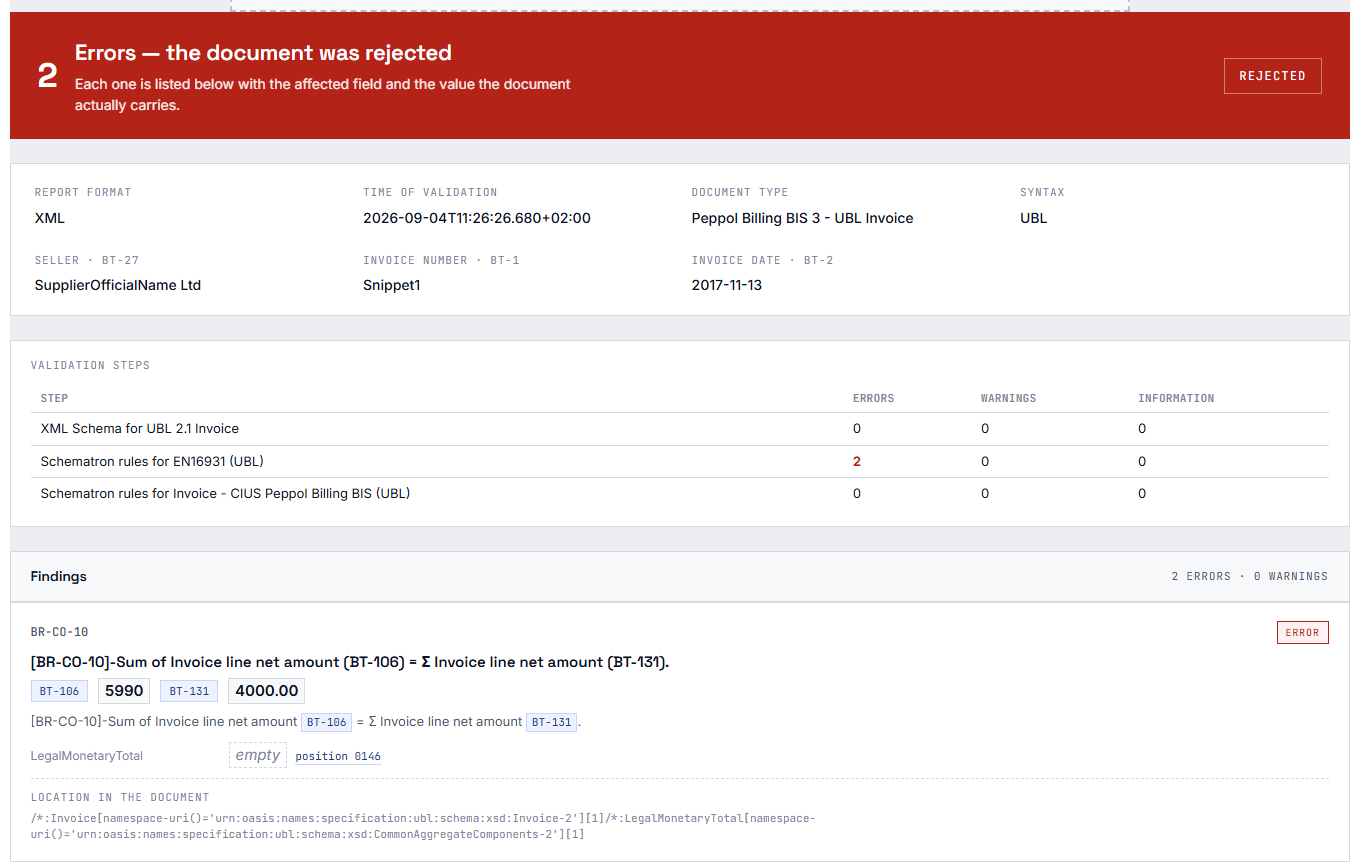
The eInvoice Validation Explorer for KoSIT turns a validation report into plain language. Instead of a rule identifier, you read what is wrong, which field of the invoice it concerns and which value is entered there. The report comes from the official KoSIT validator, the validation program of the German Coordination Office for IT Standards (KoSIT) for XRechnung. The Explorer does not validate anything itself. It explains exactly what your validator has found.

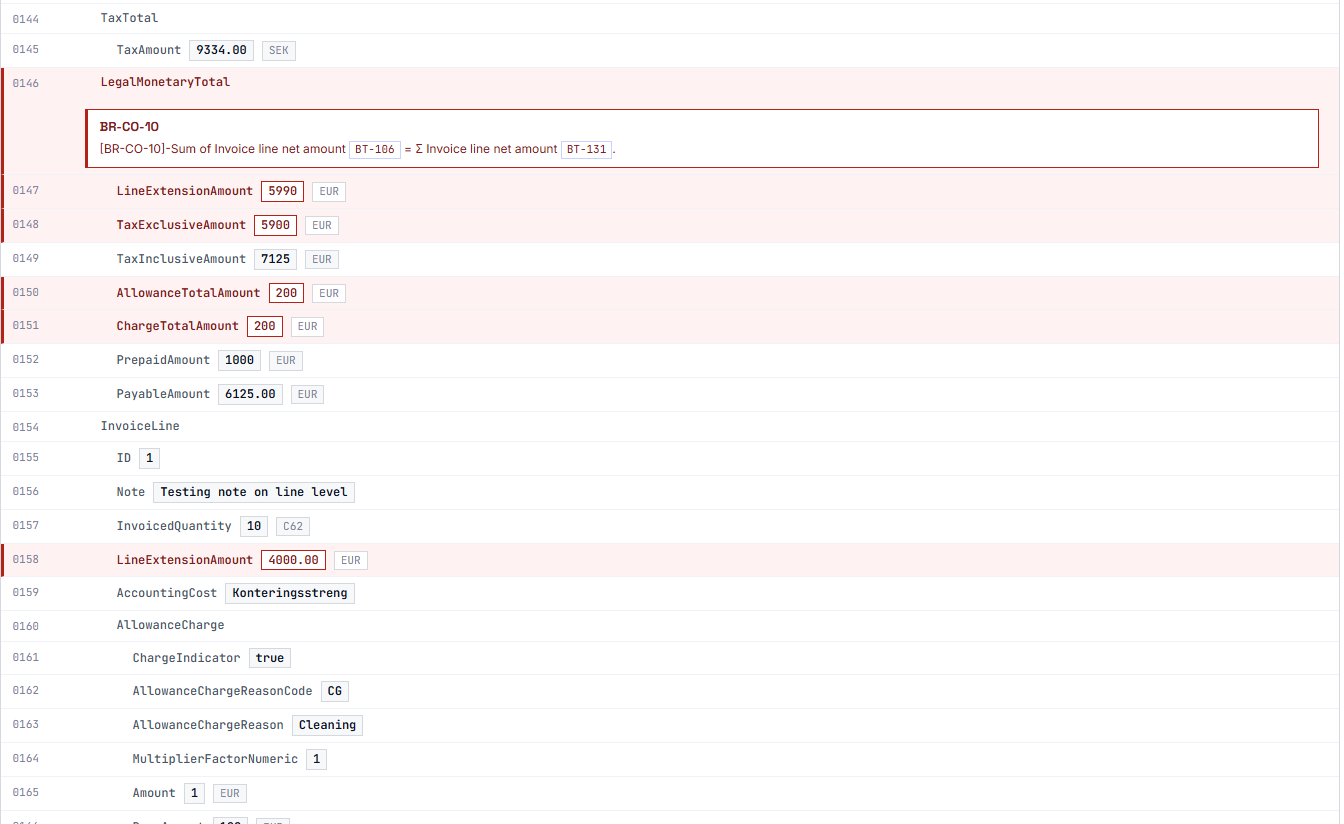
Together with the free eInvoice Viewer, every finding appears right below its field in the readable invoice. To our knowledge, the Validation Explorer is the only tool that shows the messages of a finished validation report at the affected field like this.
App and plugin

The Validation Explorer for KoSIT as an app and as a WordPress plugin

The explorer is available as an app: a folder that you unpack and open with a double click, on your computer, on your intranet or in SharePoint. The app needs no server and no validation engine, because it reads a report that already exists. The report and the invoice never leave your computer. It reads the report of the KoSIT validator as XML or HTML.

The WordPress plugin is the same explorer with the additional functions of a website: you limit the calls per visitor and day, decide from which role it appears, and show the findings right at the fields of the eInvoice Viewer. The plugin requires the free viewer plugin. App and plugin are paid products and carry the same version number.

A validation report is written for specialists

You receive an e-invoice, that is, an invoice as a structured XML file, and have it validated. Sometimes your customer sends you the validation report along with it. The report says that the invoice is rejected, and as the reason it gives a rule identifier with an English sentence from the technical validation rules.

But you want to know something else: Which detail on the invoice is wrong, what does it say right now, and what do you have to tell the supplier so that the error gets corrected?

Without help, you look up the rule in the specification and then search for the matching spot in a long XML file. With every further finding, that is, every further message in the report, the search starts all over again.

A page on your website explains the report, finding by finding

You place a shortcode on a WordPress page. A shortcode is a short placeholder in square brackets that WordPress replaces with the tool. Anyone who drops a validation report on this page first sees the result, that is, accepted or rejected. Below it, every finding appears in plain language, together with the affected field and its value, followed by the content of the validated invoice.

You don’t run WordPress? Then use the app. It is a folder whose start file you open in your browser with a double-click, on your computer, on a network drive or on your own web server. The plugin and the app are one product and carry the same version number.

1 · Drop the report
XML or HTML report of the KoSIT validator or from VAMPIRE
2 · Match the findings
in the plugin on your server, in the app in your browser
3 · Read the explanation
plain language, field and value
How the explanation comes about: you drop the report, the Explorer matches every finding to a field, and you read the result in plain language.
Note Note

1. Install the viewer and the plugin

The plugin requires the free eInvoice Viewer for PEPPOL & EN16931. So you install the viewer first, then upload the ZIP file from the shop to WordPress and activate the plugin. You do not need to configure anything to get started.

Tools Tools

2. Insert the shortcode

You add [spx_validation_report] to a page. At this spot, the area appears where visitors drop their validation report.

Adjust Adjust

3. Drop a report

The explained report appears right away on the same page, without the page reloading.

An explanation instead of a rule identifier

Every finding comes with an explanation in plain language, not just the rule identifier and the raw text of the validation rules. Errors and warnings are color-coded, and a note at the “information” level appears in blue, so you can tell them apart at a glance.

What you gain: You understand the finding without opening the specification, and you can pass it on in your own words.

Raw validation report With the Validation Explorer
Result: accepted or rejected ✓ ✓
Rule identifier ✓ ✓
Explanation in plain language – ✓
Affected field with BT or BG number – ✓
Value that the invoice contains – ✓
Jump to the spot in the invoice – ✓
Finding right below its field in the readable invoice – ✓
What a raw validation report shows and what the Validation Explorer adds.

The affected field and its actual value

The plugin matches every finding against its rule catalog and names the affected field with its label and its BT or BG number. Business Terms (BT) and Business Groups (BG) are the numbered fields and field groups of EN 16931, the European standard for e-invoices. Right after that comes the value the invoice contains at this spot. A finding then reads like “The VAT rate is wrong: 19 %” instead of just “BR-CO-17 failed”.

What you gain: You see at once which detail the supplier has to change, and you can tell them the wrong value.

The invoice content alongside, with a jump to the spot

Next to the report you can browse the content of the invoice. Lines with an error or a warning are highlighted. When you click a finding, the view scrolls to the affected line and briefly highlights it.

What you gain: You no longer have to search a long XML file by hand.

Search and filter the invoice content

A search field finds any term in the invoice content, whether it is a field label, a value or a BT number. The “BT numbers” switch shows and hides the numbers, and the “findings only” switch shows only the lines that have a finding. You can combine the search and the switches.

What you gain: Even in an invoice with hundreds of lines, a few keystrokes take you to the detail you are looking for.

The validator’s result, unchanged

At the top you see the result and the name of the validation scenario. The validation scenario is the rule package the validator used for the check. Below that come the individual validation steps with the number of their findings. The plugin does not soften or reinterpret anything. If the catalog has no plain-language text for a rule, the plugin shows the validator’s own message and labels it as such.

What you gain: You can rely on the page saying the same as your validator, only in a clearer way.

Three languages

The interface is available in German, English and French. The explanations of the rules appear in the selected language, as far as the specification contains a text in that language.

What you gain: Your colleagues in accounting read the report in their own language rather than in the English of the validation rules.


Validate in the eInvoice Viewer and see the finding at its field

The free eInvoice Viewer for PEPPOL & EN16931 is the central tool for your e-invoices. It displays the invoice in readable form, and with the validator plugins you validate it right there. If eInvoice Validator for KoSIT is installed on your website, the viewer’s toolbar shows the button “Validate with KoSIT”. The validation report then opens in its own tab, “KoSIT Validator”.

With the Validation Explorer, the explanations appear right in this tab. A click on “Position” next to a message opens the “INVOICE” tab at the affected field, and there every finding stands as a complete card right below its field. If you prefer the technical view, a switch below the messages shows the XML listing instead.

What you gain: Reading, validating and understanding happen on one page. You see an error where it sits in the invoice, not in a separate list.

On the Explorer’s own page, too

With the viewer active, the page with the shortcode also shows the invoice that a report carries in the “Invoice” view, with every finding at its field. The list of findings and the XML listing stay exactly as the validators show them. A survey of about 35 tools on October 13, 2026 found no other tool that shows validation messages at the affected field of the readable invoice.

The whole invoice at a glance

The page shows not only the lines with findings but the whole document with line numbers. Lines with findings are color-coded, and the violated rule appears directly below. So you see at once in which context an error occurs.

  • The accounts payable clerk

    An incoming invoice fails validation. The clerk drags the validation report onto the page and reads which field is affected. Then she writes the supplier a query that he will actually understand.

  • The service provider with a validation offer

    A tax firm or agency validates invoices for its clients. Instead of passing on the raw report, it points to a page on its website where the client can have the report explained.

  • The developer who creates e-invoices

    Her software writes XRechnung invoices, and the validator reports errors. For every finding she sees the field of the standard and the value her software wrote. With one click she jumps to the spot in the invoice.

  • The operator of a validator in WordPress

    His website already runs the free plugin “eInvoice Validator for KoSIT”. Once the Validation Explorer is installed as well, every validation result appears in the easy-to-read view automatically.

The shortcode

[spx_validation_report]

With the attribute bt you define for a single page whether the BT numbers are visible when a report opens, for example [spx_validation_report bt="0"].

The settings

Since version 1.10.0 the settings have their own menu entry, eInvoice Validation Explorer → KoSIT, in the WordPress admin area. The former address under “Settings” redirects there. The report itself sits in a shielded area of the page, so the styling of your theme does not affect it.

The plugin settings and their defaults
SettingDefaultWhat it is for
Daily uploads per role10 per roleOne row for guests and one for each role: empty means unlimited, 0 means no access. Administrators are never limited.
Maximum file size (MB)8The upload limit of your server applies as well; the smaller limit wins.
Trust proxy headeroffFor websites behind a reverse proxy that you trust.
Show BT numbers by defaultonVisitors can switch the numbers on and off in the report themselves.
Design kitKit HSets the styling of the report and applies to all eInvoice tools on the website.

Connecting with a validator

If the plugin “eInvoice Validator for KoSIT” or “eInvoice Validator for VAMPIRE” is active on the same website, the Validation Explorer takes over the display of the report automatically. You do not have to configure anything for this.

For developers there is also the REST address POST /wp-json/einvoice/v1/explain. The manual describes the details.

  • The report goes to your own server and nowhere else.

    The uploaded file goes to your own WordPress installation. There it is read and returned as an explained report. The plugin makes no request to a third-party service. There are no statistics, no license check and no API key.

  • Nothing is kept.

    The report and the invoice are read from the temporary upload and processed in memory only. Nothing ends up in the media library or in the database.

  • The daily limit works without a stored IP address.

    The plugin counts logged-in users by their account and anonymous visitors by their IP address in encrypted and shortened form. Only a counter is stored, and it expires after one day.

  • It runs without internet access.

    The catalogs of rules and fields are part of the plugin. That is why it also works behind a firewall that allows no outgoing connections.

Please note: A validation report usually contains names, addresses, IBANs and amounts. During the request, this data sits in the memory of your server. Mention this in your privacy policy.

  • It does not validate. It reads a report that another tool has created. If that tool is wrong, the Explorer explains the mistake just the same.
  • It does not repair. It tells you what is wrong and where. The correction stays with you or your software.
  • It does not make up explanations. If it has no text for a rule, it shows the validator’s message and labels it as such.
  • It stores nothing. That is why there is no archive and no history to look things up.
  • German rule texts are so far available for XRechnung. For the other rule sets, the validator’s original English text is shown.
  • It is not a KoSIT product. It is an independent tool by invoicePress and has no connection to KoSIT.
Note Note

eInvoice Validator for KoSIT

This plugin validates the invoice in WordPress with your own KoSIT validator. With the Explorer, its report appears in the easy-to-read view automatically.
free

Tools Tools

eInvoice Validator for VAMPIRE

This plugin validates the invoice directly in WordPress and needs no Java to do so. With the Explorer, its report also appears in the easy-to-read view.
free

Adjust Adjust

eInvoice Viewer – Extended Profiles

This add-on also explains the rules of ZUGFeRD / Factur-X EXTENDED and EXTENDED-CTC-FR and shows the values of the extension fields in the finding. It requires the eInvoice Viewer.
Paid product

Note Note

eInvoice Validation Explorer for Mustang

The counterpart for the reports of the Mustang validator. Because a Mustang report does not contain the invoice, you drop the report and the invoice together. Learn more
Paid product

Tools Tools

eInvoice Validation Explorer for VAMPIRE

Explains the reports of VAMPIRE PHP and VAMPIRE JS, including the JSON report together with the validated invoice. Learn more
Paid product

Adjust Adjust

eInvoice Viewer for PEPPOL & EN16931

The central tool: it displays every e-invoice in readable form, validates it with the validator plugins and, with the Explorer, places every finding at its field. The plugin requires the viewer. Learn more
free

5 712

rule identifiers from 17 rule sets are in the bundled catalog

311

fields of EN 16931 are in the field catalog, each with a German label

3

languages: German, English and French

0

requests to third-party services

The plugin reads the XML report of the KoSIT validator (rep:report), its HTML report and the reports of eInvoice Validator for VAMPIRE. It explains the complete core rule set of EN 16931 in both XML forms, CII and UBL, as well as the rules of XRechnung. German rule texts are available for XRechnung CII for 42 of 71 rules and for XRechnung UBL for 47 of 76 rules.

No. It explains a validation report that a validator has already created. If you want to run the validation itself in WordPress, add a validator plugin, for example the free “eInvoice Validator for KoSIT”.

You can upload the XML report and the HTML report of the KoSIT validator as well as the reports of “eInvoice Validator for VAMPIRE”. The file must end in .xml, .html or .htm.

No. The validator’s report contains the validated invoice, and the display of the invoice content is built from it. If you upload the invoice instead of the report by mistake, the page tells you so.

The plugin needs WordPress 6.0 or newer, PHP 7.4 or newer and the free eInvoice Viewer for PEPPOL & EN16931. WordPress activates the Explorer only while the viewer is active. You do not need Java, a third-party service or an API key. The app only needs a current browser.

No. It goes to your own WordPress installation and is processed there in memory only, not in the media library and not in the database. Nothing goes to a third-party service.

For the rules of the extension, the plugin shows the identifier and the message of the validator. With the “Extended Profiles” add-on, these rules are explained in plain language as well.

Yes. The same Validation Explorer is available as an app. The app is a folder that you open in your browser without WordPress and without a server: with a double-click on your computer, on a network drive, on a USB stick or on your own web server. With its default settings it makes no request to the internet at all, and the report stays in your browser. The plugin and the app are one paid product that you download as a ZIP file from the invoicePress.de shop.

Yes. There is one Validation Explorer per validation program: for KoSIT, for Mustang and for VAMPIRE. The Explorer for KoSIT also reads the XML reports of VAMPIRE, because they use the same format. For the JSON report of VAMPIRE and for Mustang reports, use the matching Explorer. As plugins, all three can run side by side.

The settings have their own menu entry, “eInvoice Validation Explorer”. In the eInvoice Viewer 2.38.0 or later, the explanations appear in the validator’s tab, and “Position” next to a message opens the “INVOICE” tab at the field. Since version 1.9.0, the Explorer places every finding of a check started in the viewer at its field in the invoice.

Try the demo and see for yourself how rule identifiers turn into clear sentences. Then buy the Validation Explorer in the invoicePress.de shop and place the shortcode on your own page, or open the app without WordPress at all.

23,80 € incl. VAT · instant download after purchase