eInvoice Validator for KoSIT

Free · WordPress plugin · For everyone who runs or wants to set up their own KoSIT validator

KoSIT validator in WordPress: validate e-invoices on your own website

With eInvoice Validator for KoSIT, you validate e-invoices with the KoSIT validator directly in WordPress. An e-invoice is an invoice as a structured file that a program can read, for example an XRechnung or a ZUGFeRD PDF. A visitor drops it on a page of your website, your own official KoSIT validator checks it, and the validation report appears with clear explanations on the same page.

Three things set the plugin apart: the result comes from the recommendation of the official KoSIT validator itself. The invoice goes only to your own website or to a validator service in your network, never to a third-party service. And with the validator service, your web server doesn’t even need Java. The plugin is free and available in version 1.10.0. It does not include the KoSIT validator itself; it controls the validator that you run or install.

Also as an app

Without WordPress: the Validator for KoSIT as an app

This plugin builds directly on an existing installation of the KoSIT validator: it starts it on your web server or talks to a validator service in your network, and it brings the controls of a website, that is daily limits per role, file size and the validation page for your visitors.

If you want to validate without WordPress, use the free app in the same version 1.10.0: a folder that you unpack and open with a double click. A page in the browser cannot start a Java program, though. The app therefore sends the invoice to the Validator Bridge, a small service in your network that calls your KoSIT validator and returns the report. If the app lies next to the viewer app, the viewer gets the button “Validate with KoSIT”.

The official KoSIT validator runs on the command line. Your colleagues don’t work there.

The KoSIT validator from the German Coordination Office for IT Standards (KoSIT) is the reference validation program for XRechnung, the German standard for e-invoices. It is a Java program that you start with a command and a file path. For the accounting team, a supplier or a customer, that is a high hurdle.

So every question like “Is this invoice correct?” ends up with the one colleague who knows the command line. He checks the invoice, copies the report into an email and explains what the rule identifiers mean. Starting January 1, 2027, larger companies in Germany must also send e-invoices, and these questions will not become fewer.

The easy way out would be a validation service on the internet. But an invoice contains names, addresses, bank details and prices, and not everyone is allowed or willing to send this data outside the company.

How to validate XRechnung and ZUGFeRD with your own validator

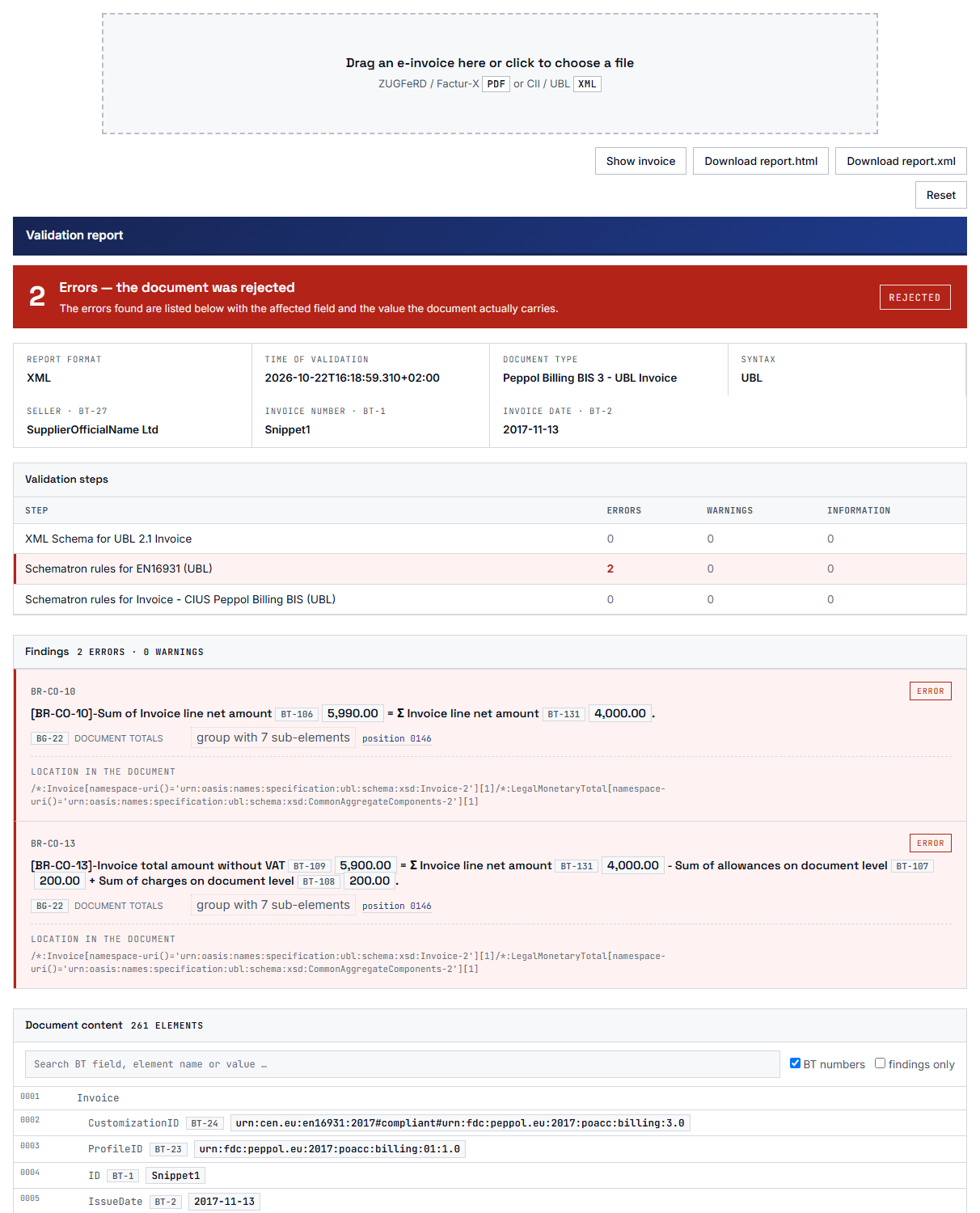
eInvoice Validator for KoSIT is the user interface for the validator you already have. A visitor drags an invoice onto the page, and the plugin passes it to your validator. Shortly after, the validation report appears below the drop zone. It states the result, that is, accepted or rejected, and explains every finding, that is, every single message from the validator, in plain words and with the affected field. You download the unchanged original report as an XML file with one click.

1 · Drop the invoice
XML or ZUGFeRD PDF
2 · Your validator checks
on the web server or as a service in your network
3 · Read the report
with explanations and as XML for download
How a check works: the visitor drops the invoice, your own validator checks it, and the report appears on the same page.

For you as the operator, it takes three steps: you set up the plugin, put the shortcode on a page, and from then on your visitors drop their invoices themselves. The three steps are shown right below the images.

KoSIT validator report in the plugin: the invoice is rejected, two errors are listed with the affected field, value and location, followed by the invoice content.

Note Note

1. Install the plugin and enter your validator

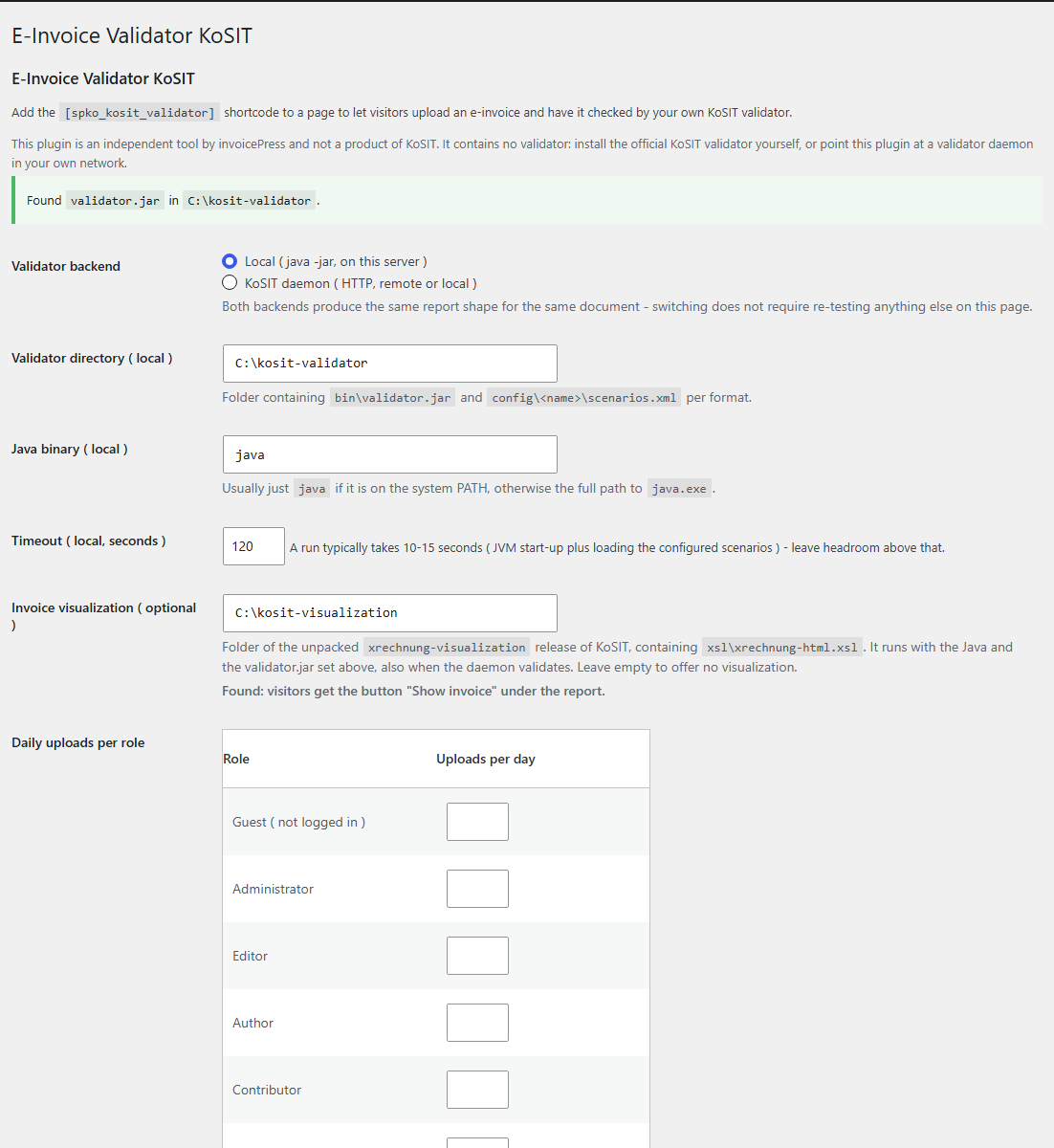
You install and activate the plugin and choose the connection in the admin area under eInvoice Validator → KoSIT. You enter either the directory of your validator on the server or the address of a validator service in your network. The system check below shows right away whether everything is ready.

Tools Tools

2. Put the shortcode on a page

A shortcode is a short placeholder in square brackets that WordPress replaces with the tool. You write

on a page or in a post, and the drop zone appears exactly there.

Adjust Adjust

3. Drop an invoice and read the report

The visitor drags an XML invoice or a ZUGFeRD or Factur-X PDF onto the zone or selects it with a click. During the check, the page says that it can take up to 15 seconds, and then the report is there.

What makes eInvoice Validator for KoSIT special

The result comes from the official KoSIT validator itself

The plugin adopts the recommendation “accept” or “reject” that the official KoSIT validator writes into its report. It does not derive a result of its own from a single flag in the report. If a report contains only warnings and no errors, the invoice therefore counts as accepted, and that is how the page shows it. Each finding appears with a plain-language explanation and the affected field, in the same report view as in eInvoice Validation Explorer, even if the Explorer is not installed.

What you gain: You get exactly the assessment of the reference tool for XRechnung, and whoever checked the invoice understands it without having to ask.

Two ways to reach your validator, one of them without Java on the web server

The local connection runs the command java -jar validator.jar directly on the web server. The “validator service” connection talks over HTTP to a KoSIT validator that was started as a service with the option -D, on the same machine or on another machine in your network. With this connection, the web server itself needs no Java. Both ways produce the same report for the same invoice. The connection test on the settings page checks each connection, including the one that is not active right now, and shows the round-trip time in milliseconds.
What you gain: You choose the way that fits your server, test a new service while the website still validates locally, and switch only when everything is green.

Local connection Validator service
Where the validator runs on the web server as a service in your network
Java needed on the web server yes, Java 17 or newer no
Default time limit per check 60 seconds 30 seconds
Same report for the same invoice ✓ ✓
The two connection types compared: both produce the same report, and only the local connection needs Java on the web server.

Settings page: local or service connection, validator directory, time limit and daily validations per role.

A validator.jar that cannot change unnoticed

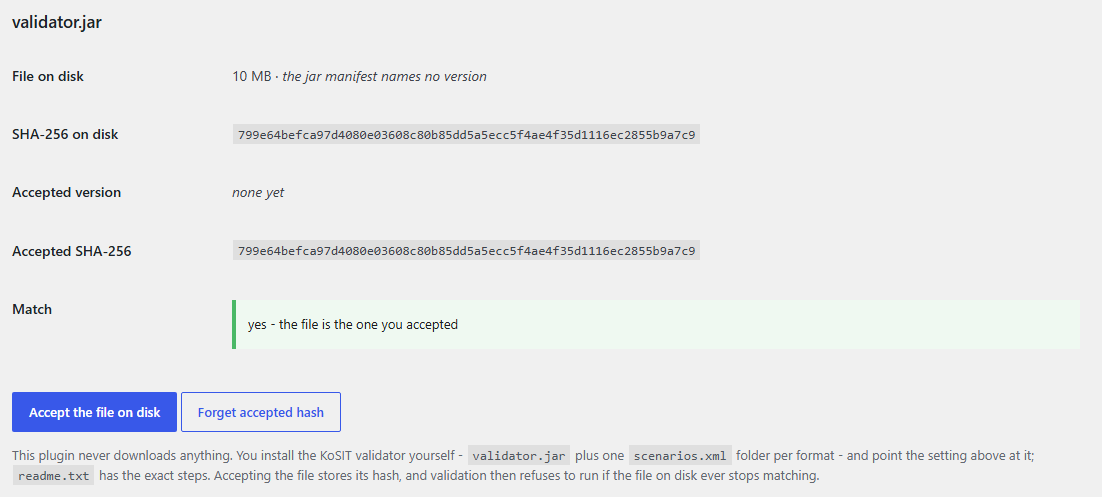
With one click you save the checksum (SHA-256) of the file validator.jar, a kind of fingerprint of the file. The settings page then shows both checksums side by side: the one of the file on disk and the one you accepted. If the file later no longer matches this fingerprint, the plugin refuses to validate. It validates again only after you explicitly accept the new file.

What you gain: On a public page, only the program you approved is running, and a replaced file is noticed immediately.

Checksum of validator.jar: accept the file, after that the plugin only validates with exactly this file.

Your invoice stays in your network

The plugin makes no outgoing request on its own. The invoice goes only to your own website and, with the service connection, to the address you entered yourself. For a ZUGFeRD or Factur-X PDF, the visitor’s browser already extracts the embedded invoice XML, so the PDF never leaves the browser. No copy of the invoice remains on the server. The details are further down on this page in the section on protecting your data.

What you gain: You can offer a validation page even for invoices with names, bank details and prices, without entrusting this data to a third-party service.

The features in detail

One drop zone for XML and PDF

The zone accepts XML invoices in both forms, UBL and CII. These are the two XML forms in which an e-invoice under EN 16931 can exist, the European standard that defines which data an e-invoice contains. It also accepts ZUGFeRD and Factur-X PDF files, that is, PDF files with an embedded XML invoice. The zone works with the mouse, through a file picker and with the keyboard. The page recognizes a PDF without an embedded invoice, such as one that was only printed or scanned, and tells the visitor.

What you gain: Your visitors do not need to know what is inside a ZUGFeRD PDF, and your server does not need to read any PDF.

The complete KoSIT report as an XML file and as an HTML page

The “Download report.xml” button saves the validator’s original report as an XML file, named after the checked invoice, for example invoice-4711-report.xml. The plugin passes the report through unchanged and does not rewrite it. Since version 1.9.1, the “Download report.html” button sits next to it. It saves the report that the official KoSIT validator also writes as an HTML page, again unchanged. You can open, print and share that page without an internet connection; the KoSIT validator writes it in German.

What you gain: You hold the original and can file it as evidence or send it to the supplier.

The invoice in the official KoSIT rendering

If you enter the folder of the KoSIT invoice rendering (xrechnung-visualization) in the settings, a button below the report displays the checked invoice as a readable document. It appears in German on a German website and in English otherwise. The rendering is created on your server with the Java and the validator.jar of the local connection.

What you gain: Next to the findings, you see the invoice itself, the way KoSIT renders it.

A document view with marked fields

Next to the report, the plugin shows a document view of the invoice. Fields that break a rule derived from the invoice itself carry a note directly below the field. Numbers and dates follow the language of your website. If the easy-to-read view cannot be built, the plugin shows a simpler report view and, as a last resort, the validator’s raw report in a shielded frame.

What you gain: You see where in the invoice a problem sits, and you always get a readable report.

A system check that names the next step

Every time the settings page loads, it checks the requirements of both connections, for example whether the plugin may start processes, whether Java is available, whether the jar file is present and intact, as well as the PHP version, the extensions and the memory. Each line is green or red, and a red line tells you what to do.

What you gain: You do not have to search for the reason why nothing gets checked, because the page tells you what is missing.

A daily limit per role

Since version 1.9.0, a table lets you set how many checks per day are allowed for guests and for each role on your website. An empty field means unlimited, and the number 0 means no access. Only successful checks are counted, and below the drop zone the visitor sees how many remain for today. Administrators are never limited.

What you gain: You can, for example, open the validation page generously for your suppliers and set a tighter limit for guests, without overloading your server.

The same look as all eInvoice tools

The drop zone, report, buttons and messages follow the design kit you chose for the eInvoice tools on your website, including a custom kit. The default is Kit H.

What you gain: The validation page looks like the rest of your tools and not like something foreign.

  • The IT department that already runs the validator

    The KoSIT validator already runs in-house, as a program or as a service. The IT department enters the directory or the address and puts the shortcode on a page in the intranet. From then on, colleagues check their invoices themselves.

  • The invoice recipient with a supplier portal

    Suppliers should check their invoice before they submit it, and the validation page sits right in the portal. A daily limit per role and for guests, plus a size limit per file, keep the load on the server under control.

  • The accounting team with a disputed invoice

    The clerk drags the invoice onto the page and reads the findings with their explanations. Then she downloads the report and attaches it to her query to the supplier.

  • The software company that creates invoices

    Developers and consultants check their outgoing invoices against exactly the scenario configurations installed on their own validator. A scenario configuration is the rule package the KoSIT validator uses to check one specific format. For your own programs, the same check is also available through a REST address.

Requirements and setup

What you need

  • WordPress 5.8 or newer (tested up to 7.1) and PHP 8.2 or newer.
  • For the local connection: Java 17 or newer on the web server, the PHP function proc_open and a directory with the file bin/validator.jar. Inside it, there is one folder per format with the file config/<name>/scenarios.xml. The intended folder names are xrechnung, factur-x and peppol. A missing folder is skipped and not treated as an error.
  • For the service connection: a KoSIT validator running in service mode (-D) and an HTTP connection from the web server to its address. Java on the web server is then not needed.
  • In the visitor’s browser, JavaScript must be enabled.

You obtain and update the KoSIT validator, its scenario configurations and Java yourself. They have their own licenses and their own release schedule.

Installation

You upload the plugin’s ZIP file under Plugins → Add New Plugin → Upload Plugin, or you place the folder einvoice-validator-for-kosit in /wp-content/plugins/, and then activate the plugin. Publication in the wordpress.org plugin directory is planned.

Creating the page

The shortcode has no attributes. The drop zone and the report sit in a shielded area: the styling of your theme does not affect this area, and its styling does not affect your page.

What you can configure

In the admin area under eInvoice Validator → KoSIT you set:

  • the connection, the validator directory and the Java command (java is enough if it is on the search path),
  • the time limit per check, by default 60 seconds for local and 30 seconds for the service, at least 5 seconds each,
  • the daily checks per role and for guests, by default 10,
  • the largest allowed file, by default 8 MB; the smaller value of this setting and the WordPress upload limit applies,
  • whether the visitor address is taken from the X-Forwarded-For header of a trusted reverse proxy (off by default),
  • the folder of the KoSIT invoice rendering (optional) and the design kit,
  • for the service, its address and, if a reverse proxy requires it, a user name and password.

For your own programs

The same check is also available through the REST address POST /wp-json/einvoice/v1/validate. A program first fetches a one-time token from the website for this. The manual describes this procedure.

  • The invoice goes to your own server and to no one else.

    The plugin makes no outgoing request on its own, neither when a page loads nor during upload or the check. It does not download the validator either. A ZUGFeRD or Factur-X PDF does not leave the visitor’s browser, because only the extracted XML is sent to your website.

  • The service connection sends only to the address you enter.

    This address is your own validator in your own network. The plugin ships no address, and as long as the field is empty, nothing is sent.

  • No copy of the invoice remains.

    The validator needs a file path. So the local connection puts the file into a throwaway directory for the duration of the request. This directory is deleted afterwards, whether the check succeeded, failed or was aborted.

  • The page is built for public use.

    The plugin checks the file extension, the actual file type and the size. A freshly fetched one-time token protects against requests that come from other sites, even on cached pages. The daily limit counts logged-in users by their user ID and anonymous visitors by their IP address in encrypted form. The content of the file is not recorded, and the buttons on the settings page are available to administrators only.

Check it yourself: Open the network panel of your browser (key F12) and drop an invoice. You will see requests to your own website only and to no other.

What the plugin deliberately does not do

  • The plugin does not check anything on its own. It contains no validator. If there is no KoSIT installation or reachable service, the system check reports exactly that, and nothing is checked.
  • It does not download the validator. You install and update the KoSIT validator, its scenario configurations and Java yourself.
  • It does not report new releases. The plugin does not check whether KoSIT has published anything newer in the meantime.
  • It offers exactly two connection types: the local validator and the validator service. If you want to validate without any Java installation, use the separate plugin eInvoice Validator for VAMPIRE.
  • It is not a queue. A very large invoice occupies the request for as long as the validator needs for the check.

How the plugin works with the other eInvoice tools

eInvoice Validator for KoSIT belongs to a family of tools that exists for each validation engine, that is, for the KoSIT validator, for Mustang and for VAMPIRE. It works together with the neighbors below simply because the other plugin is active; there is nothing to set up. If you run Mustang, eInvoice Validator for Mustang is the counterpart for that engine. For the KoSIT validator, eInvoice Scenario Studio for KoSIT, which lets you build the scenarios.xml configuration visually, and eInvoice Multicheck for KoSIT, which checks one invoice against several versions, are also planned. A comparison check for invoicePress.de has also been built: it sends the same invoice to the official KoSIT validator, Mustang and VAMPIRE at the same time and shows the results side by side. It will appear on the website as soon as we release it.

Note Note

eInvoice Viewer

An invoice opened in the Viewer gets a “Validate with KoSIT” button, and since Viewer 2.38.1 that includes a ZUGFeRD or Factur-X PDF. From Viewer 2.38 on, the validation report opens in its own “KoSIT Validator” tab with the buttons for report.xml and report.html, and a second click reopens the tab without validating again. Learn more on the Viewer page.
free

Tools Tools

eInvoice Validation Explorer for KoSIT

With the Explorer, the report appears in its presentation: in plain sentences and with details on Business Terms (BT) and Business Groups (BG), that is, the numbered fields and field groups of EN 16931. See the Explorer page and the Explorer demo.
Paid product

Adjust Adjust

Add-on Extended Profiles

Findings on fields of an extension (BT-X) show the field’s value from the invoice, and the rules of ZUGFeRD / Factur-X EXTENDED and EXTENDED-CTC-FR are explained.
Paid product

Search Search

eInvoice Validator for VAMPIRE

The alternative for everyone without Java: this plugin brings its own validation engine, VAMPIRE PHP, and runs on ordinary web hosting.
free

2

connection types: local validator and validator service

0

outgoing requests made by the plugin on its own

4

seconds was the time a local check took against the three scenario collections for XRechnung, Factur-X and PEPPOL on a desktop computer. A weaker web server needs longer, which is why the time limit is adjustable.

10

checks per day are preset for every role. You change the value per role and for guests, and administrators are never limited.

The plugin validates the formats your validator is set up for. It uses the scenario collections in the folders xrechnung, factur-x and peppol, as far as they exist. In practice, these are XRechnung 3.0.2, ZUGFeRD and Factur-X (EN16931 and EXTENDED) and PEPPOL BIS Billing 3.0. Peppol is a European network for exchanging e-invoices between companies and public authorities.

You install the plugin, enter the directory of your KoSIT validator or the address of a validator service under eInvoice Validator → KoSIT, and put the shortcode on a page. Then you drag the XRechnung onto the drop zone and read the validation report right below it. You don’t need a command line for this.

Only for the local connection, and then Java 17 or newer. With the service connection, the KoSIT validator runs on another machine in your network, and the web server needs no Java. If you cannot run a validator at all, eInvoice Validator for VAMPIRE is the right plugin: it brings its own validation engine and is also free.

No. It is an independent tool from invoicePress, has no connection to KoSIT and is not endorsed by it. The validator it controls, however, is the official KoSIT validator. KoSIT publishes it under its own license.

No, no copy remains. With the local connection, the file sits in a throwaway directory only for the duration of the request. With the service connection, the invoice goes to the address you entered and nowhere else. Only the number of checks for the daily limit is stored, not the content of the file.

All formats your validator is set up for, in practice XRechnung, ZUGFeRD, Factur-X and PEPPOL BIS Billing 3.0, as UBL or CII XML. You can also drop a ZUGFeRD or Factur-X PDF: the browser extracts the embedded XML and sends only that. A PDF that was only printed or scanned contains no invoice data, and the page tells you so.

Yes. In the table of daily uploads per role, you set how many checks per day are allowed for guests and for each role. The default is 10, an empty field means unlimited, and the number 0 blocks access. You can also set the largest allowed file.

Nothing. The plugin is free and licensed under the free GPL-2.0-or-later license. You install it as a ZIP file in WordPress; publication on wordpress.org is planned.

Your KoSIT validator can do more than the command line. Install eInvoice Validator for KoSIT, enter the directory or address, and drop your next e-invoice. The plugin is free, and publication on wordpress.org is planned. No Java and no validator of your own? Then use eInvoice Validator for VAMPIRE.