
eInvoice Viewer — EPC QR Code

Add-on for the eInvoice Viewer · WordPress plugin and app · Paid product

EPC QR code from your e-invoice: scan the transfer instead of typing it

The EPC QR Code add-on turns every e-invoice you open in the free eInvoice Viewer for PEPPOL & EN16931 into an EPC QR code for the bank transfer. In Germany, banks call this code GiroCode. You hold your phone up to the screen, and your banking app takes over the beneficiary, IBAN, amount and remittance information.

Next to the code you see the values it contains, so you can compare them before you send the payment. The code is created in your browser, and the invoice is not sent to your website or to any outside service. The add-on is available for the WordPress plugin and for the viewer app.

App and plugin

The EPC QR Code in the app and in the WordPress plugin

In the app. The EPC QR Code is an add-on for the free viewer app. You put it into the viewer’s folder, as a folder or as a single file, and it is there the next time you start the viewer. Next to the one-file app, the single file is enough. The “Transfer code” tab appears in the app exactly as in the plugin.

In the WordPress plugin. On your website you install The EPC QR Code as a plugin of its own next to the free viewer plugin. There you get the additional functions of a website: you limit the calls per visitor and day and decide from which role the add-on appears.


An e-invoice is made for software, yet you still type the transfer by hand

An e-invoice is a file that software can read, such as an XRechnung or a ZUGFeRD invoice. Everything needed for the payment is already in it: who gets the money, which account, how much and with what reference. Even so, many businesses type the IBAN into their banking app digit by digit, and every transposed digit costs time, a returned payment or a reminder.

The EPC QR code is the European standard for exactly this step, and almost every banking app can read it. The add-on builds it from the payment details the viewer has already read, so there is no more typing between the invoice and the transfer.

What you have to enter yourself for a transfer
DetailWithout the add-onWith EPC QR Code
Beneficiarytyped by handfrom the code
IBAN and BICtyped by handfrom the code
Amounttyped by handfrom the code
Remittance informationtyped by handfrom the code
Approval in the banking appby youby you, after comparing with the values next to the code

How the invoice gets into your banking app as a QR code

You open the invoice in the viewer as usual. If it names a bank account, the tab “Transfer code” appears by itself next to the tabs “INVOICE” and “XML”. It stays closed until you click it, so the invoice remains in view.

The viewer with an open invoice and the “Transfer code” tab next to “Invoice” and “XML”.

  • 1. Install the add-on

    Upload the ZIP file from the shop to WordPress and activate the plugin next to the eInvoice Viewer. For the viewer app, unzip the file into the app folder. The add-on needs no settings.

  • 2. Open an invoice in the viewer

    Drop an e-invoice with a bank account into the viewer. The tab “Transfer code” appears by itself.

  • 3. Open the tab and compare the values

    You see the note on the bank account, the code and, next to it, beneficiary, IBAN, BIC, amount and remittance information.

  • 4. Scan with your banking app

    Your banking app reads the code and fills in the transfer. You check the details and approve the payment.


The values in the code, right next to it

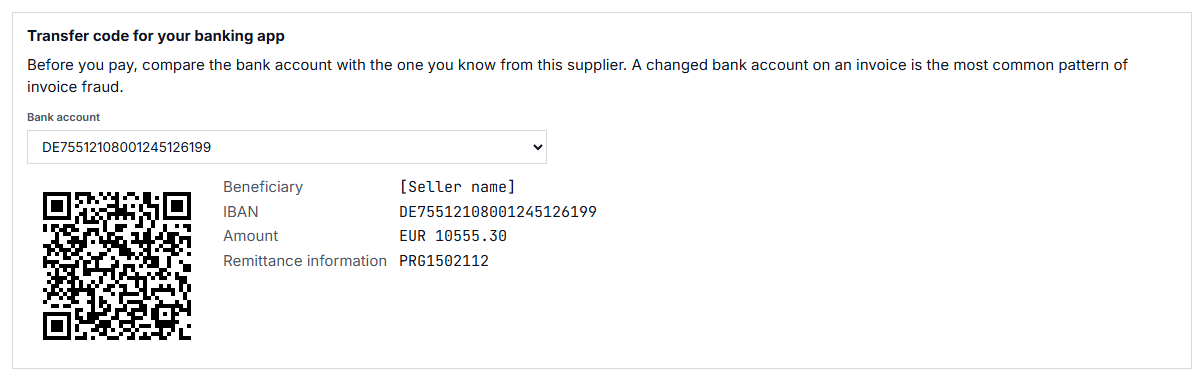
You cannot tell what a QR code contains just by looking at it. That is why the tab shows the values inside the code next to it: beneficiary, IBAN, BIC, amount and remittance information.

What you gain: Before you send the payment, you compare what your banking app shows with what the invoice asks for. A transfer only goes out when both match.

The EPC QR code with beneficiary, IBAN, BIC, amount and remittance information next to it.

The name your bank expects

The add-on takes the beneficiary first from the account name on the invoice, field BT-85 of the European standard EN 16931. If that is missing, it uses the payee (BT-59), and only then the seller (BT-27). The account name comes first because banks match the beneficiary’s name against the IBAN. The remittance information is the one given on the invoice (BT-83), otherwise the invoice number (BT-1). The amount is the amount due (BT-115).

What you gain: The name in the code matches the receiving account as closely as possible, and your supplier recognizes your payment by its reference or by the invoice number.

Several accounts on the invoice? You choose.

Some invoices name more than one bank account. You then pick the account in the field “Bank account” above the code, and the code is rebuilt for that account.

What you gain: You pay into the account you want to use, not simply the first one in the file.

No code where a code would do harm

If an invoice is paid by direct debit or card, no tab appears, because an extra transfer would pay twice. The same applies to an invoice without a bank account. For an invoice in a currency other than euro, and for an invoice with nothing left to pay, for example after a prepayment, the tab explains in one sentence why there is no code.

What you gain: You do not accidentally transfer an amount that is already being debited or has already been paid, and you never have to guess why a code is missing.

Never the code of another invoice

When you load a new invoice or click “Reset”, the tab with the old code disappears immediately.

What you gain: Even when you work through many invoices in a row, you always scan the code of the invoice in front of you.

EPC QR Code in the viewer app

The add-on is also available for the free viewer app, the folder you open in your browser without WordPress. It is a separate ZIP file from the shop that you unzip into the app folder, which then contains the folder addons/epc-qr/. The app needs version 2.37.1 or later. There, the add-on works entirely in the browser, without WordPress and without a server.

What you gain: A workstation without WordPress gets the transfer code too, for example a computer in accounting that only needs to display invoices.

You decide who sees the transfer code

The add-on has no settings page of its own. On the viewer’s settings page, “Available from role” sets the WordPress role from which the add-ons appear, for example only for logged-in staff. On a single page, you hide the tab with a switch in the viewer’s shortcode:

[spev_einvoice_viewer button_speq="no"]

What you gain: You can offer the viewer publicly and still reserve the transfer code for your accounting team.


  • The owner of a small business

    She receives her incoming invoices as XRechnung and pays them herself. Instead of typing the IBAN, she opens the invoice in the viewer and scans the code with her banking app.

  • The bookkeeper before approval

    He compares the values next to the code with what his banking app shows and approves the payment only when both match.

  • The tax firm with a client portal

    The firm offers the viewer to its clients and gives the add-on only to logged-in users through “Available from role”. Clients pay their invoices straight from the portal.


What you need

Requirements for the EPC QR Code add-on 1.2.0
WhatRequirement
WordPressversion 5.8 or later
PHPversion 8.2 or later
PlugineInvoice Viewer for PEPPOL & EN16931, free on wordpress.org; the separate tab requires version 2.38.0 or later
In the viewer appinstead of WordPress and the plugin: the viewer app version 2.37.1 or later and the EPC QR Code add-on for the app
LicenseGPL-2.0-or-later
  • The invoice stays in your browser.

    The code is created in the browser from the invoice the viewer has already read. The add-on sends nothing to your website or to any outside service, and it stores nothing.

  • No access to your account.

    The add-on does not make transfers itself and has no access to any bank account. You always approve the payment in your banking app.


So that you know exactly what you get, we also tell you the limits of the add-on:

  • It does not check whether the bank account belongs to your supplier. A changed bank account is the most common pattern of invoice fraud. That is why the tab reminds you above the code to compare the bank account with the one you know before every payment.
  • It does not make the transfer. It shows the code; you approve the payment in your banking app.
  • It only supports euro. The EPC QR code is defined for SEPA transfers in euro.
  • It does not create a code for the Swiss QR-bill.
  • It does not read the invoice itself. It works with what the viewer has read and therefore needs the viewer.
eInvoice Viewer — Hybrid Check eInvoice Viewer — Hybrid Check

eInvoice Viewer — Hybrid Check

For ZUGFeRD and Factur-X, this add-on compares the PDF with the invoice data. If the XML names a different IBAN than the PDF, you see it before you scan the code.
Paid product

eInvoice Viewer — Inbound Check eInvoice Viewer — Inbound Check

eInvoice Viewer — Inbound Check

This add-on compares an incoming invoice with your supplier list, so you learn whether the money is to go to a known account.
Paid product

eInvoice Viewer — Identifier Check eInvoice Viewer — Identifier Check

eInvoice Viewer — Identifier Check

This add-on checks the IBAN, VAT ID and other identifiers for length, structure and check digit, and so finds transposed digits.
Paid product


5

values are shown next to the code: beneficiary, IBAN, BIC, amount and remittance information

0

details of the invoice go to your website or to any outside service

2

ways to use it: as a WordPress plugin and as an add-on for the viewer app


Yes. EPC QR Code is an add-on and does nothing without the eInvoice Viewer for PEPPOL & EN16931, which you get free of charge on wordpress.org. From viewer version 2.38.0, the code has its own tab “Transfer code”. With an older viewer, the button “Transfer code” shows it in a panel next to the invoice.

Yes. The EPC QR code is the European code for SEPA transfers. German banks call it GiroCode, and most banking apps can read it.

The tab tells you in one sentence. The code is only available for invoices in euro and only when something is still due. If the invoice names no bank account or is paid by direct debit or card, the tab does not appear at all, because no transfer is needed.

No. The code is created in your browser. The add-on sends nothing to your website or to any outside service, and it stores nothing.

No. The code takes the bank account that is on the invoice and does not check whether it belongs to your supplier. That is why the note above the code asks you to compare the bank account before every payment. The Hybrid Check, which compares the PDF and XML of a ZUGFeRD invoice, and the Inbound Check with your supplier list help you do that.

Yes. For the viewer app, the add-on is a separate ZIP file in the shop. You unzip it into the app folder and reload the app in your browser. The app needs version 2.37.1 or later.


Pay your e-invoices with a scan instead of typing: the EPC QR Code add-on shows the QR code for your banking app for every invoice with a bank account, with all values next to it for comparison. You do not have the eInvoice Viewer yet? It is the free basis for this add-on.