
eInvoice Validator for Mustang

Free · WordPress plugin · For everyone who runs the Mustang validator on their own server

Validate e-invoices with Mustang – right on your WordPress website

With eInvoice Validator for Mustang, your customers, suppliers, and colleagues can validate e-invoices with Mustang without ever opening a command line. An e-invoice is an invoice in the form of a structured file that software can read, for example an XRechnung, the German standard for e-invoices sent to public authorities, or a ZUGFeRD PDF. Your visitor drops the invoice onto a page of your website, the Mustang validator on your own server checks it, and the validation report appears right below in plain language.

What sets the plugin apart: With a PDF, the visitor’s browser already extracts the embedded invoice, so only the XML file reaches your server. A checksum makes sure that only the Mustang file you approved is started. And the plugin itself sends not a single request to any third-party service. It is free and licensed under GPL-2.0-or-later.

Also as an app

Without WordPress: the Validator for Mustang as an app

This plugin builds directly on an existing installation of Mustang: it starts the file Mustang-CLI.jar on your server and brings the controls of a website, that is daily limits per role, file size and the validation page for your visitors.

If you want to validate without WordPress, use the free app in the same version 1.7.0: a folder that you unpack and open with a double click. Because a page in the browser cannot start a Java program, the app sends the invoice to the Validator Bridge, a small service in your network that calls Mustang and returns the report. If the app lies next to the viewer app, the viewer gets the button “Validate with Mustang”.

The Mustang validator runs on the command line. Your visitors don’t work there.

You run a WordPress website, perhaps a customer portal, a supplier portal, or an intranet. The same question keeps coming up: “Is this e-invoice okay?” The answer comes from a validator, a program that checks the invoice against the rules of its format. The validator from the Mustangproject is such a program. It is, however, a Java program that you start on the command line with a command and a file path.

For accounting staff, a supplier, or a customer, that is a high hurdle. So every invoice ends up with the one person in the company who knows the command. They check the file, forward the result by email, and explain what the messages mean. On top of that, Mustang writes its report as an XML file full of rule IDs and locations in technical notation. Whether the invoice is accepted or rejected is something the reader has to work out on their own.

An online validation service would be more convenient. But an invoice contains names, addresses, bank details, and prices, and not everyone is allowed to, or wants to, send that data outside the company.

The solution: your Mustang validator gets a validation page on your website

eInvoice Validator for Mustang is the user interface for the Mustang validator that you place on your server. The plugin puts a drop zone on a page of your website. A visitor drags an invoice onto it, and for this one check the plugin starts the Mustang validator on your server. It then shows the report in an easy-to-read view and also offers it, unchanged, as a download.

The plugin does not contain the validator and does not download it either. You get the file Mustang-CLI.jar yourself from the Mustangproject website and tell the plugin where it is. That way, you decide which version of the validator checks invoices on your server. The plugin is an independent tool from invoicePress and not a product of the Mustangproject.

The drop zone for ZUGFeRD and Factur-X PDFs and XML invoices.

Your own validation page in three steps

Note Note

1. Provide the validator

You place the file Mustang-CLI.jar on your server and enter its full path in the admin area under eInvoice Validator → Mustang. The system check tells you right away whether everything is ready to run.

Tools Tools

2. Add the shortcode to a page

A shortcode is a short placeholder in square brackets that WordPress replaces with the tool. You write [spmv_mustang_validator] on a page or in a post and publish it.

Adjust Adjust

3. Drop the invoice and read the report

The visitor drags a PDF or XML invoice onto the drop zone. For a typical invoice, the check with Mustang-CLI 2.25.0 took about two seconds in our measurement, including Java startup. Then the report appears below the drop zone.

This is how a check works: you set up the validator once, add the shortcode to a page, and from then on your visitors check their invoices themselves.

What makes eInvoice Validator for Mustang stand out

Note Note

A PDF never leaves the browser

A ZUGFeRD or Factur-X PDF carries the actual invoice as an embedded XML attachment. ZUGFeRD is the German name for this format, Factur-X the French one. The plugin extracts the attachment in the visitor’s browser, and only this XML is sent to your server. Your server never reads a PDF at all.

What you get: The PDF and everything else attached to it stays with the visitor, and your server accepts only the one file type it actually needs to check.

Tools Tools

A report people can actually read

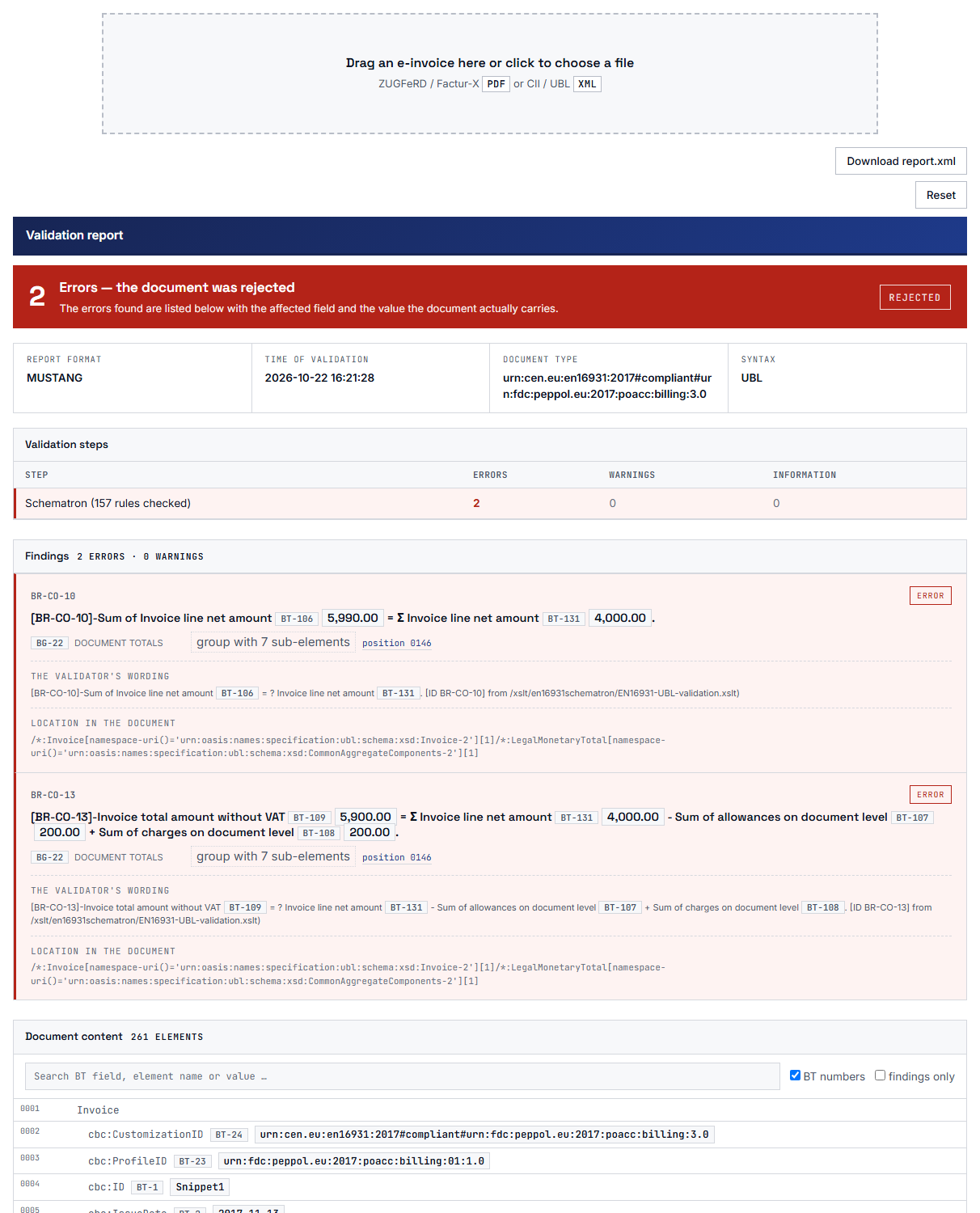
Instead of the raw Mustang report, the visitor sees the findings, that is, the individual messages, with rule texts and business terms. The uploaded invoice is attached to the report, so every finding appears at its place in the invoice. Warnings are shown as warnings, not as errors.

What you get: Whoever checked the invoice understands the result on their own and does not have to ask what a rule ID means.

Mustang report in the plugin: the result at the top, below it each finding with rule text and location.

Adjust Adjust

Only the jar file you approved

The file Mustang-CLI.jar is executable third-party code on your server. With one click, the plugin stores its SHA-256 checksum, a kind of fingerprint of the file. If the file later no longer matches this fingerprint, validation stays locked until you explicitly accept the new file.

What you get: On a public page, only the program you checked and approved yourself is ever started.

Checksum of Mustang-CLI.jar: only the accepted file may validate.

Search Search

No connection to third-party services

The plugin makes no outbound requests of its own, neither when a page loads nor during upload nor during validation. The invoice goes to your own website, and the validator runs as a Java program on the same server. Neither the invoice nor the report is kept.

What you get: You can tell your visitors with confidence that their invoice does not leave your server and is not stored there.

Note Note

A daily limit for every role

You decide how many checks each role on your website may run per day, with a separate row for guests. An empty field means unlimited, and 0 means no access. Administrators are never limited.

What you get: You can offer validation publicly without a single visitor tying up your server with Java processes, while your own team still checks without limits.

Tools Tools

Validate right from the eInvoice Viewer

If the free eInvoice Viewer is also active on your website, every invoice opened there gets a “Check with Mustang” button, including a ZUGFeRD or Factur-X PDF. From Viewer 2.38 on, the report opens in its own “Mustang Validator” tab with the button for report.xml. A second click reopens the tab without checking the invoice again.

What you get: Your visitors read the invoice and check it in the same place, without switching pages, and the invoice and the report sit neatly side by side in tabs.

Features in detail

  • One drop zone for PDF and XML

    The drop zone accepts ZUGFeRD and Factur-X PDFs as well as XML invoices in both CII and UBL syntax. CII and UBL are the two XML formats in which an e-invoice under the European standard EN 16931 can be delivered. The visitor drags the file onto the drop zone or selects it, and the drop zone can also be operated with the keyboard. That way, validation also works for people who don’t use a mouse.

  • Clear messages when a file doesn’t fit

    A PDF without an embedded invoice, such as a scanned document, is rejected with a clear message, and so is a file with the wrong extension or a file that is too large. The visitor knows right away what to do differently instead of puzzling over an error.

  • The original report as report.xml

    A button above the report saves it exactly as the Mustang validator produced it. The file name consists of the invoice name plus -report.xml. You have the original in hand and can file it as a record or attach it to a query to the supplier.

  • A clear note for newer versions

    In field BT-24, an invoice names the specification it was built to. If that field names a version Mustang does not know yet, such as XRechnung 4.0 or the standard EN 16931-1:2026, Mustang checks the invoice against the rules of the older version it does know. Since version 1.6.1, a yellow note above the report then says that the result only applies to that older version. That way you never rely on an “accepted” that has not actually been checked against the new version.

  • A system check that tells you the next step

    Every time you open the settings page, it checks three things: whether PHP may start external processes, whether a Java runtime is available, and whether the jar file is at the configured path. Each row shows a green check mark or a red cross, and below a cross you see what to do. A test button sums up the result in one line. You never have to hunt for the reason why nothing is being checked.

  • Built for public use

    The plugin checks the extension, content, and size of every file. Every check requires a fresh security token that also works on cached pages. The validator is started with a list of arguments and never as an assembled command, so no foreign command can be built from the input. For guests, the daily limit uses the IP address only as a hash, that is, in an unreadable, converted form. You can put the page on the open internet.

  • A report that looks the same in every theme

    The drop zone and the report sit in a shielded area of the page, so your theme’s styles don’t reach into it. You choose the look with the design kit: the bundled kits A and H are available. The report looks tidy on any website.

  • German, French, and English

    The plugin ships with German and French translations, and the source texts are in English. Responses appear in the language of the page, even for logged-in users whose profile uses a different language. Every visitor gets the report in the language they are reading the page in.

Requirements and setup

The plugin starts a validator; it is not one itself. Without Java and without the file Mustang-CLI.jar on the server, it checks nothing. These requirements apply to version 1.7.0:

What your server needs for eInvoice Validator for Mustang 1.7.0
WhatRequirement
WordPressversion 6.0 or later
PHPversion 8.2 or later
Javaa Java runtime, version 11 or later, installed on the server and callable by the web server user
Mustang validatorthe file Mustang-CLI.jar, downloaded by you from the Mustangproject website and placed on the server
ServerPHP must be allowed to start a Java program (function proc_open), and the web server user must be able to read the jar file
Visitor’s browserJavaScript enabled

How to set up the plugin

  • Upload the plugin as a ZIP file under Plugins → Add New Plugin → Upload Plugin and activate it.
  • Make sure Java is installed on the server, download Mustang-CLI.jar from the Mustangproject website, and put the file in a location the web server user can read.
  • On the plugin’s settings page under eInvoice Validator → Mustang, enter the full path to the jar file, including the file name, and save.
  • Run the test in the system check section. When it reports that the validator can be started, everything is ready.
  • In the section “Integrity of the jar,” accept the file on disk with one click.
  • Add the shortcode [spmv_mustang_validator] to a page and publish it. The shortcode has no attributes, because everything you can configure is on the settings page.

If the system check cannot find Java even though it is installed, the search path is usually the reason: the web server runs under its own user, which looks for Java in a different place than your own command line. In that case, enter the full path to the Java program in the settings.

What you can configure

The settings in the “Mustang validator” section and their defaults
SettingDefaultEffect
Path to Mustang-CLI.jaremptythe full path to the jar file, including the file name
Java programemptyempty means Java from the web server’s search path; otherwise the full path to the Java program
Timeout (seconds)60the longest a check may take, at least 5 seconds
Daily uploads per role10 for every rolechecks per calendar day, with a row for guests; empty means unlimited, 0 means no access
Maximum file size (MB)8the largest file accepted; the smaller of this setting and the server’s upload limit applies
Trust proxy headeroffturn on only if the website sits behind a trusted reverse proxy, that is, a server in front of it that forwards the requests
Design kitKit Hthe look of the drop zone and the report; applies to all eInvoice tools on the website

For your own software: The same check is available through the REST endpoint POST /wp-json/einvoice/v1/validate-mustang. A program first fetches a security token from the website. The manual describes this in the chapter for developers.

What the plugin deliberately does not do

  • It does not validate without Mustang and Java. If a requirement is missing, the system check says exactly that, and nothing is checked.
  • It downloads and installs nothing. You install and update the Mustang validator and Java yourself. Both have their own licenses and versions.
  • It reaches the validator in only one way: as a Java process on the same server. It cannot connect to a remote validation service.
  • With a PDF, it checks only the embedded invoice. The PDF file itself never reaches the server and is therefore not examined.
  • It keeps no archive. Invoices and reports are not stored, and there is no list of earlier checks.

How the Validator for Mustang fits into the eInvoice tools

The plugin works on its own and needs no other invoicePress package. The easy-to-read report view is built in. These tools are useful additions:

Note Note

eInvoice Viewer for PEPPOL & EN16931

The viewer is the central tool of the eInvoice family and displays any e-invoice in readable form. An invoice opened there gets the “Check with Mustang” button. From Viewer 2.38 on, the report appears in its own tab, and the check counts toward the same daily limit.
free

Tools Tools

eInvoice Validation Explorer for Mustang

For anyone who wants to read a finished Mustang report without running a validator themselves. You drop in the report and the invoice and see every finding with an explanation and the value from the invoice at its field. It does not call a validation program itself. It is available as a plugin and as an app, both in version 1.7.0.
paid product

Adjust Adjust

eInvoice Validator for KoSIT

The same validation page for the official KoSIT validator, the validation program of the German Coordination Office for IT Standards. Both plugins run on the same website, each with its own daily limit.
free

Search Search

eInvoice Validator for VAMPIRE

The answer for web hosting without Java: this plugin brings its own validation engine, VAMPIRE PHP, and runs on ordinary web hosting. With the paid VAMPIRE JS add-on, its page even validates in the visitor’s browser. It has been submitted to wordpress.org and is awaiting approval there.
free

A comparison check for invoicepress.de has also been built: an invoice is sent to the official KoSIT validator, to Mustang, and to VAMPIRE at the same time, and the results are shown side by side, differences first. It will appear on the website as soon as we release it.

0

requests to third-party services are made by the plugin on its own

2

seconds, roughly, for a typical check with Mustang-CLI 2.25.0 in our measurement, including Java startup

3

rows in the system check show whether PHP, Java, and the jar file are ready

10

checks per role and day are the default, and you can change the value for each role

Frequently asked questions about validating with Mustang in WordPress

Yes. The plugin starts a validator; it is not one itself. You need a Java runtime, version 11 or later, on the server and the file Mustang-CLI.jar, which you download yourself from the Mustangproject website. PHP must also be allowed to start a Java program. The system check on the settings page shows you whether all of this is in place.

ZUGFeRD and Factur-X as PDF or XML, XRechnung in CII and UBL syntax, and other UBL invoices, as far as the Mustang validator checks them. A PDF without an embedded invoice, such as a scanned document, contains no invoice data and is rejected with a message.

No. For the duration of the check, the invoice is copied into a separate working directory that is deleted afterward. The report is not kept either, and the plugin sends nothing to any third-party server. A dropped PDF never even leaves the visitor’s browser; only the embedded XML is sent.

No. It is an independent tool from invoicePress and has no affiliation with the Mustangproject. The validator it starts, however, is the Mustangproject’s own validator, published under its own license.

Then this plugin cannot validate, because it starts Mustang as a Java program on the same server and cannot connect to a remote validation service. eInvoice Validator for VAMPIRE is designed for web hosting without Java. It brings its own validation engine in PHP and is also free.

You have the Mustang validator, and the plugin gives it a page where anyone can validate. Read in the manual how to set it up, and let your visitors check their next e-invoice themselves. The plugin is free, and its release on wordpress.org is planned.
