
Beschreibung
From e-invoice to spreadsheet in one click
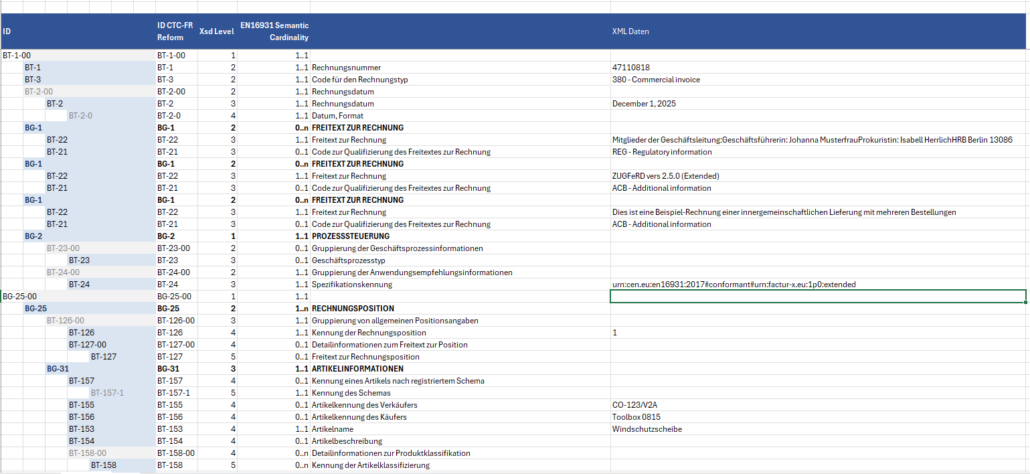
Retyping an invoice or copying it field by field takes time and invites mistakes. eInvoice Viewer — Exporter adds the button Export to Excel to the results of the free eInvoice Viewer. One click turns the invoice that is open in the viewer into an Excel file (XLSX) that you can file, compare, pass on or check field by field.
What makes it special
- Export and view cannot differ. The Exporter uses exactly the invoice data that the viewer has already read; the XML is not read a second time. What you get: what you see in the viewer is what lands in your spreadsheet.
- A structured workbook, not a data dump. A prepared template holds the EN 16931 field catalog, and every field has its own block of rows. Repeated groups such as notes, invoice lines and line allowances appear as often as the invoice contains them, and groups the invoice does not use are left out. What you get: an invoice with five lines gets five line blocks, and nothing else to scroll past.
- In the language of your page. The template is chosen by the language of the view: German, English or French.
- Under your control. You set how many exports a visitor may make per calendar day, and the add-on adds no REST route to your site.
What’s included
- The WordPress plugin as a ZIP file, with a manual in German and English. The Excel library PhpSpreadsheet is bundled.
Please note: the export uses the template for the EN 16931 core. The additional fields of the EXTENDED profile are not exported yet, and the field names in the English and French templates are still in German.
Requirements
- WordPress 5.8 or later and PHP 8.2 or later.
- The free eInvoice Viewer for PEPPOL & EN16931, installed and active.
- A program that opens .xlsx files.
Manual and product page
Read the manual before you buy, or see everything at a glance on the product page.
Get the Exporter here in the shop and keep working with invoice data where you already work.





Rezensionen
Es gibt noch keine Rezensionen.